Adp stop payment 2026

Get Form
adp stop payment Preview on Page 1

Here's how it works

01. Edit your adp stop payment online
Type text, add images, blackout confidential details, add comments, highlights and more.

02. Sign it in a few clicks
Draw your signature, type it, upload its image, or use your mobile device as a signature pad.

03. Share your form with others
Send how to stop direct deposit immediately adp via email, link, or fax. You can also download it, export it or print it out.

How to use or fill out adp stop payment with our platform

Form edit decoration
9.5
Ease of Setup
DocHub User Ratings on G2
9.0
Ease of Use
DocHub User Ratings on G2
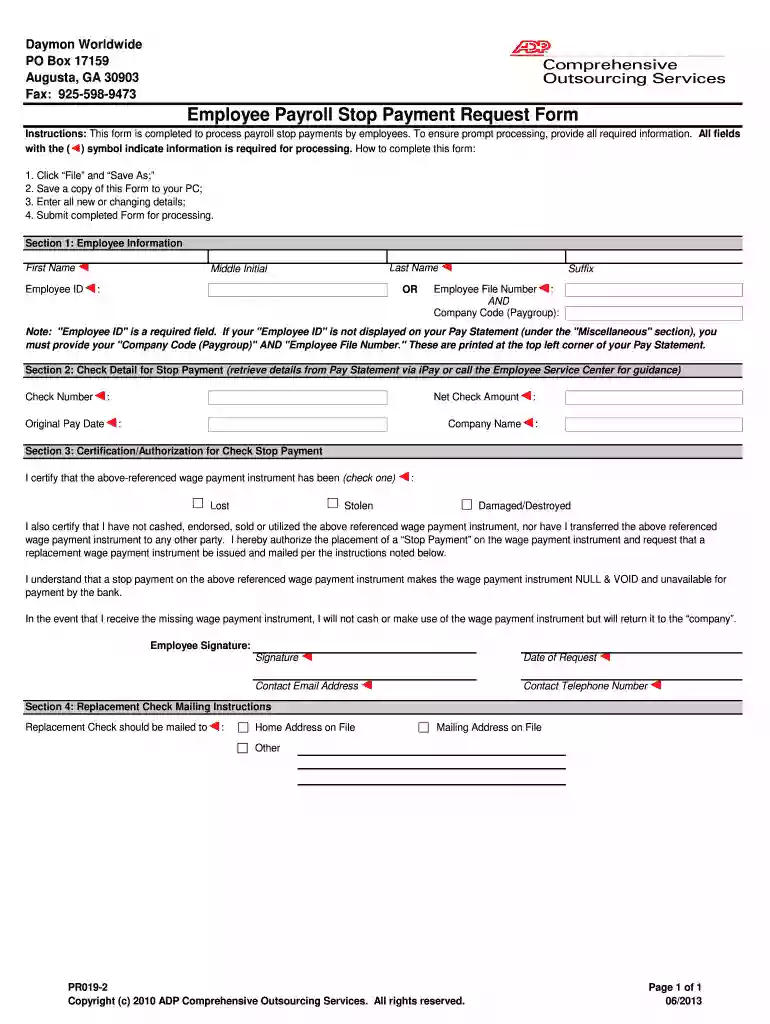
  1. Click 'Get Form' to open the Employee Payroll Stop Payment Request Form in the editor.
  2. In Section 1, enter your Employee Information. Fill in your First Name, Last Name, Middle Initial, and Employee ID. If your Employee ID is not visible on your Pay Statement, provide your Company Code (Paygroup) and Employee File Number.
  3. Proceed to Section 2 to input Check Details for Stop Payment. Retrieve the Check Number, Original Pay Date, Net Check Amount, and Company Name from your Pay Statement.
  4. In Section 3, certify the reason for the stop payment by selecting whether the check was Lost, Stolen, or Damaged/Destroyed. Sign and date the form in the designated fields.
  5. Finally, complete Section 4 by specifying where you would like the Replacement Check mailed—either to your Home Address on File or another address.

Start using our platform today for free to streamline your document editing and ensure a smooth stop payment process!

be ready to get more

Complete this form in 5 minutes or less

Get form

Got questions?

We have answers to the most popular questions from our customers. If you can't find an answer to your question, please contact us.
Contact us
1. For the check that needs to be stopped, obtain the check number from the detail listing, the check date, the payees name and the exact net dollar amount. 3. Fax the completed copy of the Stop Payment Request and Indemnification Form to 770-360-3082 and keep a copy for your records.
ADP will refund the amount of the reversal/deletion via check or electronic deposit (usually within three to five business days) depending on the clients set up. 1. Reversals can only be processed up to 5 business days after check date.
The Bottom Line: Stopping a payment on a check can prevent incorrect or unauthorized transactions but requires timely action. A stop payment request must be made before the check is processed, and most banks charge a fee for this service.
The fee to cancel, or stop payment, on a check can be $30 or more at many large banks. However, some banks and credit unions charge less, and the cost can vary depending on how you make the request. Heres an overview of what you might pay.
Banks need to record the request, update their systems, and monitor the status of the check. Risk Management: Stop payments can increase the risk of fraud or other financial disputes. The fee helps mitigate potential losses associated with these risks.

Security and compliance

At DocHub, your data security is our priority. We follow HIPAA, SOC2, GDPR, and other standards, so you can work on your documents with confidence.

Learn more
ccpa2
pci-dss
gdpr-compliance
hipaa
soc-compliance
be ready to get more

Complete this form in 5 minutes or less

Get form

People also ask

In consideration for additional costs incurred by ADP in placing stop payments, Client agrees to pay a fee of $10.00 for each stop payment or stop range.

paystop