Type text, add images, blackout confidential details, add comments, highlights and more.
02. Sign it in a few clicks
Draw your signature, type it, upload its image, or use your mobile device as a signature pad.
03. Share your form with others
Send 89 224 via email, link, or fax. You can also download it, export it or print it out.
How to use or fill out form 89 224 with our platform
Ease of Setup
DocHub User Ratings on G2
Ease of Use
DocHub User Ratings on G2
Click ‘Get Form’ to open it in the editor.
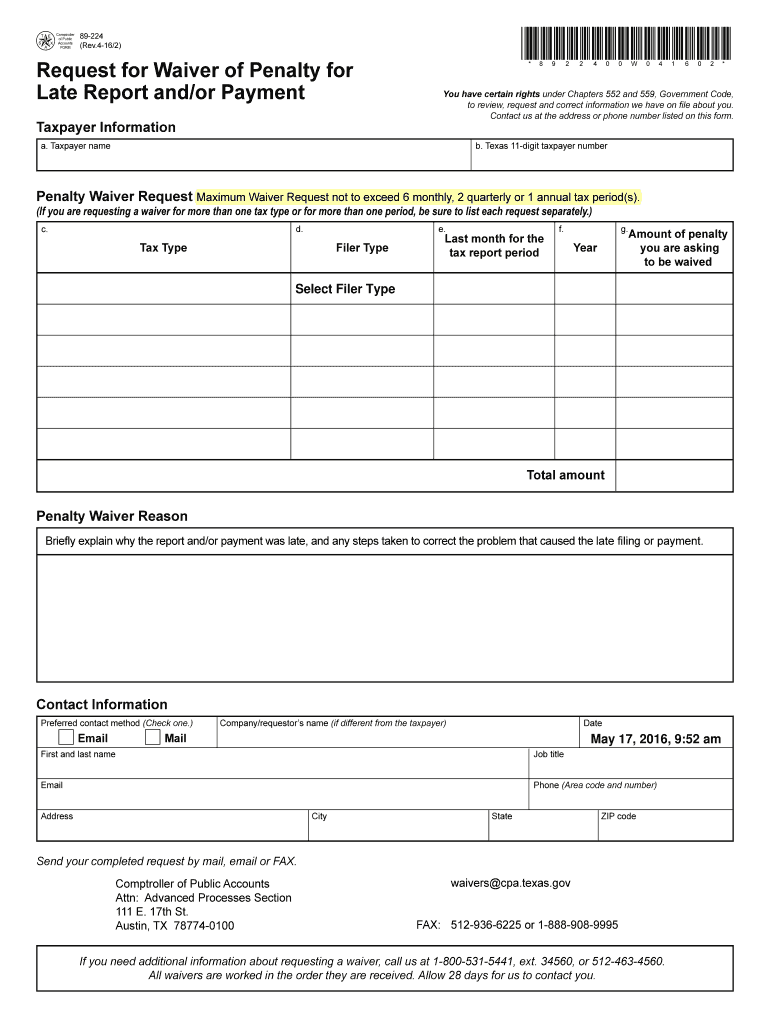
Begin by entering your Taxpayer Information. Fill in your name and Texas 11-digit taxpayer number in the designated fields.
In the Penalty Waiver Request section, specify the maximum waiver request you are seeking. Ensure that it does not exceed the allowed limits for monthly, quarterly, or annual tax periods.
Select the Tax Type and Filer Type from the dropdown menus for each period you are requesting a waiver for. Be sure to include all relevant months and years.
Indicate the amount of penalty you wish to be waived and provide a brief explanation in the Penalty Waiver Reason section detailing why your report or payment was late.
Complete your Contact Information by filling out your preferred contact method, name, job title, email, phone number, and address.
Once completed, send your request via mail, email, or fax as indicated at the bottom of the form.
Start using our platform today to easily fill out form 89 224 for free!
Form 89 224 instructionsHow to fill out form 89 224Form 89 224 pdfForm 89 225Penalty waiver request formForm 843How long can the Texas Comptroller freeze bank accountTexas Comptroller bond waiver
Security and compliance
At DocHub, your data security is our priority. We follow HIPAA, SOC2, GDPR, and other standards, so you can work on your documents with confidence.
Cookie consent notice
This site uses cookies to enhance site navigation and personalize your experience.
By using this site you agree to our use of cookies as described in our Privacy Notice.
You can modify your selections by visiting our Cookie and Advertising Notice.