01. Edit your nm taxation and revenue forms online
Type text, add images, blackout confidential details, add comments, highlights and more.
02. Sign it in a few clicks
Draw your signature, type it, upload its image, or use your mobile device as a signature pad.
03. Share your form with others
Send rpd 41083 via email, link, or fax. You can also download it, export it or print it out.
How to use or fill out rpd 41083 with our platform
Ease of Setup
DocHub User Ratings on G2
Ease of Use
DocHub User Ratings on G2
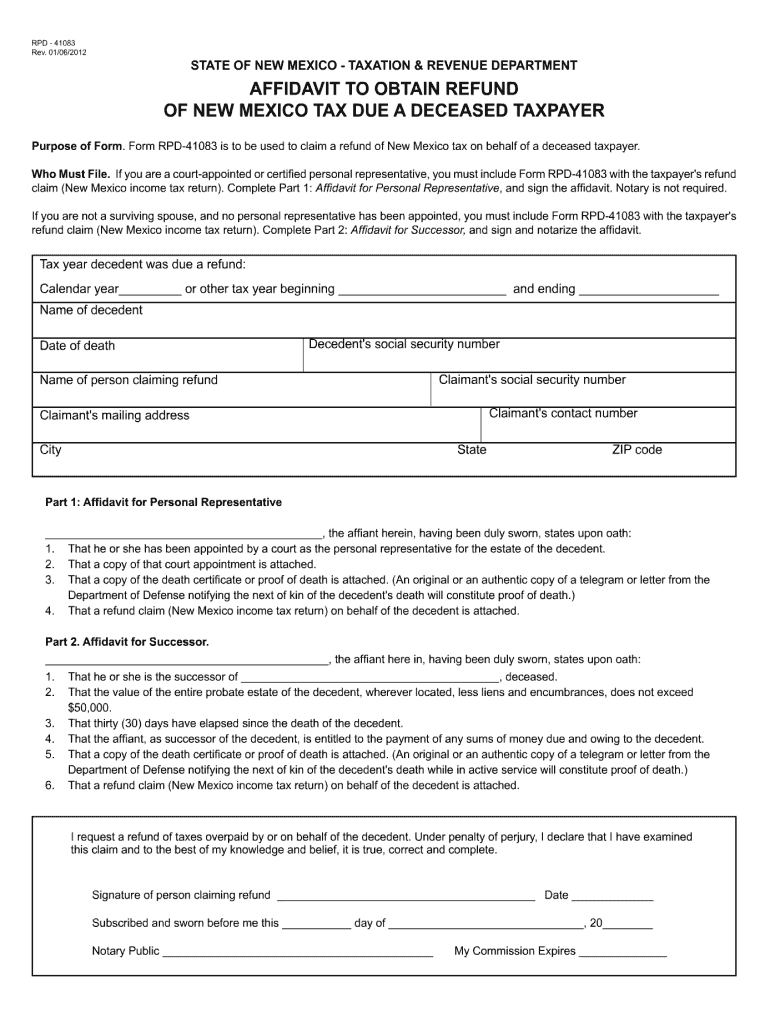
Click ‘Get Form’ to open rpd 41083 in the editor.
Begin by reviewing the header section, where you will enter your personal information such as name, address, and contact details. Ensure accuracy for effective processing.
Move to the main body of the form, which typically includes specific questions or checkboxes related to your application. Carefully read each prompt and select or fill in the appropriate responses.
In the signature section, utilize our platform’s signing feature to add your digital signature. This step is crucial for validating your submission.
Finally, review all entered information for completeness and correctness before clicking ‘Submit’ to finalize your form submission.
Start using our platform today for free and streamline your document editing experience!
Form RPD-41083 is to be used to claim a refund of New Mexico tax on behalf of a deceased taxpayer. Who Must File. If you are a court-appointed or certifiedRead more
Cookie consent notice
This site uses cookies to enhance site navigation and personalize your experience.
By using this site you agree to our use of cookies as described in our Privacy Notice.
You can modify your selections by visiting our Cookie and Advertising Notice.