Type text, add images, blackout confidential details, add comments, highlights and more.

02. Sign it in a few clicks
Draw your signature, type it, upload its image, or use your mobile device as a signature pad.

03. Share your form with others
Send form st 220 td via email, link, or fax. You can also download it, export it or print it out.

How to use or fill out ST-220-CA with our platform
Ease of Setup
DocHub User Ratings on G2
Ease of Use
DocHub User Ratings on G2
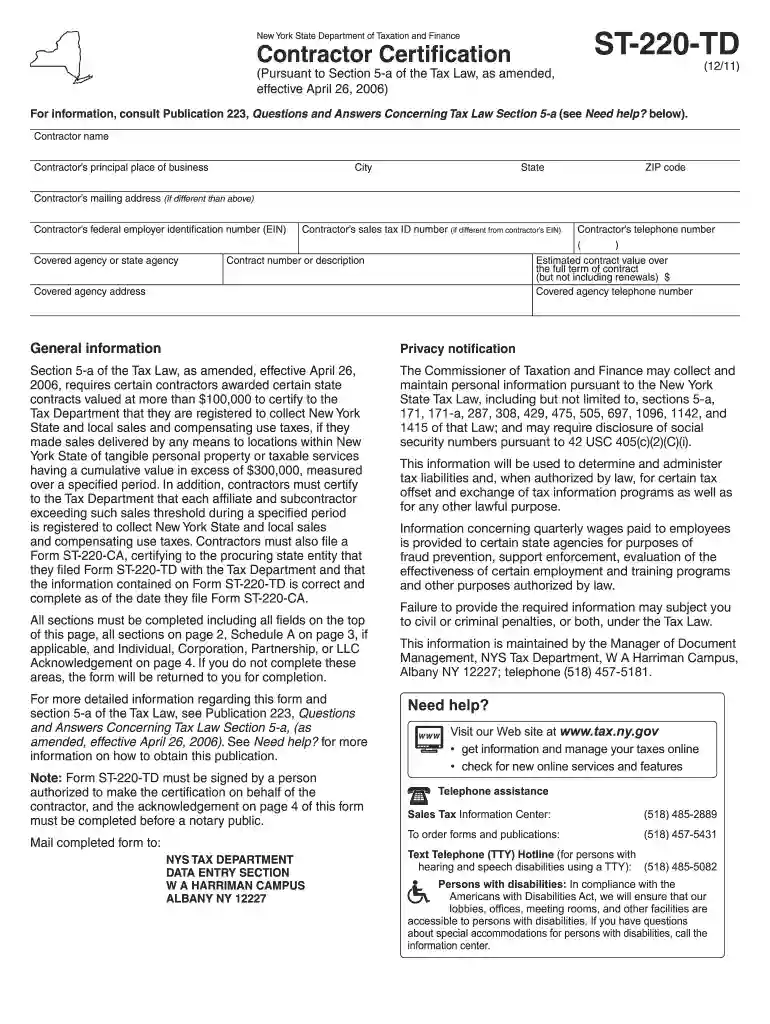
Click ‘Get Form’ to open the ST-220-CA in the editor.
Begin by entering the contractor's name and principal place of business, including city, state, and ZIP code.
Fill in the contractor’s mailing address if it differs from the principal place of business. Include the federal employer identification number (EIN) and sales tax ID number.
Provide contact information, including the contractor’s telephone number and details about the covered agency or contract number.
Complete all sections on page 2, ensuring you check registration statuses for contractors, affiliates, and subcontractors as required.
If applicable, list entities exceeding the $300,000 cumulative sales threshold in Schedule A on page 3.
Finally, ensure that a person authorized to make certifications signs the form before a notary public.
Start using our platform today to streamline your ST-220-CA completion process for free!
Form ST-220-CA:12/11:Contractor Certification to Covered
Note: Form ST-220-CA must be signed by a person authorized to make the certification on behalf of the contractor, and the acknowledgement on page 2 of thisRead more
Feb 28, 2026 Indicate by check mark if the registrant is a well-known seasoned issuer, as defined in Rule 405 of the Securities Act. ☒ Yes ☐ No.Read more
Cookie consent notice
This site uses cookies to enhance site navigation and personalize your experience.
By using this site you agree to our use of cookies as described in our Privacy Notice.
You can modify your selections by visiting our Cookie and Advertising Notice.