Type text, add images, blackout confidential details, add comments, highlights and more.
02. Sign it in a few clicks
Draw your signature, type it, upload its image, or use your mobile device as a signature pad.
03. Share your form with others
Send it via email, link, or fax. You can also download it, export it or print it out.
How to use or fill out 1997 form 540 with our platform
Ease of Setup
DocHub User Ratings on G2
Ease of Use
DocHub User Ratings on G2
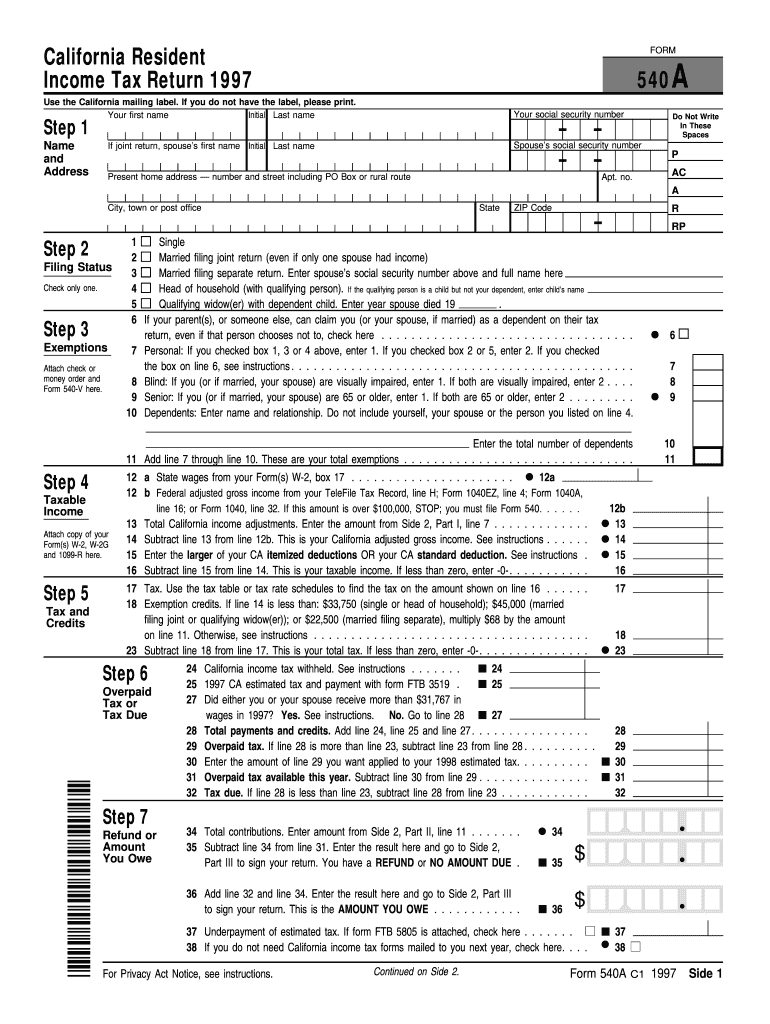
Click ‘Get Form’ to open the 1997 Form 540 in the editor.
Begin by filling out your name and address in Step 1. Ensure you include your first name, initial, last name, and social security number. If filing jointly, add your spouse's details as well.
In Step 2, select your filing status by checking the appropriate box. Options include Single, Married Filing Jointly, and Head of Household.
Proceed to Step 3 for exemptions. Enter the total number of dependents and any applicable credits based on your situation.
Continue to complete Steps 4 through 7, which involve calculating taxable income and determining any tax due or refund owed. Follow the instructions carefully for each line.
Finally, review all entries for accuracy before signing in Part III. Use our platform’s features to save and share your completed form easily.
Start using our platform today to fill out your Form 540 effortlessly and for free!
1997 form 540 instructions1997 form 540 pdfForm 540 2EZFTB Form 540 20262025 Form 540 instructionsSchedule CA (540)FTB Form 540 ScheduleForm 540 instructions PDF
Security and compliance
At DocHub, your data security is our priority. We follow HIPAA, SOC2, GDPR, and other standards, so you can work on your documents with confidence.
Forms and publications, 2007 and older Document Request
Oct 13, 2025 1997, 199 Form, California Exempt Organization Annual Information Return. 1997, 540 Form, California Resident Income Tax Return, 1997, 540 FormRead more
540 Additional income taxes are not included on the earnings because in many cases the form of earnings is shifted to produce or maintain the increase.Read more
Jun 5, 1997 Assessments, EPA 540-R-97/006 (U.S. EPA 1997). 1.2. RISK ASSESSMENT OVERVIEW. The lenn ecological risk assessment (ERA), as used in thisRead more
Cookie consent notice
This site uses cookies to enhance site navigation and personalize your experience.
By using this site you agree to our use of cookies as described in our Privacy Notice.
You can modify your selections by visiting our Cookie and Advertising Notice.