Type text, add images, blackout confidential details, add comments, highlights and more.
02. Sign it in a few clicks
Draw your signature, type it, upload its image, or use your mobile device as a signature pad.
03. Share your form with others
Send it via email, link, or fax. You can also download it, export it or print it out.
How to use or fill out Aetna Claim Form with our platform
Ease of Setup
DocHub User Ratings on G2
Ease of Use
DocHub User Ratings on G2
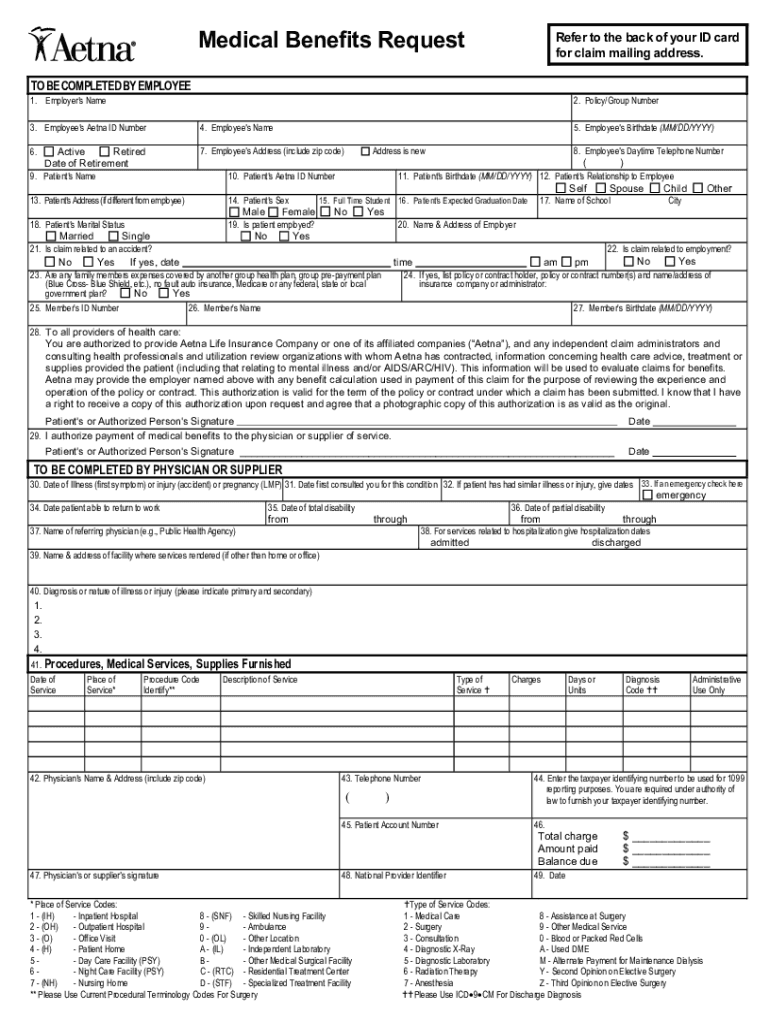
Click ‘Get Form’ to open the Aetna claim form in the editor.
Begin by filling out items one (1) through twenty-two (22) completely. This includes your employer's name, policy/group number, and your Aetna ID number.
Provide patient details such as their name, birthdate, and relationship to you. Ensure all information is accurate to avoid delays.
Complete items 23-27 only if there are other medical coverages involved. This helps in processing claims efficiently.
Sign the authorization to release information in block (28) and indicate if you want benefits paid directly to your physician in block (29).
Attach itemized bills or have your healthcare provider complete the applicable section on the reverse side of the form.
If prescription drugs are covered, submit receipts that include necessary details like drug name and purchase date.
Retain copies of all documents for your records before submitting the claim.
Start using our platform today for free to streamline your Aetna claim submission process!
Aetna claim form pdfAetna claim form onlinePrintable aetna claim formAetna Medicare reimbursement form PDFAetna dental reimbursement form online freeAetna Medicare reimbursement form onlineAetna claim statusAetna claims phone number
Security and compliance
At DocHub, your data security is our priority. We follow HIPAA, SOC2, GDPR, and other standards, so you can work on your documents with confidence.
Aug 6, 2013 Only one form is to be completed for each participant, to include all covered dependents per policy year (September 1 to August 31).Read more
Mar 19, 2021 These include our Annual Reports on Form 10-K, Quarterly Reports on Form 10-Q, Current. Reports on Form 8-K, proxy statements, registrationRead more
FOR. FASTER, EASIER SUBMISSION OF CLAIMS, THE PROVIDER MAY CONTACT THE AETNA CLAIM PROCESSING CENTER FOR INFORMATION. REGARDING ELECTRONIC CLAIM SUBMISSIONS.Read more
Cookie consent notice
This site uses cookies to enhance site navigation and personalize your experience.
By using this site you agree to our use of cookies as described in our Privacy Notice.
You can modify your selections by visiting our Cookie and Advertising Notice.