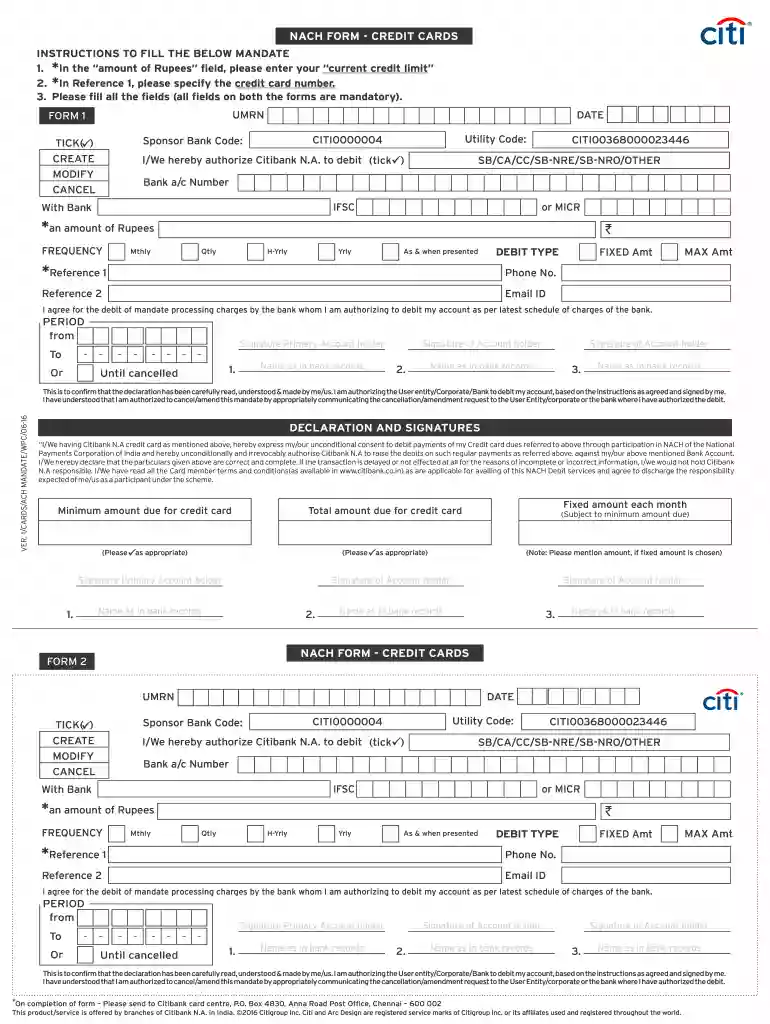
Money view nach form download pdf 2026

Get Form
money view nach form download pdf Preview on Page 1

Here's how it works

01. Edit your money view nach form download pdf online
Type text, add images, blackout confidential details, add comments, highlights and more.

02. Sign it in a few clicks
Draw your signature, type it, upload its image, or use your mobile device as a signature pad.

03. Share your form with others
Send money view nach form download via email, link, or fax. You can also download it, export it or print it out.

Definition and Meaning of Money View NACH Form

The money view NACH form serves as a crucial document for initiating automatic electronic debits from a bank account for regular payments, such as loan EMIs or utility bills. NACH, or National Automated Clearing House, is a system that facilitates an interbank electronic payment mechanism, enabling individuals and businesses to utilize Automated Clearing House (ACH) transfers seamlessly. This form is pivotal in establishing a customer's consent for recurring debits to manage their financial commitments without tedious manual intervention each month.

The specification of the NACH system supports various payments, including loans, insurance premiums, and subscription fees, thereby offering users a streamlined approach to managing expenses. By filling out this form, users grant permission to their banks to debit an agreed amount on predetermined dates, ensuring timely payment processes while reducing the risk of late fees or missed payments.

Key aspects of the NACH form include the need for accurate details, including bank account numbers and specific payment amounts, to ensure proper processing. This electronic mandate also emphasizes the user’s agreement with the terms outlined, highlighting an essential legal understanding of automated transactions.

Steps to Complete the Money View NACH Form Download PDF

To successfully complete the money view NACH form download PDF, users should follow a systematic approach to ensure accuracy and compliance:

  1. Download the Form: Access the official site or a trusted platform to obtain the NACH form in PDF format. Ensure you have the latest version for accuracy.
  2. Fill in Personal Information: Complete fields that request personal information, such as your name, address, and contact details. Ensure that this information matches your bank records.
  3. Provide Bank Details: Input your bank account details, including the account number, IFSC code, and the name of the bank. It is critical for facilitating direct debits correctly.
  4. Specify the Amount and Frequency: Clearly indicate the amount to be debited and the frequency (monthly, quarterly, etc.). This step is vital to prevent any misunderstandings regarding payment obligations.
  5. Review Terms and Conditions: Thoroughly read the terms associated with the NACH service to ensure understanding and compliance. Acknowledge your consent by signing the document.
  6. Submit the Form: Once completed, submit the form either online or via mail to the designated authority or financial institution as instructed. Keep a dated copy for your records.

By following these steps, users ensure their forms are correctly filled out and submitted, facilitating a smooth and efficient NACH process.

Important Terms Related to Money View NACH Form Download PDF

Understanding important terms associated with the money view NACH form download PDF aids in navigating its framework efficiently:

  • Automated Clearing House (ACH): This electronic network for processing transactions allows for direct debit and credit transactions between banks.
  • Electronic Mandate: A formal authorization by the account holder allowing a bank to carry out debit transactions as per specified criteria.
  • Debit Mandate: A specific type of electronic mandate that instructs the bank to debit an account for recurring payments.
  • Frequency: Refers to how often the payments will be debited, such as weekly, monthly, or annually.
  • IFSC Code: Indian Financial System Code, which is a unique identifier for a bank branch in the National Electronic Funds Transfer (NEFT) system, crucial for routing the payments accurately.
  • Beneficiary: The entity or individual receiving the payment that is scheduled through the NACH system.

These terms are essential for completing and understanding the implications of the NACH form, as they establish clear communication between the account holder and the financial institutions involved.

Why Should You Use the Money View NACH Form Download PDF

Utilizing the money view NACH form download PDF provides several benefits that streamline payment processes:

  • Convenience: Automating payment processes reduces the manual effort required each month, allowing users to focus on other important tasks without worrying about payment delays.
  • Timeliness: Regular payments ensure that users meet their financial obligations punctually, reducing the likelihood of late fees or service interruptions.
  • Financial Management: Using the NACH form helps individuals better manage their cash flow by allowing them to set fixed payment schedules, making budgeting more straightforward.
  • Environmental Impact: Transitioning to digital payments means fewer paper documents, contributing positively to environmental efforts by reducing paper waste.
  • Enhanced Security: The NACH mechanism is encrypted and regulated, offering a secure method for executing transactions without the need for physical cheques or other less secure methods.

For these reasons, many individuals and businesses increasingly rely on the electronic mandate provided by the money view NACH form for their recurring payment needs.

Who Typically Uses the Money View NACH Form Download PDF

The money view NACH form download PDF is utilized by a diverse range of individuals and entities:

  • Individual Borrowers: Customers who have loans with financial institutions often use this form to authorize automated EMI deductions from their bank accounts.
  • Small Business Owners: Businesses may use this form to manage regular payments for services, such as internet or utility bills, ensuring timely settlements.
  • Service Providers: Companies providing subscription-based services, such as insurance or software, commonly require customers to fill out NACH forms to streamline payment collection.
  • Mutual Funds and Investment Platforms: Automated investments in mutual funds often require customers to authorize regular debit transactions, thus leveraging the NACH mechanism for ease of investment management.
  • Educational Institutions: Schools and colleges may utilize this form to collect fees from students, facilitating a structured method for fee collection.

The widespread applicability of the NACH form underscores its importance in various sectors, promoting efficiency in managing financial commitments effortlessly.


decoration image ratings of Dochub
be ready to get more

Complete this form in 5 minutes or less

Get form

Got questions?

We have answers to the most popular questions from our customers. If you can't find an answer to your question, please contact us.
Contact us
Availing an instant loan in Bangalore is now hassle-free and convenient with Moneyview. All you need to do is fulfill the eligibility criteria, submit the required documents, and avail the loan within 24 hours.
National Payments Corporation of India (NPCI) has implemented National Automated Clearing House (NACH) for Banks, Financial Institutions, Corporates and Government a web based solution to facilitate interbank, high volume, electronic transactions which are repetitive and periodic in nature.
If it is a banks E-Mandate you wish to cancel, contacting the bank directly is advised either by calling the customer care, or sending an email. Additionally, you can also approach the user institution a few days prior to the payment due date.
Moneyview is ISO 27001:2022 Certified for Information Security Management Systems and uses 256-bit data encryption for data management. The information a user provides is secured against data threats, making the Moneyview app one of the safest loan apps.
How to Check Your Personal Loan Statement? Log in to your banks online banking portal. Navigate to the Loans or Loan Account section. Select the personal loan account you want to check. You should find an option to view or download your loan statement for a specific period.

Security and compliance

At DocHub, your data security is our priority. We follow HIPAA, SOC2, GDPR, and other standards, so you can work on your documents with confidence.

Learn more
ccpa2
pci-dss
gdpr-compliance
hipaa
soc-compliance
be ready to get more

Complete this form in 5 minutes or less

Get form

People also ask

will be needed to get a personal loan from Money View: PAN card number. Aadhaar card number. KYC documents such as Passport, Voter IDs, etc. Bank statements of the personal loan applicant from the last 3 months. Salary slips of the last 3 months or income documentation. Photo of the applicant (can be uploaded as a selfie)
STEP-1: Go to the Play Store on your Android phone and search for the Moneyview: Loans, Credit Score app. Alternatively, go to this link and click on to download the app. STEP-2: Once downloaded, open the app and click on I agree to allow the required permissions.

nach form money view