Type text, add images, blackout confidential details, add comments, highlights and more.
02. Sign it in a few clicks
Draw your signature, type it, upload its image, or use your mobile device as a signature pad.
03. Share your form with others
Send it via email, link, or fax. You can also download it, export it or print it out.
How to use or fill out Course Evaluation Form - Broadway School of Real Estate with our platform
Ease of Setup
DocHub User Ratings on G2
Ease of Use
DocHub User Ratings on G2
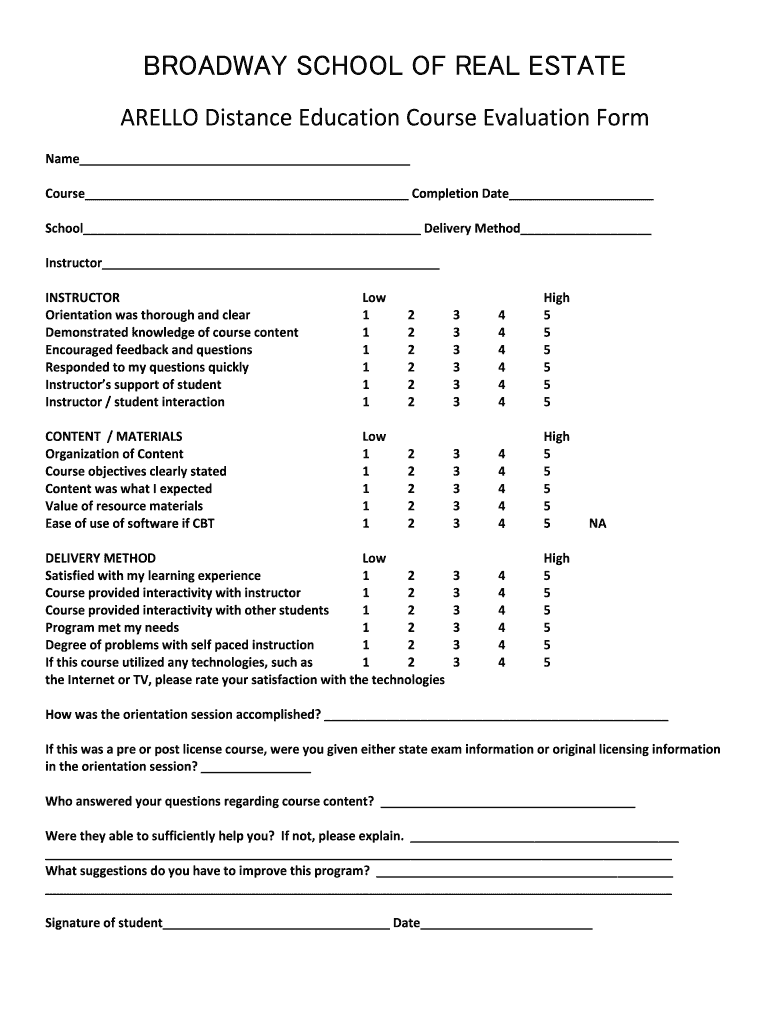
Click ‘Get Form’ to open the Course Evaluation Form in the editor.
Begin by entering your name, course title, completion date, school name, and delivery method in the designated fields at the top of the form.
Rate your instructor's performance by selecting a number from 1 (Low) to 5 (High) for each statement regarding their orientation, knowledge, feedback encouragement, and support.
In the CONTENT / MATERIALS section, evaluate the organization of content and clarity of objectives by marking your satisfaction level from 1 to 5.
For DELIVERY METHOD, assess your learning experience and interactivity with both the instructor and fellow students using the same rating scale.
Provide detailed feedback in the open-ended questions about orientation sessions and suggestions for program improvement.
Finally, sign and date the form at the bottom before submitting it through our platform.
Start filling out your Course Evaluation Form today for free using our editor!
Fill out Course Evaluation Form - Broadway School of Real Estate online It's free
Course evaluation form broadway school of real estate pdfCourse evaluation form broadway school of real estate onlineReal Estate accredited schoolsDbpr re 19FREC-approved Real Estate schoolsFlorida Real Estate post license requirementsDbpr re 18How to know if a Real Estate School is accredited
Security and compliance
At DocHub, your data security is our priority. We follow HIPAA, SOC2, GDPR, and other standards, so you can work on your documents with confidence.
Hawn dropped out of high school at 16; almost 20 years later, she earned her high school equivalency diploma. Now, she is a student in a doctoral program andRead more
The Parsons Corporation (Parsons) prepared this Principles and Practices document under contract to the Air Force Center for Environmental Excellence (AFCEERead more
Cookie consent notice
This site uses cookies to enhance site navigation and personalize your experience.
By using this site you agree to our use of cookies as described in our Privacy Notice.
You can modify your selections by visiting our Cookie and Advertising Notice.