Type text, add images, blackout confidential details, add comments, highlights and more.
02. Sign it in a few clicks
Draw your signature, type it, upload its image, or use your mobile device as a signature pad.
03. Share your form with others
Send it via email, link, or fax. You can also download it, export it or print it out.
How to use or fill out Auto Loan Application - wildernessbooksorg with our platform
Ease of Setup
DocHub User Ratings on G2
Ease of Use
DocHub User Ratings on G2
Click ‘Get Form’ to open the Auto Loan Application in the editor.
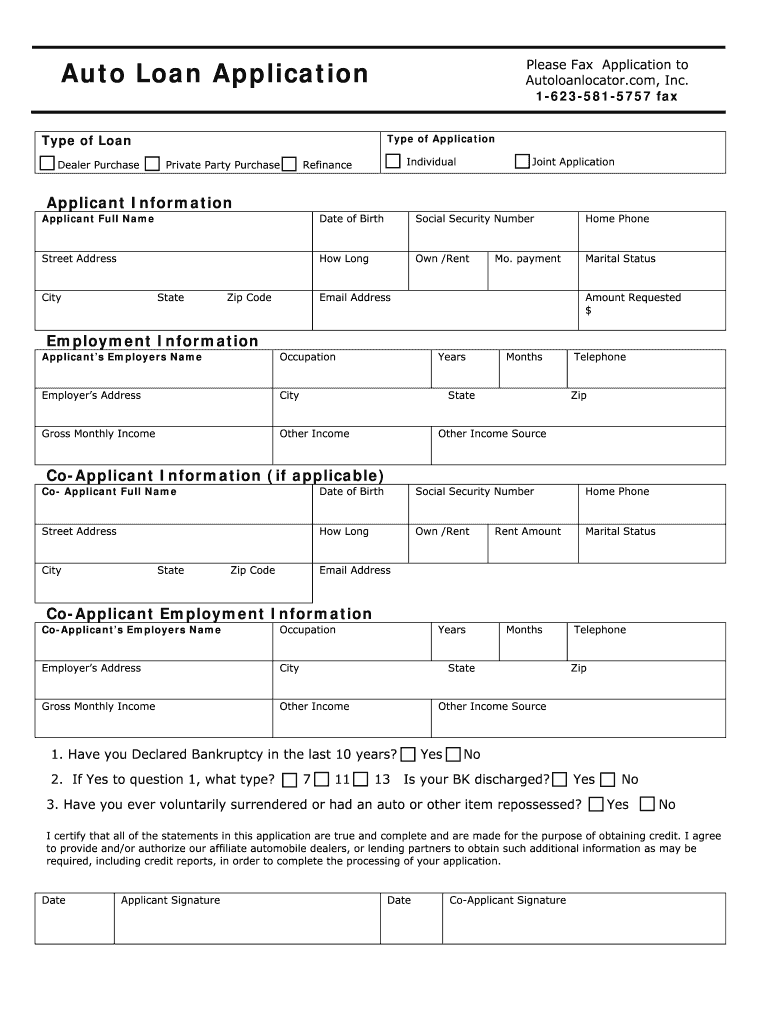
Begin by selecting the type of loan you are applying for: Dealer Purchase, Private Party Purchase, or Refinance. Check the appropriate box.
Indicate whether this is an Individual or Joint Application by checking the corresponding box.
Fill in your personal information in the Applicant Information section, including your full name, date of birth, social security number, and contact details.
Provide your employment information, including your employer's name, occupation, address, and gross monthly income.
If applicable, complete the Co-Applicant Information section with similar details for your co-applicant.
Answer any additional questions regarding bankruptcy and repossession history as required.
Finally, review all entered information for accuracy before signing and dating the application at the bottom.
Start filling out your Auto Loan Application today for free using our platform!
Fill out Auto Loan Application - wildernessbooksorg online It's free
This Owners Guide describes every option and model variant available and therefore some of the items covered may not apply to your particular vehicle.Read more
Cookie consent notice
This site uses cookies to enhance site navigation and personalize your experience.
By using this site you agree to our use of cookies as described in our Privacy Notice.
You can modify your selections by visiting our Cookie and Advertising Notice.