Type text, add images, blackout confidential details, add comments, highlights and more.
02. Sign it in a few clicks
Draw your signature, type it, upload its image, or use your mobile device as a signature pad.
03. Share your form with others
Send 956a form via email, link, or fax. You can also download it, export it or print it out.
How to use or fill out form 956a with our platform
Ease of Setup
DocHub User Ratings on G2
Ease of Use
DocHub User Ratings on G2
Click ‘Get Form’ to open form 956a in the editor.
Begin by entering your personal information in the designated fields, including your name, address, and contact details. Ensure accuracy as this information is crucial for processing.
Next, navigate to the section that requires you to provide details about your application. Carefully read each prompt and fill in the required information, ensuring you follow any specific instructions provided.
Review the declaration section at the end of the form. Here, you will need to confirm that all information provided is true and complete. Sign electronically using our platform’s signature feature.
Finally, save your completed form and choose to either download it or share it directly via email or Google Drive for easy distribution.
Start using our platform today for free to streamline your form completion process!
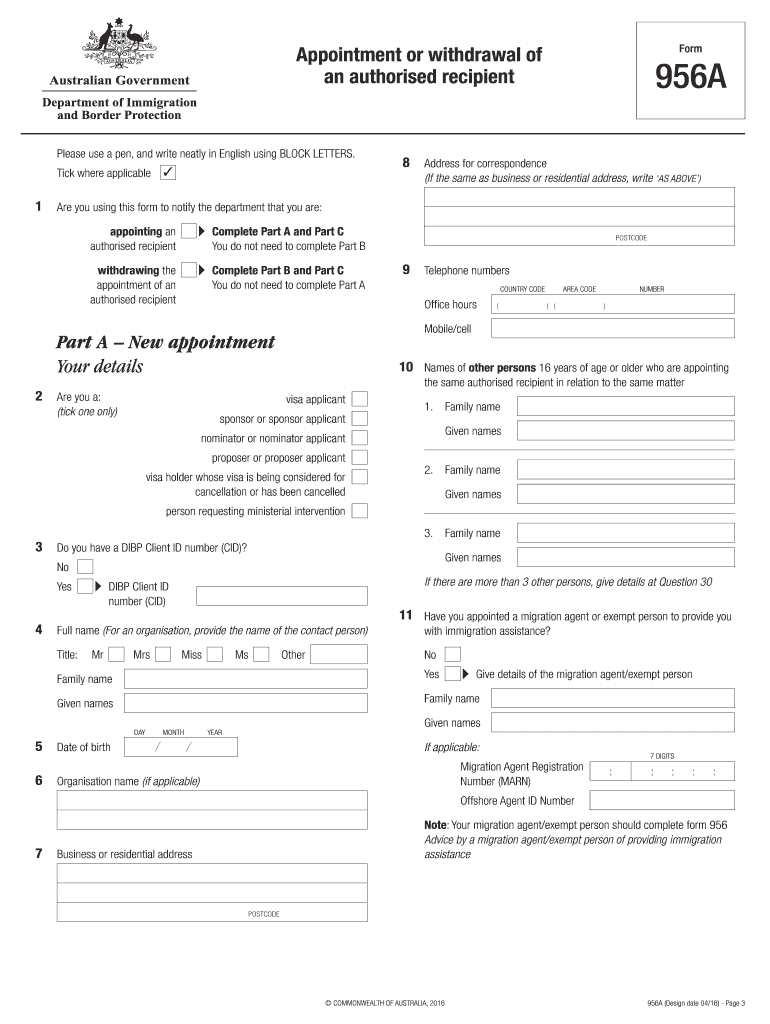
What is 956A appointment or withdrawal of an authorized recipient?
Form 956a, also known as the Appointment or Withdrawal of an Authorised Recipient, is a document used in Australian visa applications. It serves as an authorisation for a third-party individual or organisation to receive communication about your visa application on your behalf.Feb 11, 2024
What is a 956A form used for?
If a person 16 years of age or older wants to appoint a different authorised recipient they should complete a separate form 956A. The Department may use a range of means to send documents to your authorised recipient.
Can I submit form 956A online?
For online submission of Form 956 and 956A, there are two primary methods: ImmiAccount: Both forms can be uploaded through the ImmiAccount, which is the primary online platform for managing your visa applications. Email: You can also email the form to the Department of Home Affairs.
What is the form 956 application?
A separate form 956 Appointment of a registered migration agent, legal practitioner or exempt person must be completed for each matter. Where your appointment has ended, this form can also be used to notify the Department of the withdrawal of your appointment as an authorised recipient.
What happens after I submit form 956A?
Once the Department of Home Affairs processes Form 956A, your chosen authorized recipient will get all correspondence for you. You should keep in touch with them. This will help you stay updated on visa decisions, information requests, or other immigration issues.
form 956a australia
956A form pdfDo I need to fill Form 956A956A form sample filledWhat is form 956a appointment or withdrawal of an authorised recipientLatest 956a formPrint form 956aForm 956 example54 Form
Security and compliance
At DocHub, your data security is our priority. We follow HIPAA, SOC2, GDPR, and other standards, so you can work on your documents with confidence.
Among them, Form 956 and Form 956A are crucial in the Australian immigration process, each serving a unique purpose. Form 956 authorizes a migration agent or exempt person to act on your behalf, while Form 956A allows you to appoint someone to receive communications from the Department of Home Affairs.
What is form 956A for?
This form should be used to notify the Department of Home. Affairs (the Department) that you are: appointing an authorised recipient to receive documents. that the Department would otherwise have sent to you; or.
956a
Visitor visa (subclass 600) Application document checklist
Form 956A Appointment or withdrawal of an authorised recipient (the recipient completes the form and you must sign it). Page 2. Visitor visa (subclass 600)Read more
Cookie consent notice
This site uses cookies to enhance site navigation and personalize your experience.
By using this site you agree to our use of cookies as described in our Privacy Notice.
You can modify your selections by visiting our Cookie and Advertising Notice.