




Here's how it works

01. Edit your form online
Type text, add images, blackout confidential details, add comments, highlights and more.

02. Sign it in a few clicks
Draw your signature, type it, upload its image, or use your mobile device as a signature pad.

03. Share your form with others
Send it via email, link, or fax. You can also download it, export it or print it out.
How to use or fill out affidavit consideration excise tax property with our platform

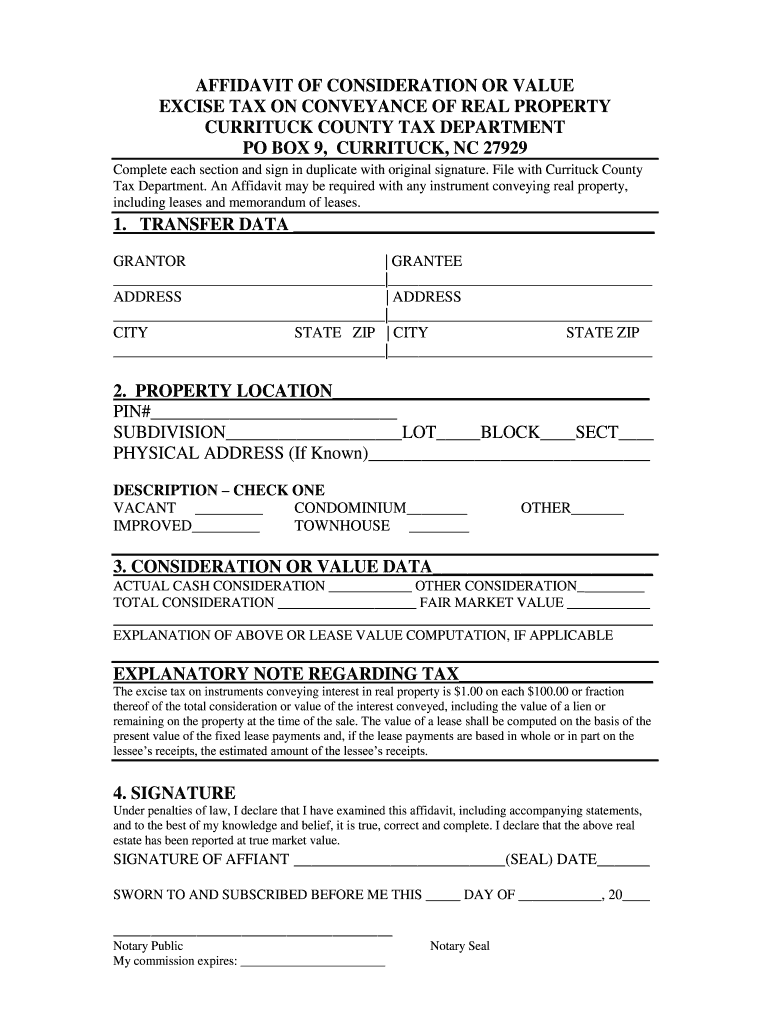
- Click ‘Get Form’ to open the affidavit consideration excise tax property in the editor.
- Begin by filling out the 'TRANSFER DATA' section. Enter the names and addresses of both the Grantor and Grantee, ensuring all fields are accurately completed.
- Next, move to 'PROPERTY LOCATION'. Input the PIN number, subdivision details, and physical address if known. Select the appropriate description of the property type by checking one of the options provided.
- In 'CONSIDERATION OR VALUE DATA', specify the actual cash consideration and any other considerations. Calculate and enter the total consideration and fair market value as required.
- Complete any necessary explanations regarding tax calculations in the designated area, ensuring clarity for future reference.
- Finally, sign in the 'SIGNATURE' section. Ensure your signature is original and complete all required notary information before submitting your affidavit.
Start using our platform today to fill out your affidavit for free and streamline your document processes!
Fill out affidavit consideration excise tax property online
It's free
It's free
Security and compliance
At DocHub, your data security is our priority. We follow HIPAA, SOC2, GDPR, and other standards, so you can work on your documents with confidence.
Learn more


