




Here's how it works

01. Edit your form online
Type text, add images, blackout confidential details, add comments, highlights and more.

02. Sign it in a few clicks
Draw your signature, type it, upload its image, or use your mobile device as a signature pad.

03. Share your form with others
Send it via email, link, or fax. You can also download it, export it or print it out.
How to use or fill out Eaton County Assumed Name Certificate

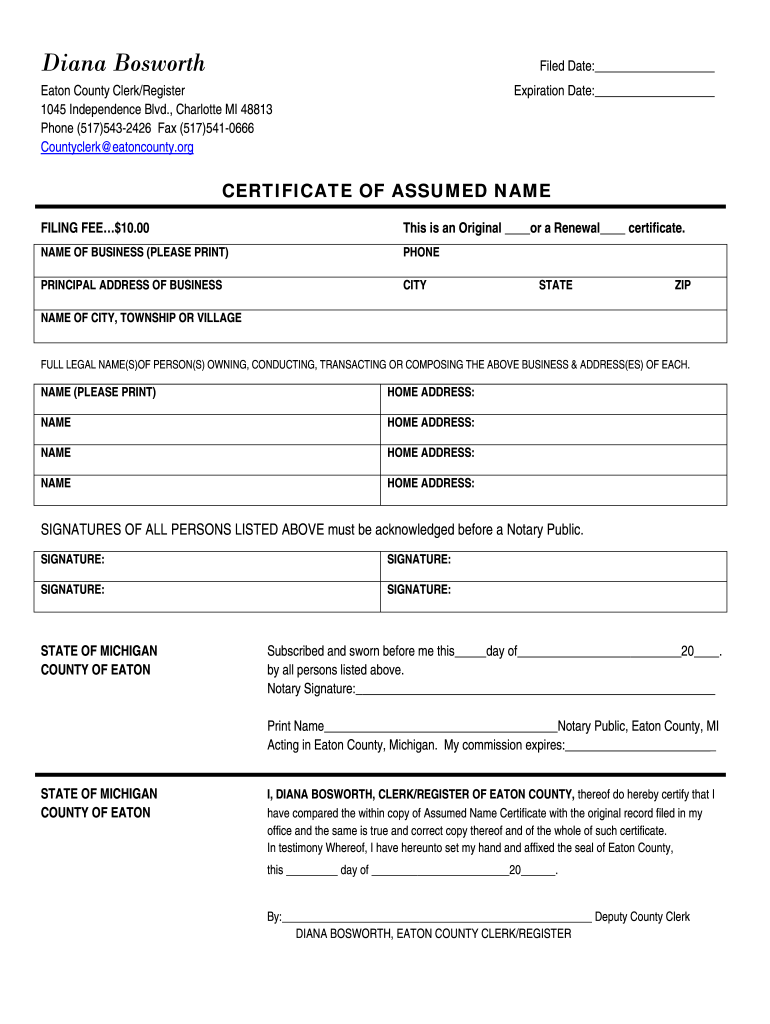
- Click ‘Get Form’ to open the Eaton County Assumed Name Certificate in our editor.
- Begin by entering the 'Filed Date' at the top of the form. This is essential for record-keeping.
- Indicate whether this is an Original or a Renewal certificate by checking the appropriate box.
- Fill in the 'Name of Business' field clearly, followed by your contact phone number.
- Provide the principal address of your business, including city, state, and ZIP code.
- List the name of the city, township, or village where your business operates.
- Enter the full legal names and home addresses of all individuals owning or conducting business under this name. Ensure each name is printed clearly.
- All listed individuals must sign in the designated areas. Remember that signatures need to be acknowledged before a Notary Public.
- Complete the notary section at the bottom once all signatures are obtained. This includes signing and printing their name along with their commission expiration date.
Start filling out your Eaton County Assumed Name Certificate today for free using our platform!
Fill out eaton county assumed online
It's free
It's free
Security and compliance
At DocHub, your data security is our priority. We follow HIPAA, SOC2, GDPR, and other standards, so you can work on your documents with confidence.
Learn more




