Horse bill of sale without warranties 2026

Get Form
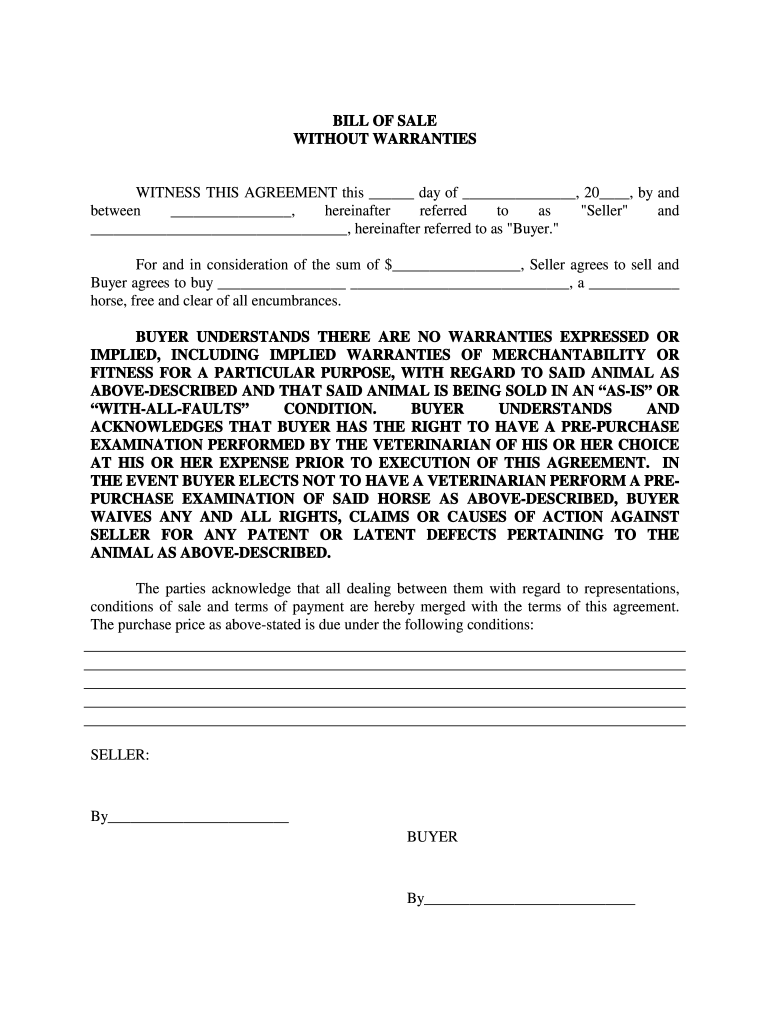
bill of sale no warranty Preview on Page 1

Here's how it works

01. Edit your bill of sale no warranty online
Type text, add images, blackout confidential details, add comments, highlights and more.
02. Sign it in a few clicks
Draw your signature, type it, upload its image, or use your mobile device as a signature pad.
03. Share your form with others
Send horse bill of sale via email, link, or fax. You can also download it, export it or print it out.

How to use or fill out horse bill of sale without warranties with our platform

Form edit decoration
9.5
Ease of Setup
DocHub User Ratings on G2
9.0
Ease of Use
DocHub User Ratings on G2
  1. Click ‘Get Form’ to open the horse bill of sale without warranties in the editor.
  2. In the first section, enter the date of the agreement in the format '___ day of ______, 20_'.
  3. Next, fill in the Seller's name and Buyer’s name in the designated fields.
  4. Specify the purchase price by entering the amount in '$_____'.
  5. Describe the horse being sold by filling in its name and breed in '_____ ________, a ___ horse'.
  6. Review and acknowledge that there are no warranties expressed or implied regarding the horse. This is crucial for understanding your rights.
  7. Sign and date at the bottom where indicated for both Seller and Buyer to finalize the agreement.

Start using our platform today to easily complete your horse bill of sale without warranties for free!

be ready to get more

Complete this form in 5 minutes or less

Get form

Got questions?

We have answers to the most popular questions from our customers. If you can't find an answer to your question, please contact us.
Contact us

Sure, it is possible with DocHub. This trustworthy and compliant online editor has a phone-based signing option. Once you log in to your DocHub account and import your horse bill of sale without warranties to our editor, fill out all blank areas and utilize the Sign feature on the upper barf. Click on Create your signature and choose Phone from the available options. Here, you scan a QR code using your smartphone and draw your signature on your phone screen, as you usually do when signing physical papers. If you access DocHub right from your mobile device, you can eSign your form by drawing your electronic signature, uploading its picture, or simply with a typed name.

In addition to a comprehensive toolset for editing PDFs on mobile devices, DocHub enables you to sign your printable horse bill of sale along the way. Open our editor in your internet browser, make modifications using DocHub’s toolset, and finish your editing by eSigning the completed form.

How to Write a Horse Bill of Sale Step 1 \u2013 Date and Parties. Enter the date in which the document is being created. ... Step 2 \u2013 Horse Description. Horse's Name (if named) ... Step 3 \u2013 Purchase Price Information. ... Step 4 \u2013 Security Deposit. ... Step 5 \u2013 Signatures. ... Step 6 \u2013 Acknowledgement of Notary Public.
Depending upon the price of the horse, the equine professional's reputation in the industry and horse's intended use, commissions are typically 10-25% of the sale price. However, a trainer and client can agree upon any level of commission.
Elements of a sales agreement Buyer and seller names and contact information. Description of goods, services, or property being purchased. Payment amount, dates, and method. Liability of each party in the case of loss, damage, or delivery failure. Ownership information, such as when ownership formally transfers to the buyer.

Security and compliance

At DocHub, your data security is our priority. We follow HIPAA, SOC2, GDPR, and other standards, so you can work on your documents with confidence.

Learn more
ccpa2
pci-dss
gdpr-compliance
hipaa
soc-compliance

People also ask

Preparing a Sales Contract in Seven Steps Determine Customer Needs. ... Agree on a Solution. ... Indicate the Scope of Work. ... Set the Timeline. ... Establish Pricing & Payment Requirements. ... Create Service Terms. ... Send the Sales Contract for Review & Signature.
How to Write a Horse Sale Contract Identify the parties. That's the buyer(s) and seller(s), including addresses, phone numbers, and Social Security or Federal tax-identification numbers. ... Identify the horse. ... Date of sale. ... Price and terms of sale. ... Risk of loss. ... Warranties. ... Prepurchase exam. ... Insurance.
Horse Bill of Sale Requirements Description of Horse: the horse's date of birth, coat color (bay/chestnut/gray), sex, breed, registration number, markings or tattoos. Sire: details about the horse's father, including his registration number. Dam: details about the horse's mother, including her registration number.

Related links