Type text, add images, blackout confidential details, add comments, highlights and more.

02. Sign it in a few clicks
Draw your signature, type it, upload its image, or use your mobile device as a signature pad.

03. Share your form with others
Send it via email, link, or fax. You can also download it, export it or print it out.

How to use or fill out ri 76 10 with our platform
Ease of Setup
DocHub User Ratings on G2
Ease of Use
DocHub User Ratings on G2
Click ‘Get Form’ to open the ri 76 10 document in the editor.
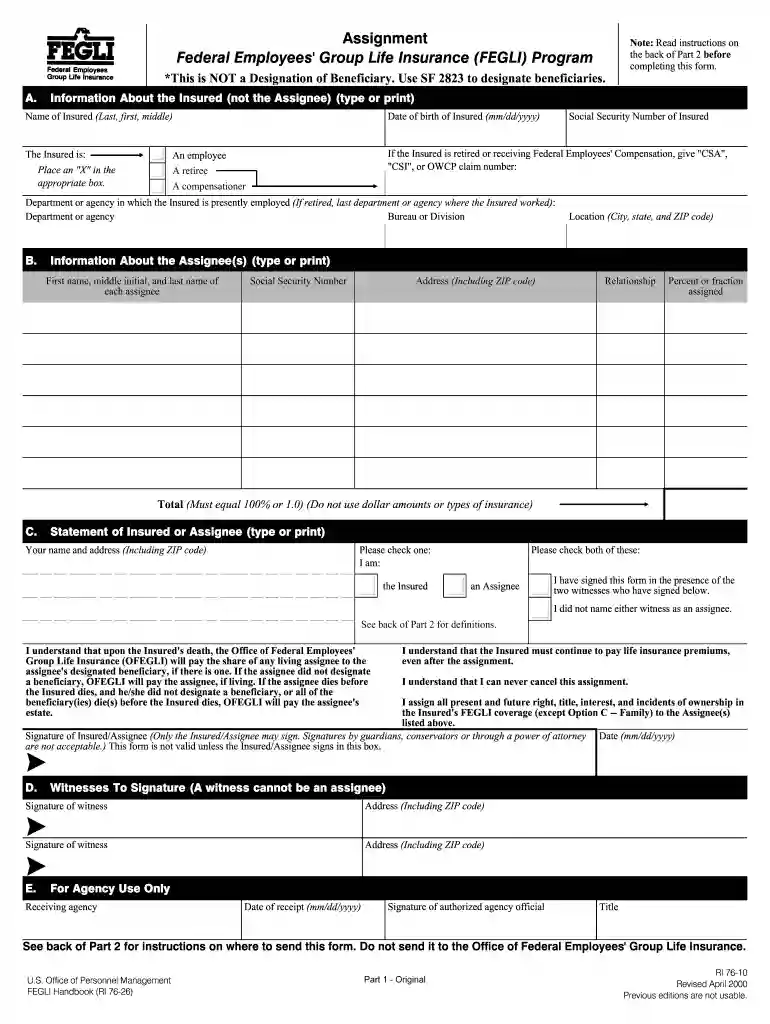
Begin by filling out Section A, which requires information about the insured. Enter the name, date of birth, and Social Security Number. Indicate if the insured is an employee, retiree, or compensationer by placing an 'X' in the appropriate box.
In Section B, provide details about the assignee(s). Include their full names, Social Security Numbers, addresses, relationships to the insured, and ensure that the total percentage assigned equals 100%.
Proceed to Section C where both the insured and assignee must sign. Ensure that two witnesses also sign this section. This step is crucial for validating the assignment.
Finally, review all entries for accuracy. If any mistakes are found, start over with a new form as erasures or cross-outs are not acceptable.
Start using our platform today to streamline your form completion process for free!
Ri 76 10 2022Ri 76 10 pdfRI 76-26OPM Form RI 79-9 PDFHow to fill out form RI 79-9 PDFOPM form RI 92-19AWhere do i send OPM form RI 79-9 online freeWhere to mail OPM form RI 79-9
Security and compliance
At DocHub, your data security is our priority. We follow HIPAA, SOC2, GDPR, and other standards, so you can work on your documents with confidence.
The Assignee is the person(s), firm(s), or trust(s) (usually named on an Assignment form, RI 76-10) who owns and controls the Insureds life insurance.Read more
Cookie consent notice
This site uses cookies to enhance site navigation and personalize your experience.
By using this site you agree to our use of cookies as described in our Privacy Notice.
You can modify your selections by visiting our Cookie and Advertising Notice.