



Canadian commercial invoice template 2026

Get Form
invoice template canada Preview on Page 1

Here's how it works

01. Edit your invoice template canada online
Type text, add images, blackout confidential details, add comments, highlights and more.

02. Sign it in a few clicks
Draw your signature, type it, upload its image, or use your mobile device as a signature pad.

03. Share your form with others
Send canada commercial invoice via email, link, or fax. You can also download it, export it or print it out.

How to use or fill out Canadian Commercial Invoice Template with Our Platform

Form edit decoration
9.5
Ease of Setup
DocHub User Ratings on G2
9.0
Ease of Use
DocHub User Ratings on G2
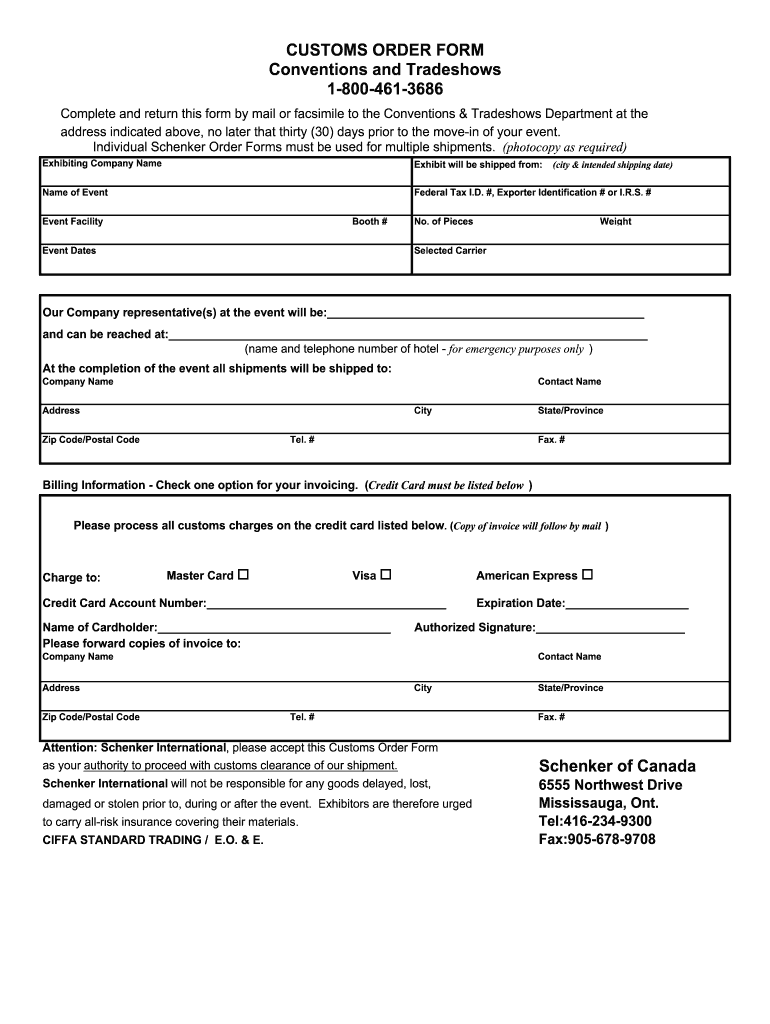
  1. Click ‘Get Form’ to open the Canadian commercial invoice template in the editor.
  2. Begin by entering your exhibiting company name at the top of the form. This identifies who is responsible for the shipment.
  3. Fill in the event details, including the name of the event, event facility, booth number, and event dates. Ensure accuracy to avoid any logistical issues.
  4. Provide shipping information such as where the exhibit will be shipped from, including city and intended shipping date.
  5. List the number of pieces and total weight of your shipment. This information is crucial for customs processing.
  6. Select your preferred carrier for shipping and provide contact details for your company representative at the event.
  7. Complete billing information by selecting an invoicing option and providing credit card details if necessary.
  8. Finally, ensure you sign and date the form before submission to authorize customs clearance.

Start using our platform today to streamline your document editing and ensure a hassle-free experience!

be ready to get more

Complete this form in 5 minutes or less

Get form

Got questions?

We have answers to the most popular questions from our customers. If you can't find an answer to your question, please contact us.
Contact us
Commercial Invoice: Primarily used for transactions between businesses and for customs clearance. It includes detailed information about the sale and shipment. CN22/CN23 Forms: These forms are used specifically for postal shipments and are required for packages sent via mail.
As long as you are the only owner, your business starts when your business activities start. You are therefore free to invoice clients as necessary. Once you provide a good and service in exchange for a fee, you can consider yourself a sole proprietor, a business owner, and can create a personal invoice.
The commercial invoice or other acceptable documentation shall contain: An adequate description of the merchandise. The quantities of the merchandise. The values or approximate values of the merchandise.
The easiest way to build a commercial invoice is to download a customizable template from a reputable site. You can use this commercial invoice form from the U.S. Department of Commerce, or this example from FedEx.
You can use a Commercial Invoice in place of a CCI as long as you include the following information: The exporters full name, address and country. The importers full name and address. A detailed description of the goods in the shipment.

Security and compliance

At DocHub, your data security is our priority. We follow HIPAA, SOC2, GDPR, and other standards, so you can work on your documents with confidence.

Learn more
ccpa2
pci-dss
gdpr-compliance
hipaa
soc-compliance
be ready to get more

Complete this form in 5 minutes or less

Get form

People also ask

The exporter or seller provides the commercial invoice to accompany the shipment.
How to create a Canada invoice online. Fill in your company and contact information, date and invoice number. Include line items with descriptions of billable work, and agreed rates. Add tax and calculate the amount due, noting payment terms. Download your invoice as PDF. Get paid using your Wise bank account details.

Related links

