Type text, add images, blackout confidential details, add comments, highlights and more.
02. Sign it in a few clicks
Draw your signature, type it, upload its image, or use your mobile device as a signature pad.
03. Share your form with others
Send vehicle appraisal form pdf via email, link, or fax. You can also download it, export it or print it out.
How to use or fill out 14-128 Used Motor Vehicle Certified Appraisal Form - Texas with our platform
Ease of Setup
DocHub User Ratings on G2
Ease of Use
DocHub User Ratings on G2
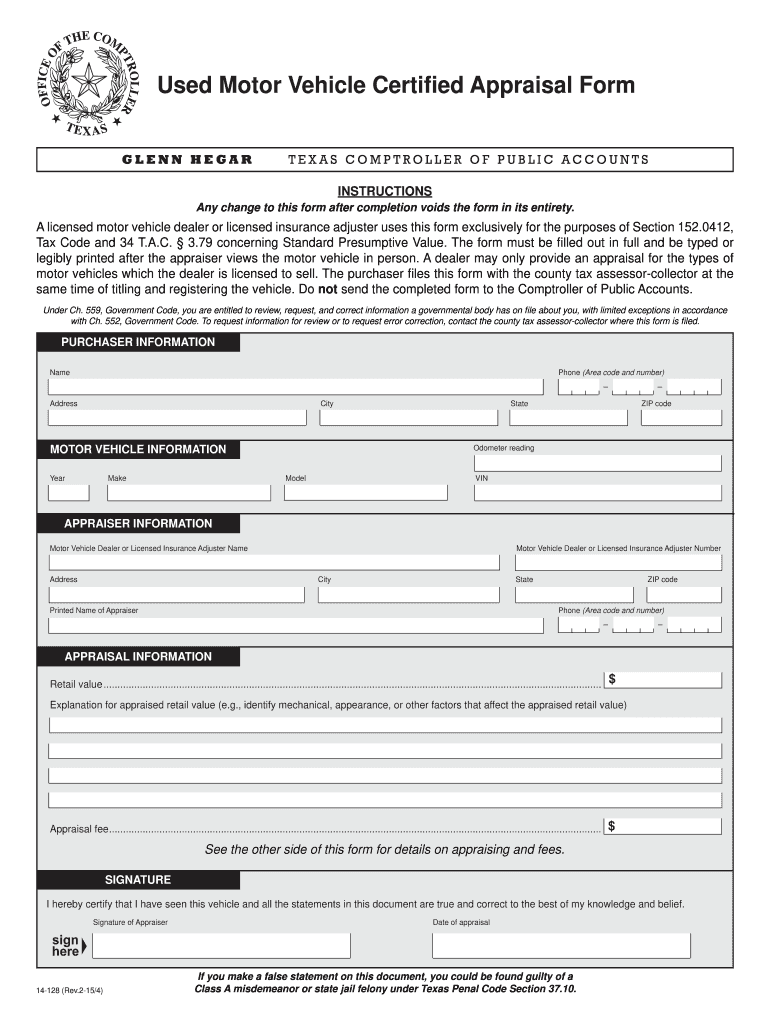
Click ‘Get Form’ to open the 14-128 Used Motor Vehicle Certified Appraisal Form in the editor.
Begin by filling out the 'Purchaser Information' section. Enter your name, phone number, address, city, and ZIP code. Ensure all details are accurate for proper processing.
Next, move to the 'Motor Vehicle Information' section. Input the year, make, model, state, and VIN of the vehicle being appraised.
In the 'Appraiser Information' section, provide details about the licensed motor vehicle dealer or insurance adjuster. Include their name, address, license number, and contact information.
Fill out the 'Appraisal Information' by stating the retail value and providing an explanation for this value based on mechanical or appearance factors.
Finally, ensure you sign and date the form in the designated area to certify that all information is true and correct.
Start using our platform today to fill out your appraisal form online for free!
Fill out 14-128 Used Motor Vehicle Certified Appraisal Form - Texas ... online It's free
14 128 used motor vehicle certified appraisal form texas pdf14 128 used motor vehicle certified appraisal form texas free14 128 used motor vehicle certified appraisal form texas downloadAuto appraisal formVtr 125 appraisalsCar appraisal for bonded titleVehicle appraisalTax appraisal form
Security and compliance
At DocHub, your data security is our priority. We follow HIPAA, SOC2, GDPR, and other standards, so you can work on your documents with confidence.
Form 14-128 (Back)(Rev.7-25/6). Motor Under the law, the Comptroller sets the fee for a certified appraisal by a licensed Texas motor vehicle dealer.Read more
34 Tex. Admin. Code 3.79 - Standard Presumptive Value
A certified appraisal must be on comptroller form 14-128, Texas Used Motor Vehicle Appraisal Form. (3) Appraisal standards. Upon request by a purchaser of aRead more
Cookie consent notice
This site uses cookies to enhance site navigation and personalize your experience.
By using this site you agree to our use of cookies as described in our Privacy Notice.
You can modify your selections by visiting our Cookie and Advertising Notice.