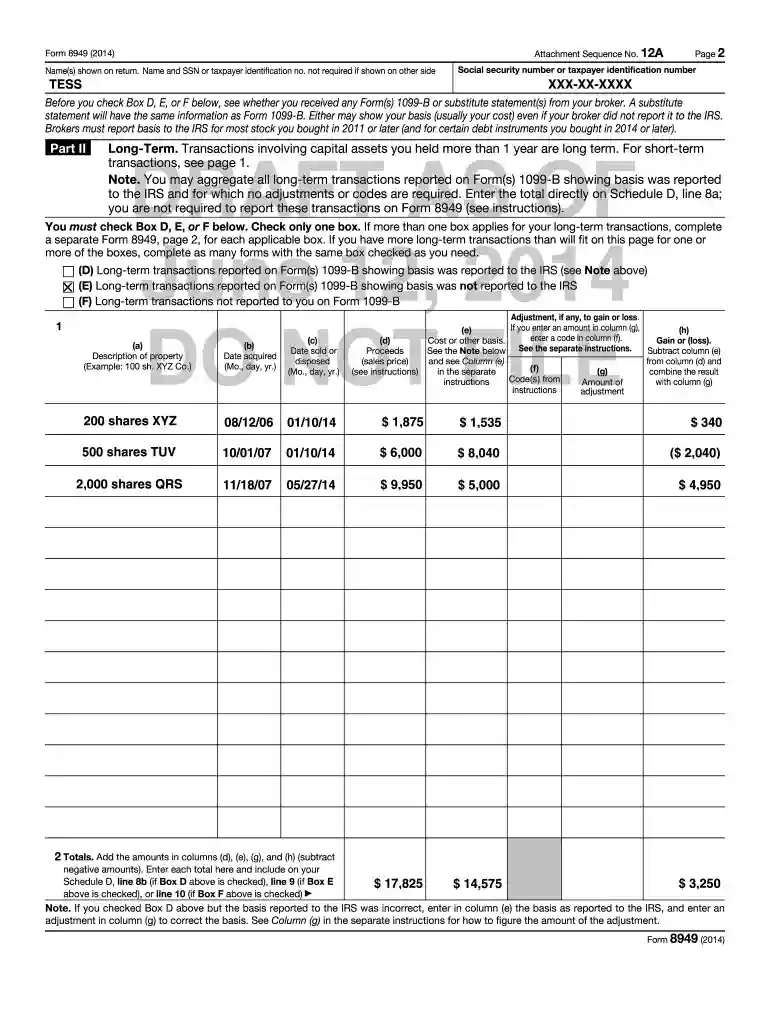
To review Tess's completed Form 8949 and Schedule D ... - IRS.gov - apps irs-2026

Get Form
form 8949 example filled out Preview on Page 1

Here's how it works

01. Edit your form 8949 example filled out online
Type text, add images, blackout confidential details, add comments, highlights and more.

02. Sign it in a few clicks
Draw your signature, type it, upload its image, or use your mobile device as a signature pad.

03. Share your form with others
Send 8949 via email, link, or fax. You can also download it, export it or print it out.

How to use or fill out To review Tess's completed Form 8949 and Schedule D with our platform

Form edit decoration
9.5
Ease of Setup
DocHub User Ratings on G2
9.0
Ease of Use
DocHub User Ratings on G2
  1. Click ‘Get Form’ to open it in the editor.
  2. Begin by reviewing the personal information section, ensuring that Tess's name and social security number are correctly displayed.
  3. In Part II, identify the long-term transactions. Check Box D, E, or F based on whether the basis was reported to the IRS. Only check one box.
  4. Fill in the details for each transaction: description of property, date acquired, date sold, proceeds, cost basis, and any adjustments needed.
  5. Calculate totals for columns (d), (e), (g), and (h) at the bottom of the form. Ensure these totals are accurately transferred to Schedule D.

Start using our platform today to streamline your document editing and ensure a smooth filing process!

be ready to get more

Complete this form in 5 minutes or less

Get form

Got questions?

We have answers to the most popular questions from our customers. If you can't find an answer to your question, please contact us.
Contact us

Yes, and it’s really easy! DocHub is a web-based PDF editor with advanced document processing capabilities that allow you promptly modify your forms, complete empty fields and drop new ones for others to fill out, and create eSignatures in several ways. Import your form 8949, provide information as requested, and decide how you want to eSign your template - by typing your name, drawing your signature, uploading its image, or using a QR code.

If you store your files in Google Drive, there is no need to download your pad 8949 on the computer and upload it back to our editor. A much simpler way is to install a browser extension created by DocHub to simplify this flow. The extension allows editing PDFs in your web browser. Alternatively, you can integrate your DocHub and Gmail accounts for more efficient editing.

Preparing Schedule D and 8949 Any year that you have to report a capital asset transaction, youll need to prepare Form 8949 before filling out Schedule D unless an exception applies. Form 8949 requires the details of each capital asset transaction.
Schedule D is included in TurboTax Premier, TurboTax Live Premier, Self-Employed, and TurboTax Live Self-Employed (online) and in all personal CD/Download versions of TurboTax.
The primary purpose of IRS Form 8949 is to report sales and exchanges of capital assets. Form 8949 is filed along with Schedule D of your individual federal income tax form. Anyone who has received one or more Forms 1099-B, Forms 1099-S, or IRS-allowed substitutions should file a Form 8949.

Security and compliance

At DocHub, your data security is our priority. We follow HIPAA, SOC2, GDPR, and other standards, so you can work on your documents with confidence.

Learn more
ccpa2
pci-dss
gdpr-compliance
hipaa
soc-compliance

People also ask

You and your spouse may list your transactions on separate forms or you may combine them. However, you must include on your Schedule D the totals from all Forms 8949 for both you and your spouse. Corporations and partnerships.
When you enter investment sales or exchanges from Form 1099-B or 1099-S in TurboTax, well automatically fill out Form 8949 and transfer the info to Schedule D.
E-file. If you e-file your return but choose not to report each transaction on a separate row on the electronic return, you must either (a) include Form 8949 as a PDF attachment to your return, or (b) attach Form 8949 to Form 8453 (or the appropriate form in the Form 8453 series) and mail the forms to the IRS.
Form 8949 - Forcing to Print When Not Required From within your TaxAct return (Online or Desktop), click on the Federal tab. Click on Investment Income to expand the category. Click on Gain or loss on the sale of investments. Click on Print all capital gain or (loss) transactions on Form 8949. Check the box.

what is form 8949