




Here's how it works

01. Edit your commission disbursement authorization trec online
Type text, add images, blackout confidential details, add comments, highlights and more.

02. Sign it in a few clicks
Draw your signature, type it, upload its image, or use your mobile device as a signature pad.

03. Share your form with others
Send commission disbursement authorization form texas via email, link, or fax. You can also download it, export it or print it out.
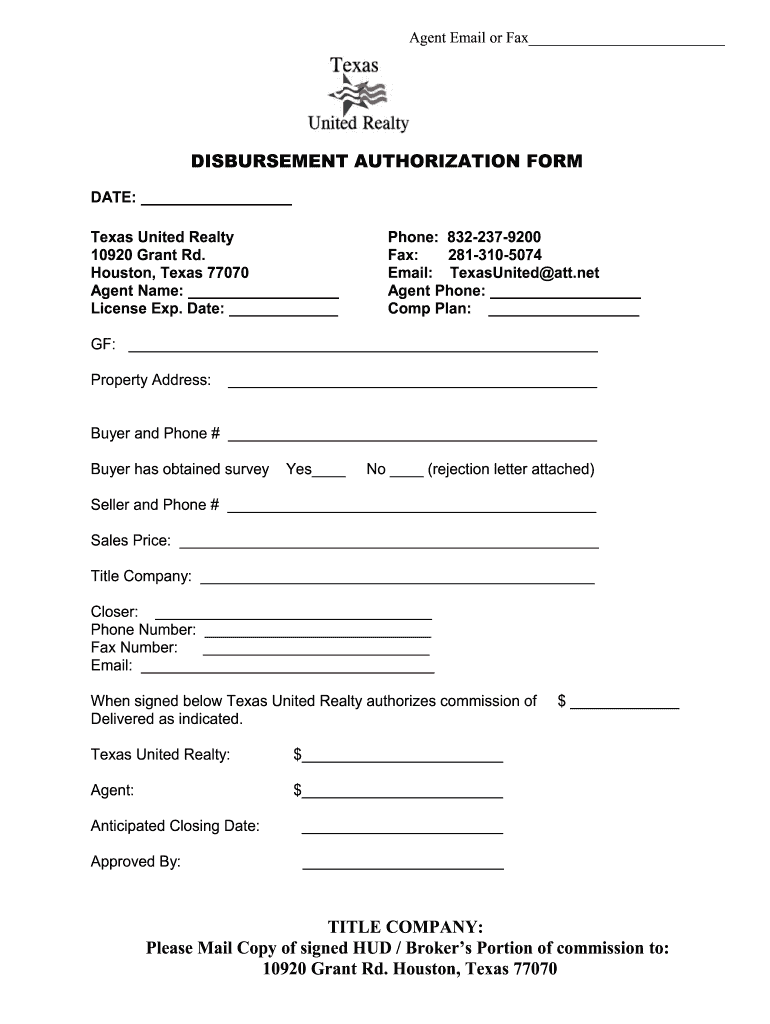
How to use or fill out disbursement houston commission with our platform

- Click ‘Get Form’ to open the disbursement authorization form in the editor.
- Begin by entering the date at the top of the form. This is essential for record-keeping.
- Fill in your agent name and license expiration date. Ensure accuracy as this information is crucial for verification.
- Provide your contact details, including phone and email. This allows for easy communication regarding the transaction.
- Complete the property address section, ensuring all details are correct to avoid any processing delays.
- Indicate whether a survey has been obtained by checking 'Yes' or 'No'. If 'No', attach the rejection letter as required.
- Fill in seller information and sales price accurately, as these details are vital for closing procedures.
- Enter title company details, including closer's name and contact information, to facilitate smooth communication during closing.
- Finally, specify the anticipated closing date and ensure all signatures are collected before submission.
Start using our platform today to streamline your document editing and signing process for free!
Fill out disbursement houston commission online
It's free
It's free
Security and compliance
At DocHub, your data security is our priority. We follow HIPAA, SOC2, GDPR, and other standards, so you can work on your documents with confidence.
Learn more


Related forms
A hearing notice
The document provides detailed instructions for setting a hearing or status conference in court. It outlines the steps t ...

California inventory object
The document provides instructions for maintaining privacy when filling out a form related to conservatorship and guardi ...

Confidential response request
The document FL-358 is a legal form used in the Superior Court of California for responding to requests for special immi ...

PUB 111 Anchorage Felony Drug Court - Alaska Court Records
The Anchorage Felony Drug Court is a therapeutic court designed for defendants charged with drug-related felonies who se ...

Illinois bond whereas
The document is an Illinois Loan Broker's Bond, which outlines the obligations of a principal and surety to the State of ...

Origin illinois pdf
The document provides a comprehensive history of the origin and evolution of counties in Illinois, detailing their estab ...
Illinois deposit form
The document is a form for the deposit of wills and certification of diligent search in the State of Illinois, managed b ...

Illinois probate records
The document is a pamphlet from the Illinois State Archives aimed at assisting genealogical researchers in utilizing pro ...