Type text, add images, blackout confidential details, add comments, highlights and more.
02. Sign it in a few clicks
Draw your signature, type it, upload its image, or use your mobile device as a signature pad.
03. Share your form with others
Send dma 5002 via email, link, or fax. You can also download it, export it or print it out.
How to use or fill out dma 5200 application with our platform
Ease of Setup
DocHub User Ratings on G2
Ease of Use
DocHub User Ratings on G2
Click ‘Get Form’ to open the dma 5200 application in the editor.
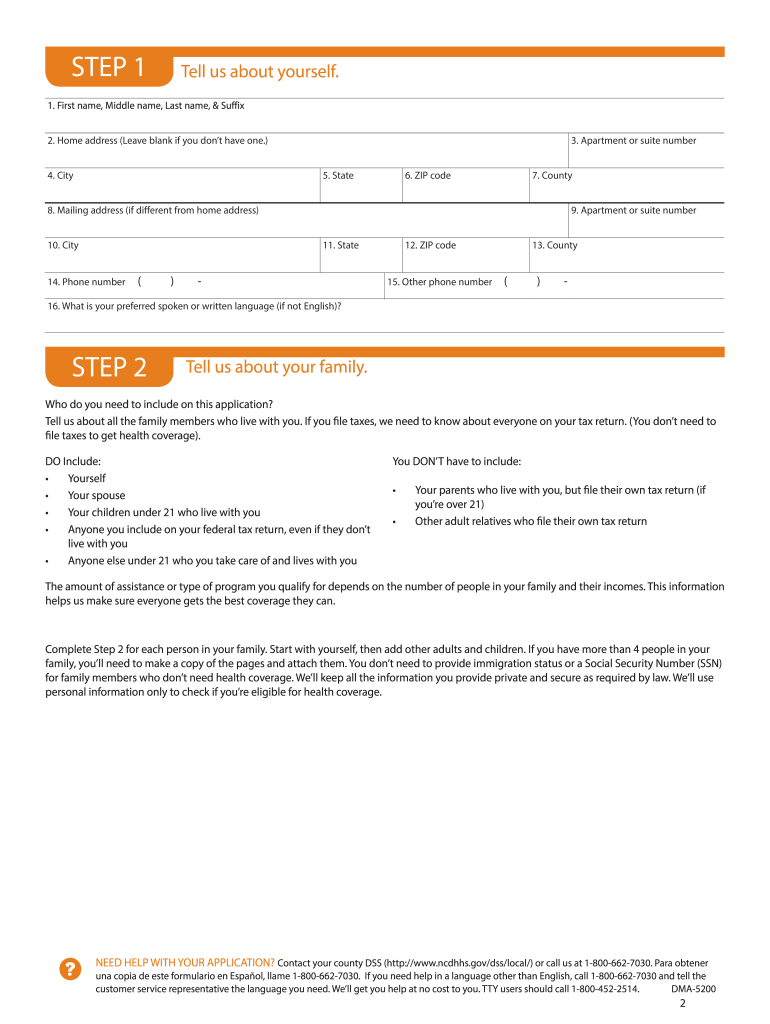
Begin by filling out Step 1, which requires your personal information. Enter your first name, middle name, last name, and suffix. Provide your home address, city, state, ZIP code, and county.
Proceed to Step 2 where you will list family members who need coverage. Include yourself, spouse, children under 21 living with you, and anyone claimed on your tax return.
For each family member listed in Step 2, provide their details including relationship to you, date of birth, sex, and Social Security number if applicable.
Continue through the form by providing current job and income information for each person as required in the subsequent sections.
Once all sections are completed accurately, review your entries for any errors before signing the application at Step 5.
Finally, submit your completed application by taking or mailing it to your local County Department of Social Services.
Start using our platform today to fill out your dma 5200 application online for free!
Emergency Medicaid Urgent Medical Services for Immigrant
Dec 7, 2016 Applicants may apply for EMS coverage by: 1. Applying online at ePASS;. 2. Completing a paper application using Form DMA- 5200 or Form DMA-Read more
2501 Mail Service Center Raleigh, NC 27699-2501 NC Medicaid Contact Center Phone: 888-245-0179 Monday-Friday 8 am to 5 pm Closed on State holidays.Read more
The SEC2 device driver manages the operation of the SEC 2.0 commonly instantiated into PowerQUICC processors. It is a fully functional component, meant toRead more
Cookie consent notice
This site uses cookies to enhance site navigation and personalize your experience.
By using this site you agree to our use of cookies as described in our Privacy Notice.
You can modify your selections by visiting our Cookie and Advertising Notice.