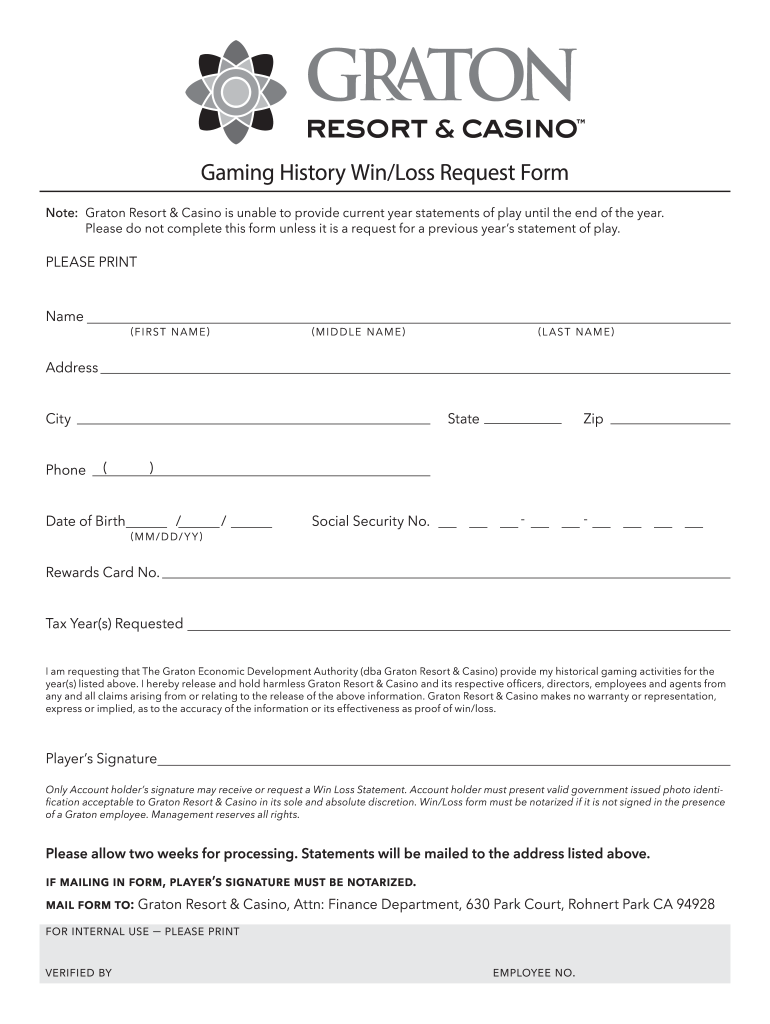
Graton win loss statement 2026

Get Form
graton win loss statement Preview on Page 1

Here's how it works

01. Edit your graton win loss statement online
Type text, add images, blackout confidential details, add comments, highlights and more.
02. Sign it in a few clicks
Draw your signature, type it, upload its image, or use your mobile device as a signature pad.
03. Share your form with others
Send graton win via email, link, or fax. You can also download it, export it or print it out.

How to use or fill out graton win loss statement with our platform

Form edit decoration
9.5
Ease of Setup
DocHub User Ratings on G2
9.0
Ease of Use
DocHub User Ratings on G2
  1. Click ‘Get Form’ to open the graton win loss statement in the editor.
  2. Begin by entering your personal information. Fill in your first, middle, and last name in the designated fields.
  3. Next, provide your address, including city, state, and zip code. Ensure all details are accurate for proper processing.
  4. Input your phone number and date of birth in the specified format (mm/dd/yyyy). This information is crucial for identity verification.
  5. Enter your Social Security Number and Rewards Card Number as required. These details help link your request to your gaming history.
  6. Select the tax year(s) you are requesting statements for. Be sure to specify only previous years as current year requests are not accepted until year-end.
  7. Sign the form where indicated. Remember that only account holders can request a Win Loss Statement, and a valid ID may be required.
  8. If mailing the form, ensure it is notarized if not signed in front of a Graton employee. Send it to the provided address for processing.

Start using our platform today to easily fill out and manage your graton win loss statement online for free!

be ready to get more

Complete this form in 5 minutes or less

Get form

Security and compliance

At DocHub, your data security is our priority. We follow HIPAA, SOC2, GDPR, and other standards, so you can work on your documents with confidence.

Learn more
ccpa2
pci-dss
gdpr-compliance
hipaa
soc-compliance