Type text, add images, blackout confidential details, add comments, highlights and more.
02. Sign it in a few clicks
Draw your signature, type it, upload its image, or use your mobile device as a signature pad.
03. Share your form with others
Send 50 771 via email, link, or fax. You can also download it, export it or print it out.
How to use or fill out form 50 771 with our platform
Ease of Setup
DocHub User Ratings on G2
Ease of Use
DocHub User Ratings on G2
Click ‘Get Form’ to open it in the editor.
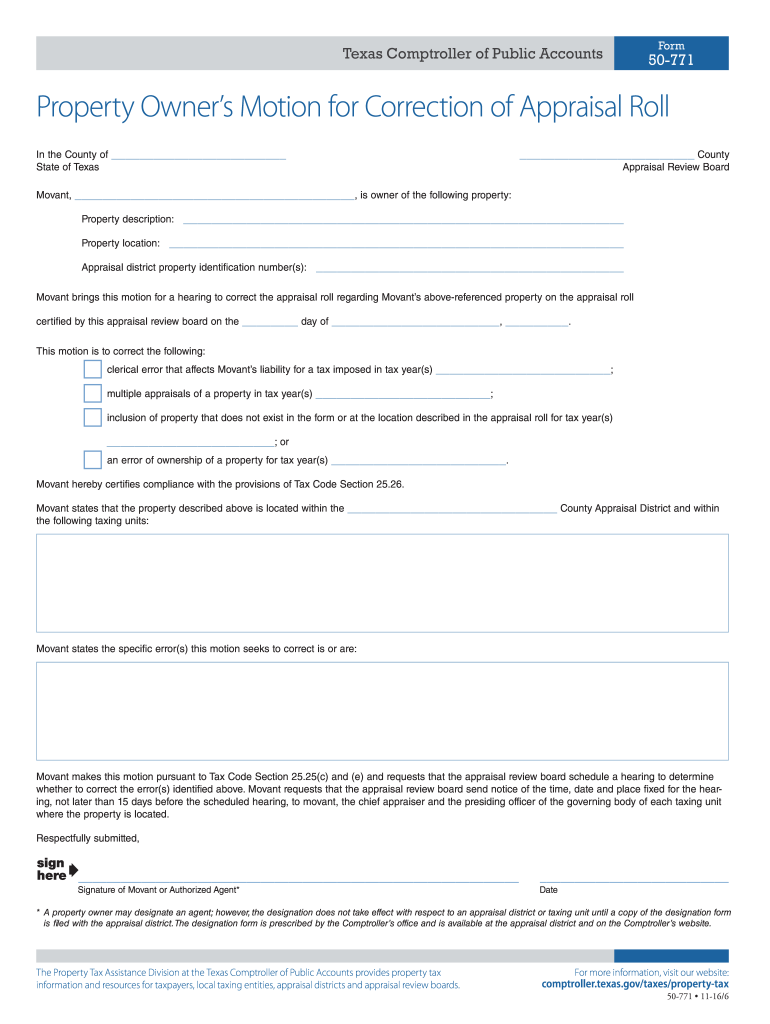
Begin by entering your name as the Movant in the designated field. This identifies you as the property owner initiating the motion.
Fill in the County Appraisal Review Board's name and provide a detailed description of your property, including its location and identification number.
Indicate the specific errors you are addressing by checking the appropriate boxes and providing details for each error type listed.
Complete the certification section by signing and dating the form. If applicable, designate an authorized agent for representation.
Finally, provide your contact information, including phone number and mailing address, ensuring all details are accurate for correspondence regarding your hearing.
Start using our platform today to fill out form 50 771 online for free!
How to fill out form 50 771Form 50 771 pdfForm 50 771 texasForm 50 771 downloadForm 50 771 texas comptrollerForm 50-114Form 50-144 instructionsForm 50 145
Security and compliance
At DocHub, your data security is our priority. We follow HIPAA, SOC2, GDPR, and other standards, so you can work on your documents with confidence.
50-771 Property Owners Motion for Correction of Appraisal Roll
A property owner may use this motion to correct, for any of the five preceding years: (1) clerical errors that affect a property owners liability for a taxRead more
The CIA Information Act of 1984 authorizes the Director of the CIA to exempt most agency operational files from the search and review requirements ofRead more
Pre-Entrance Health Requirements for Graduate Students
Step One: Complete the Student Medical History form Step Two: Upload a copy of your Immunization Record Step Three: Complete the Physicians Evaluation forRead more
Cookie consent notice
This site uses cookies to enhance site navigation and personalize your experience.
By using this site you agree to our use of cookies as described in our Privacy Notice.
You can modify your selections by visiting our Cookie and Advertising Notice.