




Here's how it works

01. Edit your form online
Type text, add images, blackout confidential details, add comments, highlights and more.

02. Sign it in a few clicks
Draw your signature, type it, upload its image, or use your mobile device as a signature pad.

03. Share your form with others
Send it via email, link, or fax. You can also download it, export it or print it out.
How to use or fill out Arizona Articles 2014 form with our platform

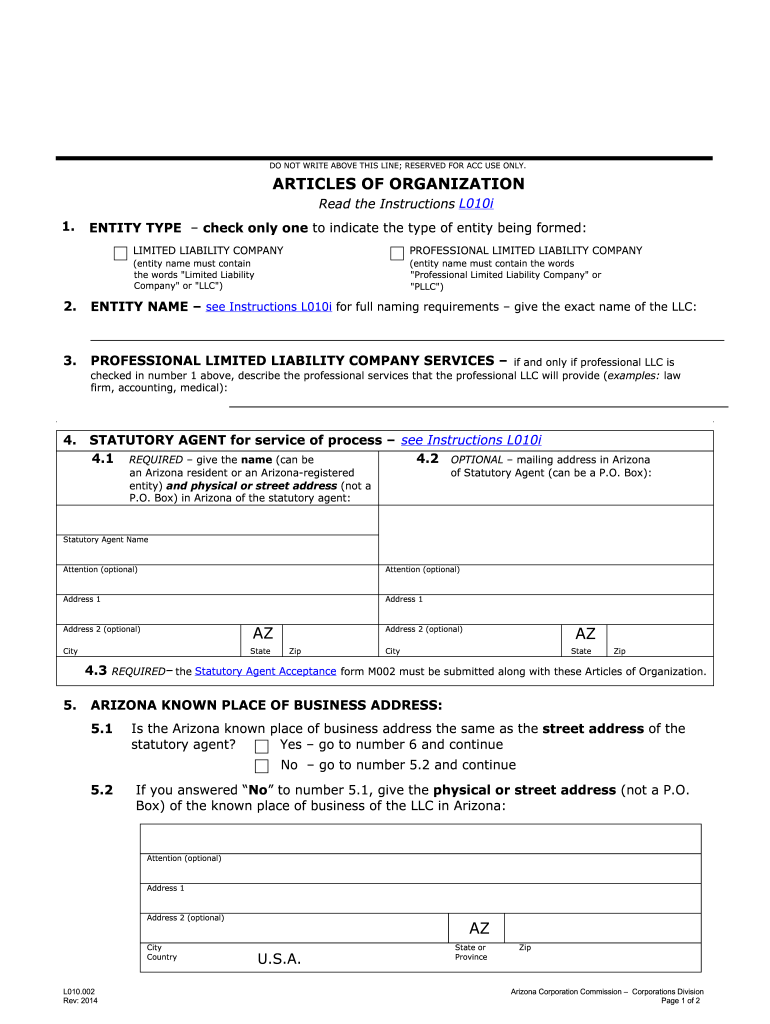
- Click ‘Get Form’ to open the Arizona Articles of Organization in the editor.
- In Section 1, select the entity type by checking either 'Limited Liability Company' or 'Professional Limited Liability Company'. Ensure that your entity name includes the appropriate designation.
- Proceed to Section 2 and enter the exact name of your LLC as per the naming requirements outlined in Instructions L010i.
- If applicable, describe the professional services your PLLC will provide in Section 3. This is only necessary if you selected 'Professional Limited Liability Company' in Step 2.
- In Section 4, provide the name and address of your statutory agent. Ensure that this agent is either an Arizona resident or a registered entity.
- Complete Section 5 by indicating whether your known place of business is the same as your statutory agent's address. If not, provide the physical address.
- Fill out Section 6 regarding the duration of your LLC. If it’s perpetual, skip to Section 7 or 8 based on management structure.
- Choose between a Manager-Managed or Member-Managed LLC in Sections 7 and 8 respectively, and ensure to attach the required forms.
- Finally, complete Section 9 by listing the Organizer's name and obtaining their signature along with the date.
Start filling out your Arizona Articles of Organization for free today using our platform!
Fill out arizona articles 2014 form online
It's free
It's free
See more arizona articles 2014 form versions
We've got more versions of the arizona articles 2014 form form. Select the right arizona articles 2014 form version from the list and start editing it straight away!
Security and compliance
At DocHub, your data security is our priority. We follow HIPAA, SOC2, GDPR, and other standards, so you can work on your documents with confidence.
Learn more


