







Definition & Meaning
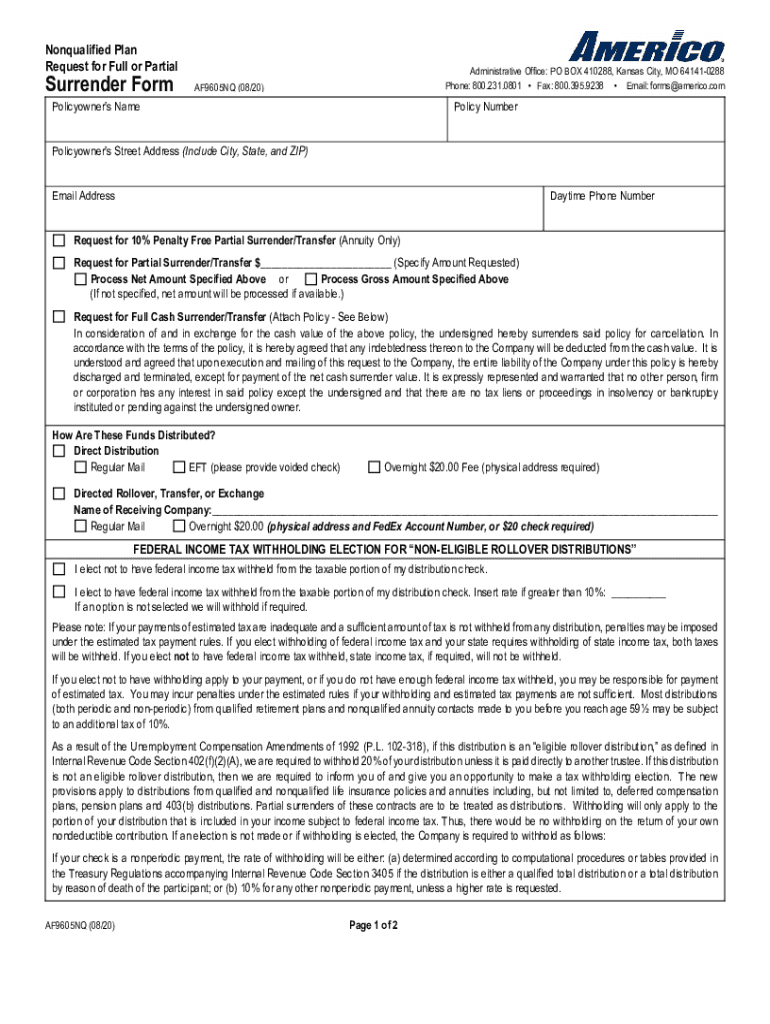
The Nonqualified Plan Surrender Form is a crucial document used by individuals seeking to liquidate or cash out funds from a nonqualified retirement plan. Nonqualified plans are typically employer-sponsored retirement savings plans that do not adhere to the Employee Retirement Income Security Act of 1974 (ERISA) guidelines, providing more flexibility in contributions and distributions. This form facilitates the formal request to either fully or partially surrender these funds, ensuring compliance with both the plan’s rules and the Internal Revenue Service (IRS) guidelines.
A nonqualified plan often includes deferred compensation plans, which are used to attract and retain key employees by offering tax-deferred savings incentives. The surrender process typically involves specific tax implications, including potential income tax liability on the distributed amount, and, in some cases, early withdrawal penalties.
How to Obtain the Nonqualified Plan Surrender Form
To obtain the Nonqualified Plan Surrender Form, individuals should contact their plan administrator or employer's human resources department. Many companies provide these forms through their employee portal or by requesting them via email or through customer service.
Alternatively, some financial institutions offer access to surrender forms through their websites. For employer-sponsored plans, it’s essential to ensure the form aligns with the specific plan details and complies with the administration’s regulations. For broad access, digital copies might be available for download, while specific plans might require a paper form request.
Steps to Complete the Nonqualified Plan Surrender Form
-
Read the Instructions: Carefully go through the instructions attached to understand the specific requirements and information needed.
-
Personal Information: Enter personal details, including name, contact information, and social security number.
-
Plan Details: Provide particulars of the nonqualified plan, such as the plan number and any account numbers associated with the surrender request.
-
Surrender Amount: Specify whether the surrender is full or partial, indicating the exact amount if partial.
-
Tax Withholding: Choose the tax withholding preference; federal and state taxes could apply to the distribution.
-
Sign the Agreement: The individual must sign and date the form to confirm the surrender request, ensuring all sections are completed accurately.
-
Submit the Form: Return the form as instructed, either by mail, email, or online submission, depending on the plan's requirements.
Key Elements of the Nonqualified Plan Surrender Form
- Personal Identification Information: Ensures that the form is processed for the correct individual.
- Plan Identification Details: Correlates the request with the appropriate account.
- Surrender Request Type: Distinguishes whether the request is for a full or partial withdrawal.
- Tax Information: Outlines how withholding taxes will be managed upon distribution.
- Signature and Date: Legal verification needed to authorize the surrender.
Important Terms Related to Nonqualified Plan Surrender Form
- Deferred Compensation: Income deferred to a future date, allowing tax advantages under nonqualified plans.
- Tax Withholding: Amount withheld from a distribution to cover anticipated income taxes.
- Distribution: The payout or withdrawal from a retirement plan account.
- Beneficiary: The person designated to receive benefits from a plan upon the account holder's death.
IRS Guidelines
The IRS requires that distributions from nonqualified plans comply with specific tax rules, including reporting the distribution as income on tax returns. Participants should confirm if their plan type allows early distributions without penalties. For surrender forms, individuals should ensure they comply with IRS regulations to avoid potential fines or additional taxes.
Plan holders are encouraged to consult a tax advisor or financial planner if there is any uncertainty regarding the tax implications of funds surrendered from nonqualified plans. Navigating the complexities of IRS rules may prevent unexpected tax liabilities.
Form Submission Methods
Nonqualified Plan Surrender Forms can be submitted in several ways, depending on the plan’s policies:
- Online Submission: Some institutions allow the form to be filled and submitted electronically via their secure platforms.
- Mail: Traditional method involving mailing a paper form to the designated address of the plan administrator.
- In-Person: Although less common, some institutions may offer in-person submissions at specific locations or branches.
Penalties for Non-Compliance
Failure to adhere to the regulations when surrendering funds from a nonqualified plan can result in significant penalties. Early withdrawal penalties, similar to those in qualified retirement plans, may apply if specific conditions are not met. Additionally, underreporting the distribution on tax returns may lead to fines or interest from the IRS.
Individuals must confirm the surrender request's compliance with plan rules and existing tax obligations. Awareness of trigger points that incur penalties is vital to avoid unnecessary financial setbacks.




