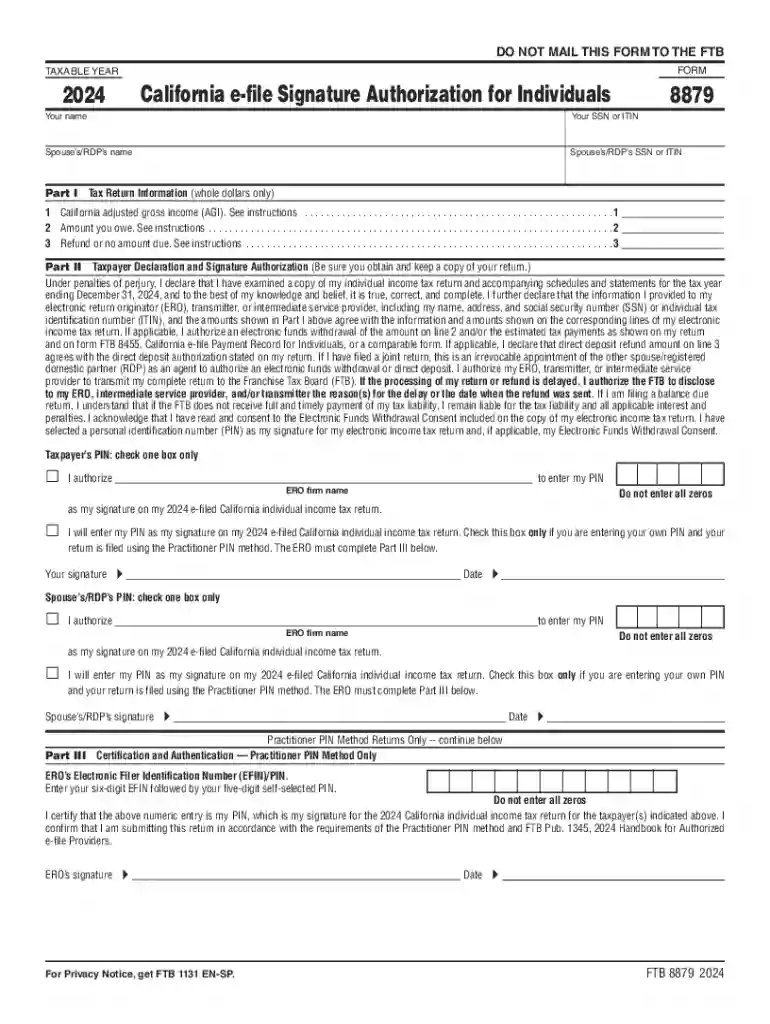
2024 California e-file Signature Authorization Preview on Page 1

2024 California e-file Signature Authorization-2026

Here's how it works

  • 01. Edit your form online

    Type text, add images, blackout confidential details, add comments, highlights and more.

  • 02. Sign it in a few clicks

    Draw your signature, type it, upload its image, or use your mobile device as a signature pad.

  • 03. Share your form with others

    Send it via email, link, or fax. You can also download it, export it or print it out.

Definition and Meaning of the 2024 California e-file Signature Authorization

The 2024 California e-file Signature Authorization, referred to as Form FTB 8879, is used by individuals to authorize the electronic filing of their California individual income tax return for 2024. This form acts as a taxpayer's consent, allowing authorized tax preparers to electronically file the taxpayer's return. By signing the form, taxpayers acknowledge and agree to submit their tax information through the e-filing process.

Key Features:

  • Authorization: Serves as legal authorization for tax preparers to e-file on behalf of the taxpayer.
  • Consent: Confirms that the taxpayer has reviewed and agreed to the terms of returning filing.
  • Record: Acts as proof of taxpayer and preparer agreement for future reference.

How to Use the 2024 California e-file Signature Authorization

Using Form FTB 8879 involves a few straightforward steps:

  1. Review Tax Return: Taxpayers must first review their completed California individual income tax return prepared by their tax professional.
  2. Sign the Form: After reviewing, the taxpayer signs Form FTB 8879 to provide consent for e-filing.
  3. Tax Preparer Submission: Once signed, the tax preparer submits both the form and the taxpayer's electronic return to the California Franchise Tax Board (FTB).

Additional Considerations:

  • Ensure all personal and financial details are accurately listed on the form.
  • It's crucial that the taxpayer retains a copy for their records.

Steps to Complete the 2024 California e-file Signature Authorization

Completing the form is a critical part of the e-filing process. Follow these steps for accuracy:

  1. Gather Required Information: Ensure you have all the necessary details from your tax return.
  2. Fill in Taxpayer's Details: Complete the sections with your name, address, and Social Security Number.
  3. Verify Tax Information: Ensure that financial figures match those on the actual tax return.
  4. Sign and Date: Provide your signature and the date to validate the form.
  5. Hand Over to Preparer: Turn over the signed form to your tax preparer for submission.

Important Tips:

  • Verify all entered information carefully to avoid discrepancies.
  • Confirm that your preparer has all necessary returned documentation.

Why Use the 2024 California e-file Signature Authorization

The primary advantage of using this form is to ensure a streamlined e-filing process. Here are reasons to utilize it:

  • Efficiency: Allows quick and secure electronic submission of tax returns.
  • Compliance: Ensures adherence to California tax filing regulations.
  • Record Keeping: Provides a clear record of consent for future audits or queries.

Benefits Include:

  • Faster processing and receipt of refunds.
  • Reduced paper usage, aligning with environmentally friendly practices.

Important Terms Related to 2024 California e-file Signature Authorization

Understanding significant terms aids in accurately completing and utilizing the form:

  • Taxpayer Identification Number (TIN): The unique number assigned to a taxpayer for the purposes of tracking tax responsibilities.
  • Electronic Filing (e-fil): The process of submitting tax returns over the internet, reducing paperwork and processing times.
  • Preparer Tax Identification Number (PTIN): A number required for paid preparers to include on tax documents they prepare.

Legal Implications:

  • Incorrect or false information on the form can result in penalties.
  • Both the taxpayer and preparer must comply with legal requirements outlined by the Franchise Tax Board.

IRS Guidelines on the 2024 California e-file Signature Authorization

The Internal Revenue Service (IRS) outlines specific guidelines for e-filing, applicable even within state contexts:

  • Ensure your e-file authorization matches the information submitted for federal returns where applicable.
  • Review accuracy of details to avoid delays in processing.

Key Points:

  • Double-check TIN and SSN entries for correctness.
  • Consult IRS publications for state and federal e-file compatibility.

Filing Deadlines and Important Dates

Adhering to deadlines ensures timely processing of tax returns:

  • April 15, 2025: Regular deadline for submitting the California e-file Signature Authorization.
  • October 15, 2025: Extended deadline, available upon request, usually requiring additional documentation.

Strategies to Avoid Late Submission:

  • Set reminders for essential filing dates.
  • Consult your tax preparer well in advance to ensure everything is in order.

Form Submission Methods

Submitting Form FTB 8879 varies based on personal preference and technology access:

  • Online Filing: Most common approach, requiring digital submission through a secure tax preparer software or service.
  • Mail Submission: For those preferring paper trails, ensure you use a certified mailing service.
  • In-Person: Some opt to complete and deliver their form directly for added assurance.

Factors to Consider:

  • Choose the method that offers you the most peace of mind and receipt confirmation.
  • Balance convenience with security, especially for high-value returns.

See more 2024 California e-file Signature Authorization versions

We've got more versions of the 2024 California e-file Signature Authorization form. Select the right 2024 California e-file Signature Authorization version from the list and start editing it straight away!

VersionsForm popularityFillable & printable
20244.2 Satisfied (21 Votes)
20234.4 Satisfied (50 Votes)
20224.7 Satisfied (35 Votes)
20214.8 Satisfied (216 Votes)
20204.4 Satisfied (101 Votes)
20194.4 Satisfied (169 Votes)
20184.3 Satisfied (129 Votes)
20174.4 Satisfied (129 Votes)
20124.3 Satisfied (194 Votes)

be ready to get more

Complete this form in 5 minutes or less

Security and compliance

At DocHub, your data security is our priority. We follow HIPAA, SOC2, GDPR, and other standards, so you can work on your documents with confidence.

Related links

2024 FORM 8879 California e-file Signature Authorization

I DocHub that the above numeric entry is my PIN, which is my signature for the 2024 California individual income tax return for the taxpayer(s) indicated aboveRead more

Learn more
united states securities and exchange commission

Feb 28, 2026 Indicate by check mark if the registrant is a well-known seasoned issuer, as defined in Rule 405 of the Securities Act. ☒ Yes ☐ No.Read more

Learn more
IRS e-file Signature Authorization for a Tax Exempt Entity 8879-TE

Check the box for the return for which you are using this Form 8879-TE and enter the applicable amount, if any, from the return. Form 8038-CP and.

Learn more
If you believe that this page should be taken down, please follow our DMCA take down process here