







Definition and Meaning
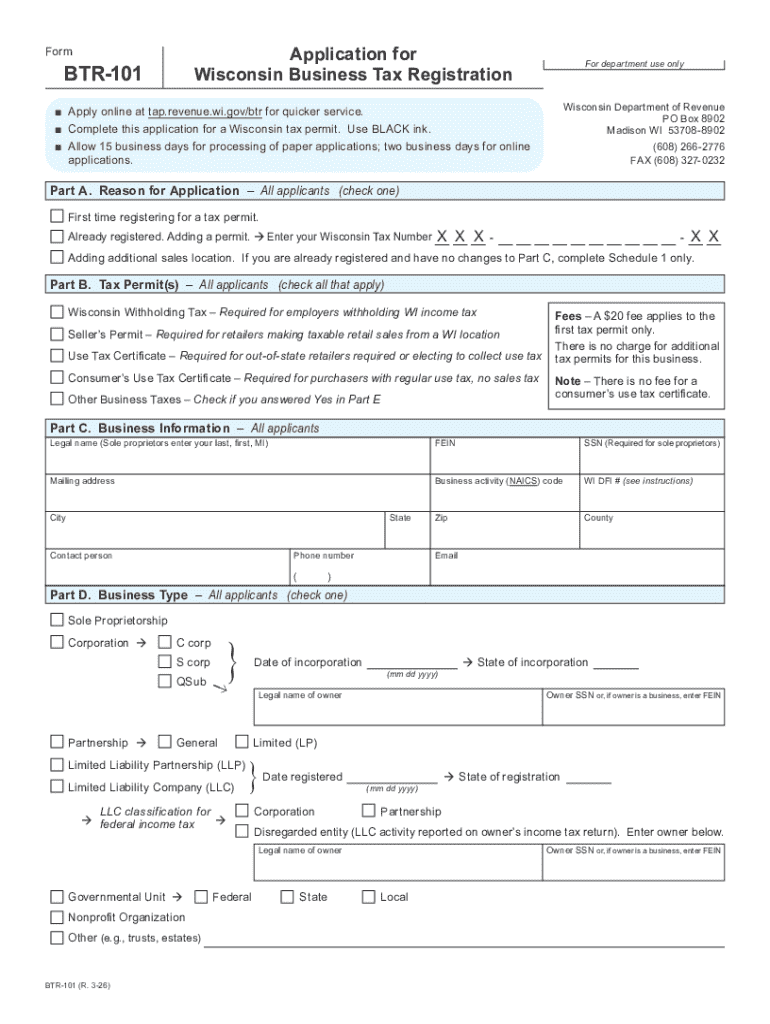
The March 2026 BTR-101 Application for Wisconsin Business Tax Registration is a document required for businesses operating in Wisconsin to register for state tax purposes. This form serves as the initial step in establishing a business's tax profile, allowing the Wisconsin Department of Revenue to assign the necessary tax accounts based on the nature and structure of the business. A business tax registration ensures compliance with the state's taxation system, enabling businesses to collect and remit taxes such as sales tax, withholding tax, and other applicable state-level taxes.
Key Features of the Form
- Purpose: Registers businesses for Wisconsin state tax obligations.
- Jurisdiction: Specific to Wisconsin state tax registration requirements.
- Relevancy: Crucial for businesses planning to operate within Wisconsin.
How to Use the March 2026 BTR-101 Form
The BTR-101 form is designed to be intuitive, yet thorough, ensuring that businesses provide essential information needed by the Wisconsin Department of Revenue. Utilizing this fillable form requires a careful entry of details to prevent delays in processing.
Step-by-Step Instructions
- Access the Form: Download the fillable form from reputable sources like dochub.com or the official Wisconsin Department of Revenue website.
- Populate Business Details: Enter the business name, EIN, and contact information.
- Specify Tax Types: Indicate which taxes the business will be liable for, such as sales tax or withholding tax.
- Provide Owner Information: Detail the personal information of the business owner or responsible party, including Social Security Number.
- Submit Additional Documents: Attach any required supplementary documents, such as business licenses.
- Review and Submit: Carefully review all entered information before submitting. Make any necessary adjustments for accuracy.
How to Obtain the March 2026 BTR-101 Form
Available Channels
Obtaining the BTR-101 form can be accomplished through various channels designed to ensure convenience and accessibility for all business types:
- Online Download: Directly from the Wisconsin Department of Revenue website.
- Dochub.com Integration: Access the form through document management platforms like DocHub, which provide seamless integration and editing features.
- Local Offices: Visit a Wisconsin Department of Revenue office for physical copies.
Importance of Filing the BTR-101 Form
Registering with the BTR-101 form is a legal requirement for businesses operating in Wisconsin, ensuring adherence to state tax laws. This registration facilitates the smooth collection and payment of applicable state taxes, safeguarding businesses against potential penalties and legal issues.
Benefits
- Compliance: Aligns business practices with state tax regulations.
- Accountability: Establishes a clear tax reporting structure.
- Avoids Penalties: Timely registration prevents fines and compliance issues.
Who Typically Uses the BTR-101 Form
The BTR-101 is utilized primarily by business entities required to register for Wisconsin state taxes. This includes:


Business Entity Types
- Corporations: Required for corporate tax accounts.
- LLCs: Necessary for limited liability company tax identification.
- Partnerships and Sole Proprietorships: Ensures all forms of businesses are registered appropriately for tax purposes.
Key Elements of the BTR-101 Form
Essential Sections
Understanding the critical components of the form ensures accurate and efficient completion:
- Business Information: Includes the legal name, type, and contact details.
- Owner Information: Details about company ownership and responsible parties.
- Tax Type Selection: Specifies which taxes apply to the business operations.
- Signature Section: Finalize with an authorized signature to validate the submission.
Legal Use and Compliance
Complying with the requirements of the BTR-101 form is crucial to ensure a legal business operation within Wisconsin. The form acts as the foundational document for establishing a tax relationship with the state, which is legally binding and critical for compliance.
Regulatory Implications
- State Tax Compliance: Businesses must adhere to the outlined tax obligations once registered.
- Official Record Keeping: The information submitted becomes part of the state’s official records, maintaining transparency and accountability.
Form Submission Methods
Options for Submission
The BTR-101 form accommodates various submission methods to suit different preferences:
- Online Submission: Quick and efficient through the official Wisconsin Department of Revenue website.
- Mail Submission: Traditional mailing of the completed form to the department’s address.
- In-Person Submission: Direct submission at a designated public office location for immediate processing.




