






Definition & Meaning
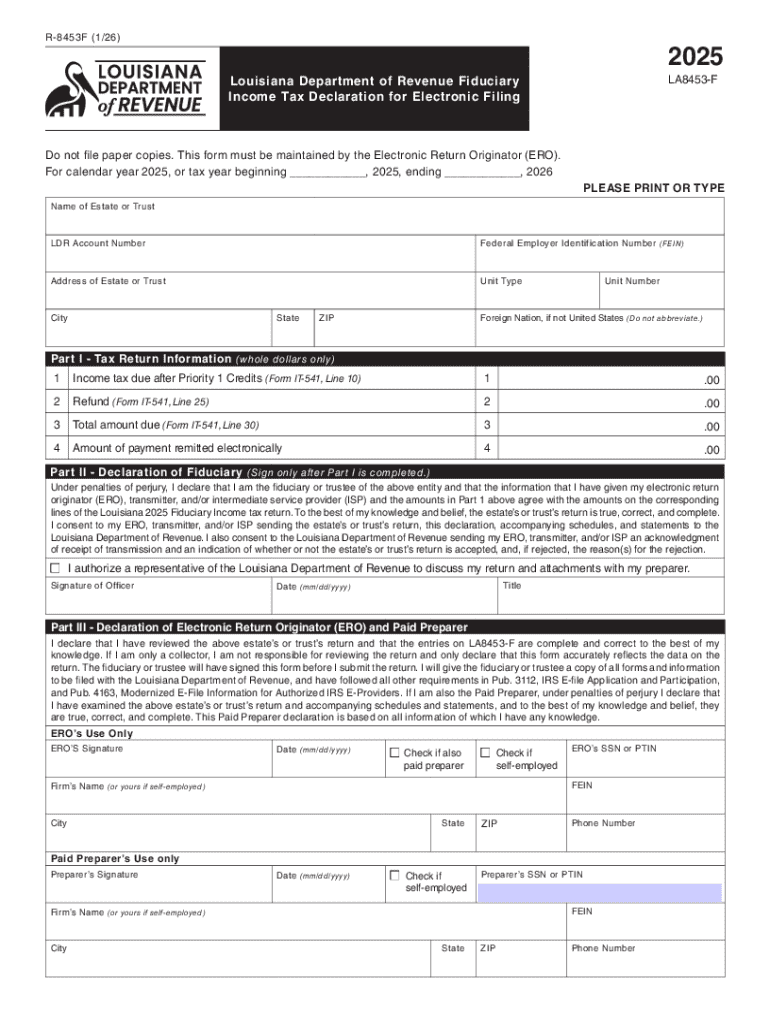
The R-8453F is a form used for the electronic filing of fiduciary income tax returns with the Louisiana Department of Revenue. This document serves as a declaration, affirming that the fiduciary information submitted electronically is accurate and complete. By using Form R-8453F, the filer confirms adherence to the state's regulations and requirements pertaining to fiduciary income tax. The form is typically handled by entities managing fiduciary responsibilities, such as executors of estates or trustees, ensuring compliance with state tax laws.
How to Use the R-8453F for Electronic Filing
- Identify the Electronic Return Originator (ERO): Confirm that your ERO is authorized to submit fiduciary tax returns electronically. This is crucial as the form must be maintained by the ERO.
- Prepare Accurate Information: Gather all necessary financial details regarding the fiduciary income to ensure the data reflects actual figures.
- Complete the Form R-8453F: Fill in all required sections of the form, paying close attention to accuracy.
- Electronically Submit the Declaration: Once completed, ensure the associated electronic financial data is ready for submission through the appropriate channels.
- Maintain a Copy: As part of the process, the ERO should maintain a physical or digital copy of the R-8453F, as it may need to be provided upon request by the Louisiana Department of Revenue.
How to Obtain the R-8453F Form
The R-8453F form can be obtained from the official website of the Louisiana Department of Revenue or through authorized electronic filing platforms. Tax professionals and electronic return originators often have access to a library of forms for filing purposes. It’s important to verify the version to ensure you are using the most recent form that aligns with current filing requirements.
Steps to Complete the R-8453F Form
- Download the Form: Access the R-8453F from the official website of the Louisiana Department of Revenue or through your ERO.
- Fill in Fiduciary Details: Enter the fiduciary’s identification and the specific year of filing.
- Verify Financial Data: Ensure all income, deductions, and credits are accurate as per the fiduciary documents.
- Add Signatures: The form requires authorized signatures to validate the information provided.
- Review for Accuracy: Double-check the form for any discrepancies to avoid submission delays or rejections.
- Upload or Store Appropriately: Once filled and signed, store as instructed for record-keeping by the ERO.
Why Use the R-8453F: Louisiana Department of Revenue Fiduciary Income Tax Declaration
- Simplifies Electonic Filing: Using the R-8453F streamlines the process of filing fiduciary income tax returns electronically.
- Ensures Compliance: Adhering to the requirement ensures compliance with Louisiana state tax regulations.
- Reduces Errors: With clear electronic guidelines, the likelihood of errors in tax documents is reduced.
- Facilitates Record-Keeping: Maintains an organized method for tracking tax filings.
Who Typically Uses the R-8453F
- Trustees and Executors: Those responsible for trusts and estates use this form to electronically file fiduciary returns.
- Electronic Return Originators (EROs): These professionals facilitate the electronic submission of the form.
- Tax Advisors and Accountants: They often assist in preparing and verifying information related to fiduciary tax filings.


Key Elements of the R-8453F
- Taxpayer Identification Section: Includes fields for the fiduciary entity's name and taxpayer identification number.
- Declaration and Signature Section: A segment for authorized signatories to affirm the truthfulness of the data.
- Rollover Information: If applicable, this section deals with any fiduciary rollovers.
- Details of Financial Information: Captures income, deductions, and tax liability specifics for the declared year.
Form Submission Methods
- Electronic Filing: Utilizes authorized EROs for direct submissions to the Louisiana Department of Revenue.
- Record Maintenance: The ERO retains the completed R-8453F as part of their files, as paper submissions are not required.
Penalties for Non-Compliance
Failure to accurately file or adhere to the R-8453F guidelines may result in penalties, including fines or additional scrutiny from tax authorities. Ensuring the proper submission and maintenance of this form mitigates the risk of such penalties, emphasizing the importance of compliance with state fiduciary tax requirements.