






Definition & Meaning
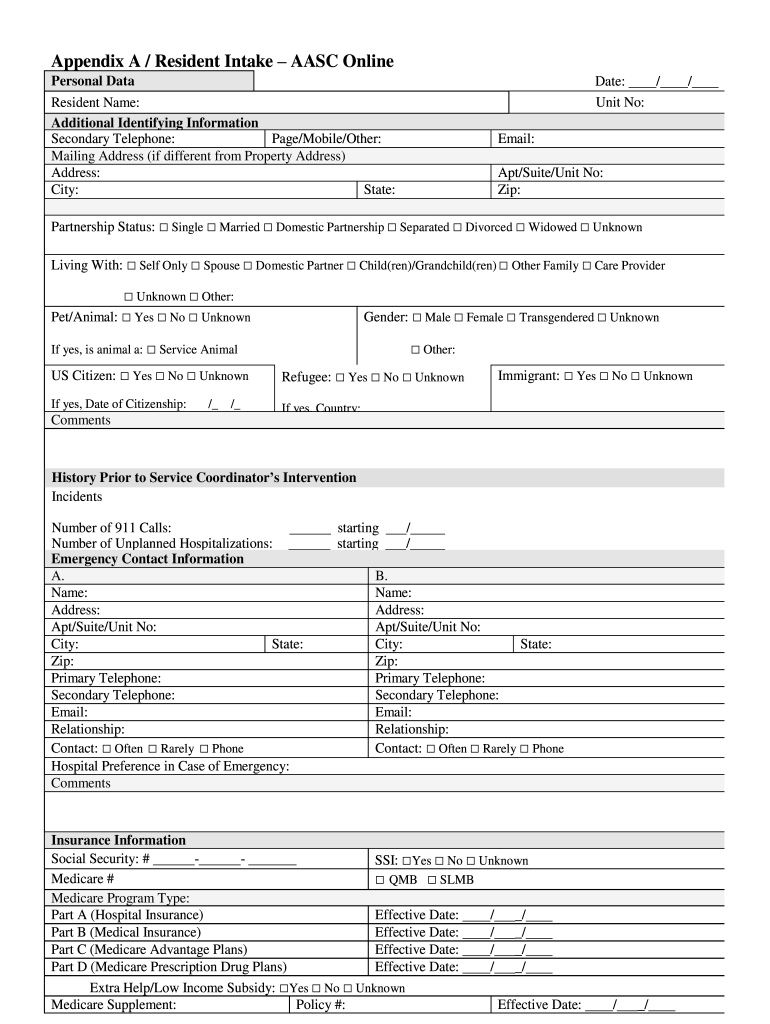
The Resident Intake Form - AASC OnlineSoftware for Service is a specialized document used primarily by housing services and property management firms. This form is designed to gather essential information from new residents efficiently. It ensures smooth onboarding into a housing community, capturing pertinent details like personal data, emergency contacts, and any special accommodations required. This form's structured approach aids in the streamlined processing and management of resident information.
How to Use the Resident Intake Form - AASC OnlineSoftware for Service
To effectively utilize the Resident Intake Form - AASC OnlineSoftware for Service, follow these steps:
-
Access the Form: Obtain the form from your housing management's website or office. It might be available as a downloadable PDF or as an online form to be completed on their platform.
-
Complete the Form: Enter all requested information accurately. This typically includes personal identification, contact information, and any specific needs or preferences related to your housing.
-
Review for Accuracy: Double-check all entered data to ensure there are no errors or omissions.
-
Submit the Form: Depending on the platform, submit the form either by printing and mailing it, uploading it online, or handing it in personally at the relevant office.
-
Confirmation: Once submitted, monitor for any follow-up communications to confirm receipt and review any additional steps necessary to complete the intake process.
Steps to Complete the Resident Intake Form - AASC OnlineSoftware for Service
-
Begin with Personal Information:
- Provide your full legal name, date of birth, and Social Security Number.
- Include any previous names, if applicable, to ensure accurate record-keeping.
-
List Contact Information:
- Enter your current mailing address and phone numbers.
- Specify any alternative contact methods, such as a secondary email address.
-
Provide Emergency Contact Details:
- List at least one emergency contact, noting their relationship to you.
- Include their phone number and email address for immediate access in case of emergencies.
-
Indicate Specific Accommodations Needed:
- Note any accessibility requirements or special living accommodations necessary.
-
Complete Additional Required Sections:
- Depending on the property's requirements, you might need to fill in financial information or employment details.
- Provide any supporting documentation if requested.
Why You Should Use the Resident Intake Form - AASC OnlineSoftware for Service
Utilizing the Resident Intake Form - AASC OnlineSoftware for Service is vital for several reasons:
- Efficiency: Streamlines the entire intake process, reducing administrative workload.
- Accuracy: Ensures that all relevant resident information is captured at the outset, minimizing the risk of errors.
- Compliance: Facilitates adherence to regulatory requirements and housing policies.
- Customization: Allows for personalization based on individual resident needs, leading to better service delivery.
Key Elements of the Resident Intake Form - AASC OnlineSoftware for Service
The form comprises several critical sections designed to comprehensively capture resident data:
- Personal Identification Data: Ensures proper identification and record-keeping.
- Emergency Contacts: Provides essential information in case of emergencies.
- Financial Details: May be required to assess financial qualifications for housing.
- Accommodation Needs: Allows for the specification of any necessary adjustments to living arrangements.
Legal Use of the Resident Intake Form - AASC OnlineSoftware for Service
The legal use of this intake form is governed by privacy laws and housing regulations in the United States. It is crucial that all information provided on the form is accurate and true to prevent legal repercussions. Misrepresentation may result in disqualification from housing services or termination of any lease agreements. Housing providers must ensure all data collected is securely stored and used solely for the intended purposes, as outlined under the Fair Housing Act.
Who Typically Uses the Resident Intake Form - AASC OnlineSoftware for Service
Typically, the Resident Intake Form is used by:
- Property Management Companies: To streamline the intake of new tenants into their housing units.
- Social Service Agencies: When assisting clients in obtaining housing and ensuring that their needs are met.
- Residents: To formally convey their personal details and any specific requirements to their housing provider upon moving in.


Important Terms Related to Resident Intake Form - AASC OnlineSoftware for Service
- Intake Process: The sequence of steps undertaken to enroll a person into a service or program.
- Resident: An individual who lives in a particular locality or housing community.
- Accommodation: Adjustments or modifications made to support residents' living requirements.
- Privacy Act Compliance: Refers to adhering to laws that protect personal data gathered through forms like these, including the rights of individuals regarding their information.
By thoroughly understanding these components and utilizing the Resident Intake Form appropriately, residents and housing providers can ensure a smooth and compliant onboarding experience.