






Definition and Meaning of the UI 2.5 Form
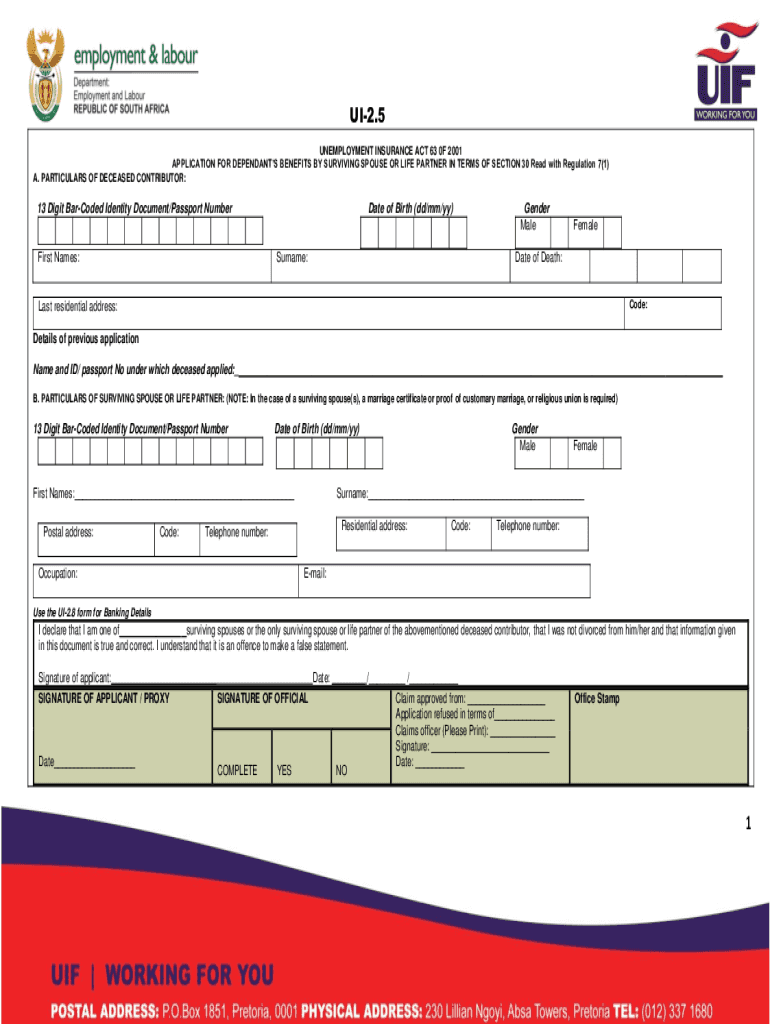
The UI 2.5 form, also known as the Unemployment Insurance Application for Dependents Benefits, is a critical document utilized in the United States to apply for unemployment benefits on behalf of a deceased contributor. The form serves as a formal application required under the Unemployment Insurance Act of 2001, specifically designed for use by surviving spouses or life partners. The key purpose of the UI 2.5 form is to facilitate the transfer of benefits that the deceased contributor was entitled to, ensuring financial support reaches the rightful beneficiaries in a timely manner. Understanding its structure and precise requirements is essential for anyone tasked with completing the form.
Purpose and Context
- Designed to apply for benefits on behalf of a deceased.
- Required under the Unemployment Insurance Act 63 of 2001.
- Typically used by surviving spouses or life partners.
- Aimed at ensuring the rightful transfer of unemployment benefits.
Steps to Complete the UI 2.5 Form
Filling out the UI 2.5 form involves several important steps to ensure that all required details are accurately provided. Below is a comprehensive guide to completing the form:
-
Gather Required Information:
- Obtain personal details of the deceased contributor, such as full name, social security number, and employment history.
- Collect your own identification details if you are the applicant.
-
Complete Personal Information Section:
- Enter the deceased's information in the appropriate fields, ensuring accuracy to avoid delays in processing.
-
Provide Employment Details:
- Fill in the contributor’s employment history, including the name of the last employer, address, and dates of employment.
-
Enter Applicant Information:
- Include your own information as the applicant, including full name, relationship to the deceased, and current contact information.
-
Sign and Date the Form:
- Carefully review all entered details before signing and dating the form as the applicant.
- Ensure the form is complete to prevent the need for additional documentation.
-
Submit the Form:
- Determine the appropriate submission method (online, mail, or in-person) based on state-specific guidelines.
- Attach any additional required documents such as death certificate or proof of relationship.
Important Terms Related to the UI 2.5 Form
Understanding the terminology associated with the UI 2.5 form is crucial for completing it accurately. Here are key terms often encountered:
- Deceased Contributor: The individual who contributed to the unemployment insurance from whom benefits are being claimed.
- Surviving Spouse/Life Partner: The applicant who is claiming the benefits due to their relationship with the deceased.
- Unemployment Insurance Act: The legislative framework governing the issuance and management of unemployment benefits in the U.S.
- Dependents Benefits: Financial support provided to beneficiaries of the deceased contributor.
Legal Use of the UI 2.5 Form
The UI 2.5 form must be used in compliance with legal standards and regulations outlined under the Unemployment Insurance Act. This form is employed for the legitimate claim of benefits that the deceased contributor was entitled to receive, transferring such benefits to their dependents upon meeting eligibility requirements. While submitting the form, ensure that all data provided is accurate and truthful to avoid legal repercussions.
- Compliance Requirements:
- All submitted information must align with the guidelines set forth in the Unemployment Insurance Act.
- Misrepresentation of facts can lead to penalties and disqualification from receiving benefits.
Required Documents for the UI 2.5 Form
Accompanying the UI 2.5 form, certain documents are required to substantiate the application for benefits. Here’s what you need to attach:
- Death Certificate: Official proof of the deceased contributor's passing.
- Proof of Relationship: Documents such as marriage or domestic partnership certificates.
- Identification: Photocopy of the applicant’s ID to verify identity and relationship status.
- Employment Records: Any documents that verify the deceased’s employment contributions.
Penalties for Non-Compliance
Failure to accurately complete the UI 2.5 form or omission of necessary documents can lead to several penalties:
- Rejection of the benefit application.
- Possible legal action if fraudulent information is detected.
- Delay in benefits distribution.
- Financial penalties as dictated by state regulations.
State-Specific Rules for the UI 2.5 Form
While the UI 2.5 form follows a standard format, certain state-specific rules and guidelines must be adhered to. These might include differing deadlines, supplementary documentation requirements, or method of submission variations.
- Deadline Variations: Submission periods can vary significantly from state to state.
- Additional Documentation: Some states may require further proof of eligibility.
How to Obtain the UI 2.5 Form
Securing a UI 2.5 form can be done through various channels, ensuring accessibility for all applicants:
- Online Portal: The form can often be downloaded from the official unemployment insurance website of the relevant state.
- Local Office: Physical copies may be available at local unemployment insurance offices.
- Mail Request: In some cases, you can request the form be sent via mail if accessibility is an issue.
Understanding and navigating the UI 2.5 form demands both attention to detail and compliance with legal standards. By following the prescribed steps and ensuring the completeness of required documentation, applicants can effectively manage this administrative process.