






Definition & Meaning
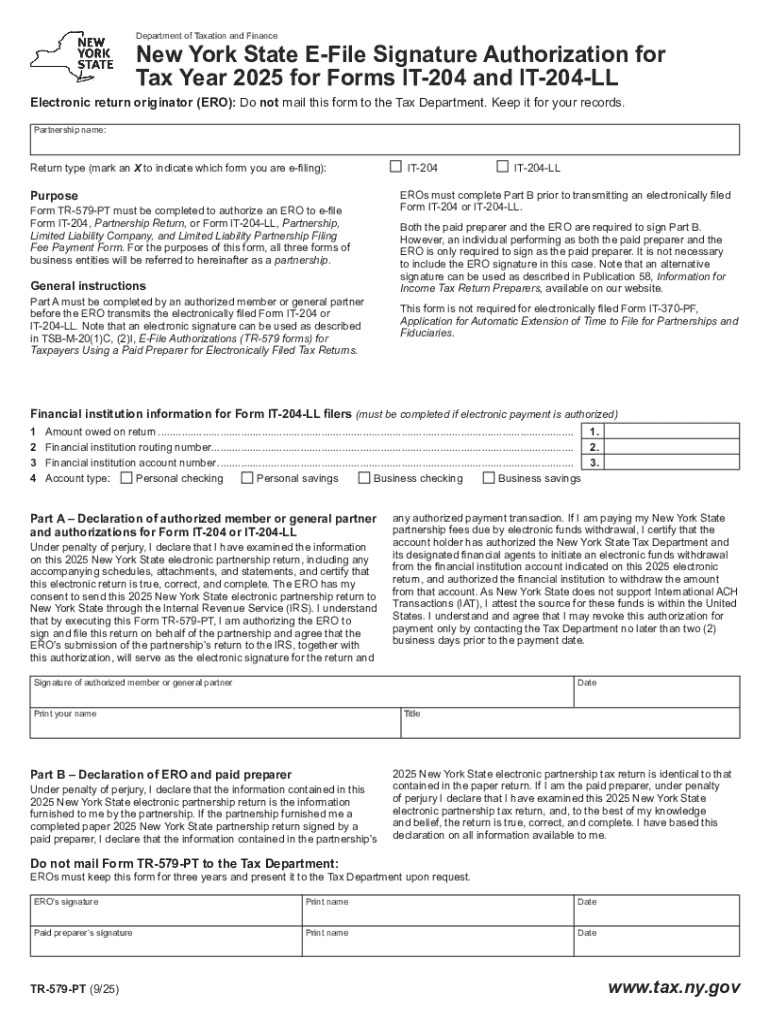
The "New York State E-File Signature Authorization for Tax Year 2025 for Forms IT-204 and IT-204-LL" refers to the official document used by businesses in New York to authorize electronic filing of specific tax forms for the 2025 tax year. This authorization form is crucial for entities such as Limited Liability Companies (LLCs) and partnerships required to submit their tax information without the need for physical signatures, thereby modernizing and simplifying the filing process. The form primarily serves to confirm that an authorized individual, often a principal officer or tax preparer, has reviewed the electronic filing and approves the submission.
How to Use the Authorization Form
To use this form effectively, precise steps must be followed which ensures compliance with tax regulations:
-
Access and Review the Form: Obtain the form from the Department of Taxation and Finance's website. Carefully review the instructions and details to understand the requirements.
-
Complete Required Fields: Fill in essential details such as business name, identifying information, and tax year.
-
Obtaining Approval: Secure approval from the authorized individual within your business for the electronic filing. This often involves a principal officer or licensed tax practitioner.
-
Sign the Form Electronically: Utilize electronic signature features to complete the form, ensuring the signature is legally binding under the ESIGN Act.
-
Submit through Authorized Channels: Typically, submission should be done through an electronic return originator (ERO) or an approved tax software to maintain compliance and track submission status.
How to Obtain the Authorization Form
The New York State E-File Signature Authorization for Forms IT-204 and IT-204-LL can be accessed directly from the New York Department of Taxation and Finance's official website. Alternatively, businesses may retrieve it via authorized electronic filing platforms that integrate tax services:
- Visit the Tax Department Website: Use their forms and publications section to find the specific form needed.
- Tax Software Providers: Many tax preparation software packages include direct access to this form as part of their service offering, streamlining the process.
- Tax Professionals: Professional tax preparers and accountants often have direct access to the necessary forms and can assist in obtaining and completing them.
Steps to Complete the Authorization Form
Completing the authorization form correctly is vital for ensuring the electronic filing is accepted:
-
Gather Necessary Documentation: Have your business’s tax information ready, including EIN and previous year’s records if applicable.
-
Fill Out Identification Information: Ensure accuracy when entering business names, tax identification numbers, and contact details.
-
Authorize an Electronic Return Originator (ERO): Engage an ERO to handle the submission. This is critical to ensuring the process is compliant with tax regulations.
-
Verify and Double Check Entries: Confirm that all information provided is accurate and complete to avoid rejection or penalties.
-
Add Legal Electronic Signature: The authorized individual’s electronic signature should be added to validate the document’s accuracy and approval.
-
Submit and Confirm Receipt: Send the completed form via the appropriate electronic channel and keep confirmation of submission for your records.
Key Elements of the Authorization Form
Understanding the core components of the signature authorization form helps in accurate completion:
- Taxpayer Identification: Include details like EIN and relevant business identifiers.
- Authorized Signature: Ensure accuracy and legality of the electronic signature.
- Declaration: A formal declaration stating the information provided is true and complete.
- Date of Authorization: The specific date when the authorized individual approved the filing.
- Role of Signatory: Identification of the individual’s role within the business or agency preparing the return.
Legal Use of the Authorization Form
The New York State E-File Signature Authorization has specific legal implications:
-
Compliance with ESIGN Act: The electronic signature used must comply with state and federal laws, ensuring it's legally recognized.
-
Binding Commitment: The form binds the business to the accuracy of the information being submitted and stands as a formal declaration to that fact.
-
Audit Trail for Validation: Maintaining records of these forms is essential for audit purposes and demonstrating due diligence in tax matters.
Penalties for Non-Compliance
Failure to properly complete and submit the New York State E-File Signature Authorization form can lead to significant consequences:
-
Monetary Fines: Incorrect or late submissions could result in financial penalties imposed by the state.
-
Interest on Unpaid Taxes: Additional costs may accrue if tax payments are delayed due to submission errors.
-
Potential Legal Action: In worst-case scenarios, persistent non-compliance can lead to legal actions against the business.
Form Submission Methods
There are several ways to submit this authorization form:
-
Via an ERO: The most recommended method, as these professionals ensure submissions meet all regulatory guidelines.
-
Using Approved Software: Tax software with electronic filing capabilities can be a self-service option for submitting the form.
-
Direct Online Submission: Enabled systems through the tax department’s website allow for streamlined direct form uploading.
Filing Deadlines / Important Dates
Awareness of deadlines is crucial when dealing with tax-related documents:
-
Regular Filing Deadline: Typically aligns with the tax return submission date, but specifics can vary so always verify annually.
-
Extension Considerations: If additional time is needed, it's important to file for extensions appropriately to avoid penalties.
-
Reminders and Alerts: Setting up calendar reminders or using software features that alert you to deadlines can prevent missed submissions.
This structured content ensures comprehensive information about the "New York State E-File Signature Authorization for Tax Year 2025 for Forms IT-204 and IT-204-LL," providing critical insights for accurate and compliant electronic tax filing within New York State.