






Understanding the New York State E-File Signature Authorization For Forms NYS-1 and NYS-45
Definition and Purpose
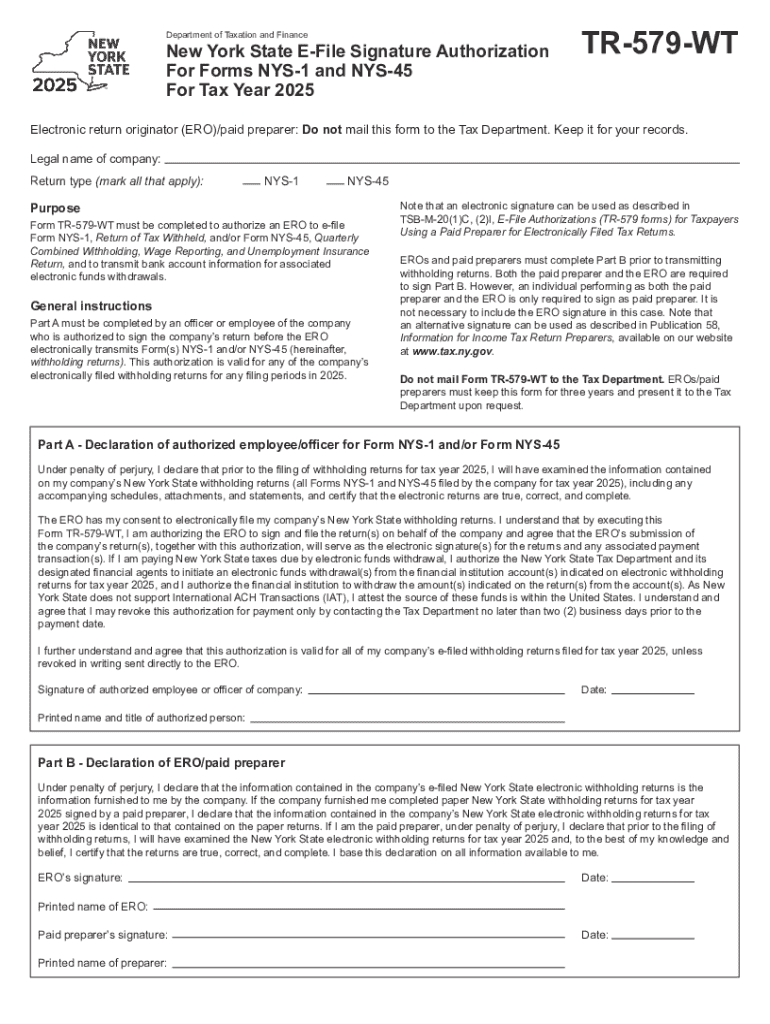
The New York State E-File Signature Authorization for Forms NYS-1 and NYS-45 for Tax Year 2025 is a document that authorizes tax professionals to file specific state tax forms on behalf of their clients. Form NYS-1 is used for Withholding Tax Payment, while Form NYS-45 is for Quarterly Combined Withholding, Wage Reporting, and Unemployment Insurance Returns. By using this authorization form, taxpayers give consent to electronic submission, streamlining the tax filing process and ensuring compliance with state regulations.
How to Use the Authorization Form
Step-by-Step Guide
- Review Form Instructions: Start by thoroughly reading the instructions provided with the form to understand the required information and conditions.
- Complete Taxpayer Information: Fill in personal or business taxpayer details, ensuring accuracy and consistency with existing tax records.
- EROs and Paid Preparers: If applicable, the electronic return originator (ERO) or paid preparer should provide their information, including their registration number and firm details.
- Signature and Date: The taxpayer and ERO/paid preparer must sign and date the form, indicating confirmation and agreement to the authorization.
- Submission: Once completed, the form should be retained, as instructed, without mailing it to the New York State Department of Taxation and Finance, unless specifically requested.
Obtaining the New York State E-File Signature Authorization
This authorization form can be accessed online through the New York State Department of Taxation and Finance’s official website. Alternatively, tax professionals can provide the form directly to their clients as part of the service package when preparing state tax filings.
Completing the Form Successfully
Key Information Required
- Taxpayer Identification: Include Social Security Number (SSN) or Employer Identification Number (EIN).
- Contact Information: Provide current mailing address and phone number for both the taxpayer and preparer.
- Filing Year and Form Type: Clearly indicate the tax year and specify the forms (NYS-1, NYS-45) for which authorization is granted.
Common Mistakes to Avoid
- Missing Signatures: Ensure all required parties have signed the document.
- Incorrect ID Numbers: Double-check taxpayer and preparer identification numbers to avoid processing delays.
- Incomplete Sections: Carefully review each section to confirm all fields are filled accurately.
Legal Implications of Using the E-File Signature Authorization
- Compliance with State Law: This form complies with New York State’s electronic filing regulations, providing a legal basis for authorized parties to submit tax forms electronically.
- ESIGN Act Adherence: The electronic signature on this form is legally binding under the ESIGN Act, reinforcing the validity of e-files.
Typical Users of the Authorization Form
- Tax Professionals: Accountants and certified tax specialists often use this form to facilitate client filings.
- Businesses: Corporations, LLCs, and partnerships in New York State may authorize their chosen preparers to handle multiple form submissions.
- Individuals: Self-employed individuals or those with complex tax situations may also find this form beneficial.
Key Elements to Remember
Fundamental Components
- Authorization Scope: The form grants permission specifically for forms NYS-1 and NYS-45.
- Retention Mandate: While not filed with the state, the form must be retained for record-keeping purposes.
Important Dates and Filing Deadlines
Understanding filing deadlines for NYS-1 and NYS-45 is crucial for timely compliance. For most users:
- Quarterly Deadlines: NYS-45 filings are typically due on January 31, April 30, July 31, and October 31.
- Frequent Updates: Stay alert to any changes by regularly checking the New York State Department of Taxation and Finance website.
Penalties for Non-Compliance
Failing to submit the required forms or missing filing deadlines can lead to:
- Fines and Penalties: Financial penalties imposed by the state for late or incorrect submissions.
- Interest Charges: Accumulating interest on unpaid tax liabilities.
Software Compatibility
Using tax preparation software can simplify the authorization process:
- Platforms: Software like TurboTax or QuickBooks may sync directly with the form requirements.
- Integration: Many programs now offer features to auto-fill forms and streamline electronic submissions.
Understanding the details of the New York State E-File Signature Authorization for Forms NYS-1 and NYS-45 is key to ensuring that your tax filings are accurate and compliant with state laws.