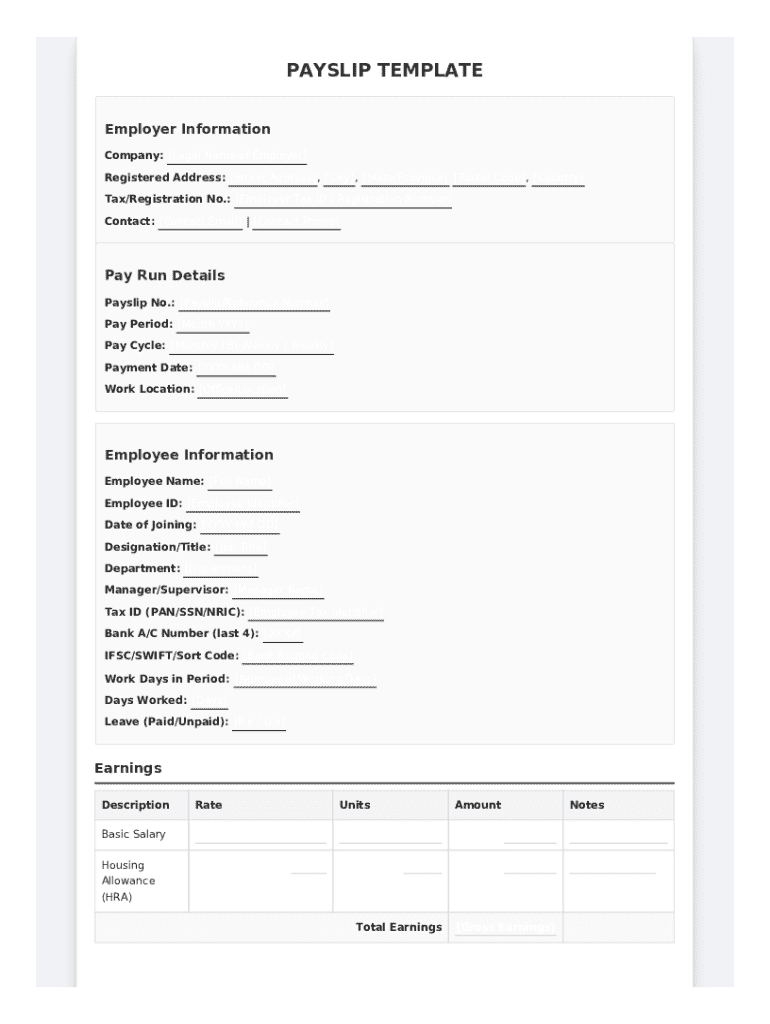







Definition and Meaning of a Payslip Template
A payslip template is a standardized document that provides employees with a detailed breakdown of their earnings and deductions for a specific pay period. It typically includes vital information such as gross pay, taxes, insurance deductions, and net pay. This template serves as a crucial resource for both employees and employers, ensuring clarity and transparency in monthly payment procedures. By providing a comprehensive overview of wage calculations and deductions, the payslip template ensures that employees are informed about their financial transactions, supporting legal compliance and personal finance management.
Key Elements of a Payslip Template
Several critical elements form the backbone of a payslip template, ensuring it delivers all necessary information:
- Employee Information: This includes the employee’s name, identification number, and employment position.
- Employer Details: The employer's name, address, and contact information help authenticate the document.
- Pay Period: Specifies the period for which the salary is being paid.
- Gross Pay: The total earnings before any deductions, comprising base salary, overtime, and bonuses.
- Deductions: A breakdown of various deductions such as federal, state, and local taxes, social security, and healthcare contributions.
- Net Pay: The actual amount received by the employee after all deductions.
- Year-to-Date Totals: Cumulative figures for earnings and deductions from the start of the financial year to the present pay period.
By clearly itemizing these elements, the payslip template provides transparency and ensures compliance with state and federal regulations.
How to Use the Payslip Template
Using a payslip template is straightforward, designed to streamline the payroll process:
- Input Employee Information: Start by accurately entering the employee’s personal and employment details.
- Calculate Earnings: Record the base salary, bonuses, and any overtime. Automated systems often facilitate this calculation.
- List Deductions: Detail all necessary deductions, ensuring they align with federal and state regulations, such as taxes and retirement plan contributions.
- Verify Totals: Double-check gross and net pay calculations to avoid errors.
- Distribute the Payslip: Once completed and verified, distribute the payslip electronically or physically, based on your company’s preference.
Employers should also maintain records of all payslips for accounting purposes and future reference.
Steps to Complete the Payslip Template
Completing a payslip template requires meticulous attention to detail, ensuring accuracy for both employer and employee. Here’s a step-by-step process:
- Gather Required Information: Collect all necessary data, including working hours, pay rates, and applicable tax rates.
- Enter Data into Template: Use payroll software or a pre-defined template to enter the collected data, starting with basic identification details.
- Calculate Pay and Deductions: Automated tools minimize human error when calculating gross pay, deductions, and final net pay.
- Review and Confirm: Ensure accuracy throughout the document by comparing against employee contracts and current tax laws.
- Generate and Distribute Payslips: Once the information is verified, generate the payslips and send them to employees, maintaining copies for company records.
The process should adhere to local and federal guidelines to ensure legality and fairness.
Who Typically Uses the Payslip Template
The payslip template is a versatile tool suited for a wide range of business entities, but it’s primarily utilized by:
- HR Departments: Responsible for managing company payrolls and ensuring accurate and timely payslip distribution.
- Small Business Owners: Often utilize templates to streamline payroll tasks without the need for extensive software solutions.
- Accountants: Use the template to verify payroll accuracy across multiple clients.
- Employees: Refer to their payslips to manage personal finances, verify their earnings and deductions, and address any discrepancies.
Every user benefits from the template’s ability to simplify complex payroll calculations into an understandable form.


Important Terms Related to Payslip Template
Understanding the terminology associated with payslips is crucial for effective use:
- Gross Pay: The total income earned before any deductions.
- Net Pay: The final amount an employee receives after all deductions.
- Deductions: Amounts subtracted from gross pay, covering taxes, insurance premiums, etc.
- Overtime: Additional pay received for hours worked beyond the regular schedule.
- Year-to-Date (YTD): Accumulated totals of earnings and deductions from the start of the year to the present.
- Withholding: Tax withheld from an employee's salary intended for tax obligations.
Familiarity with these terms allows better comprehension and usage of the payslip template.
Legal Use of the Payslip Template
Compliance with legal standards ensures both the employer and employee are protected:
- Federal and State Compliance: The template should reflect up-to-date tax codes and labor regulations.
- Record Keeping: Employers must keep payslip records for a minimum number of years, as dictated by state law, to substantiate their payroll practices.
- Employee Rights: Provides employees with documented proof of their earnings and deductions, essential for resolving disputes and financial planning.
Legal adherence helps build trust and avoid potential legal disputes between employers and employees.
State-Specific Rules for the Payslip Template
The configuration and usage of payslip templates may vary across different states due to specific regulations:
- California: Requires detailed information on both hourly rates and hours worked.
- New York: Mandates the inclusion of all allowance information used in the wage adjustment.
- Texas: Prioritizes clear documentation of all deductions, including authorized non-tax deductions.
Staying informed about state-specific rules is essential for accurately completing and using a payslip template.
Software Compatibility Considerations
Ensuring compatibility with popular software solutions enhances the efficacy of payslip templates:
- Accounting Software: Templates often integrate with programs like QuickBooks for automatic calculation and record-keeping.
- Payroll Software: Systems such as Gusto or ADP streamline payslip generation and distribution processes.
- Document Processing Tools: DocHub and similar platforms provide editing and distribution capabilities that enhance payslip management, crucial for businesses leveraging digital workflows.
Selecting the right tools ensures the seamless integration of payslip templates into existing payroll processes.