






Definition & Meaning
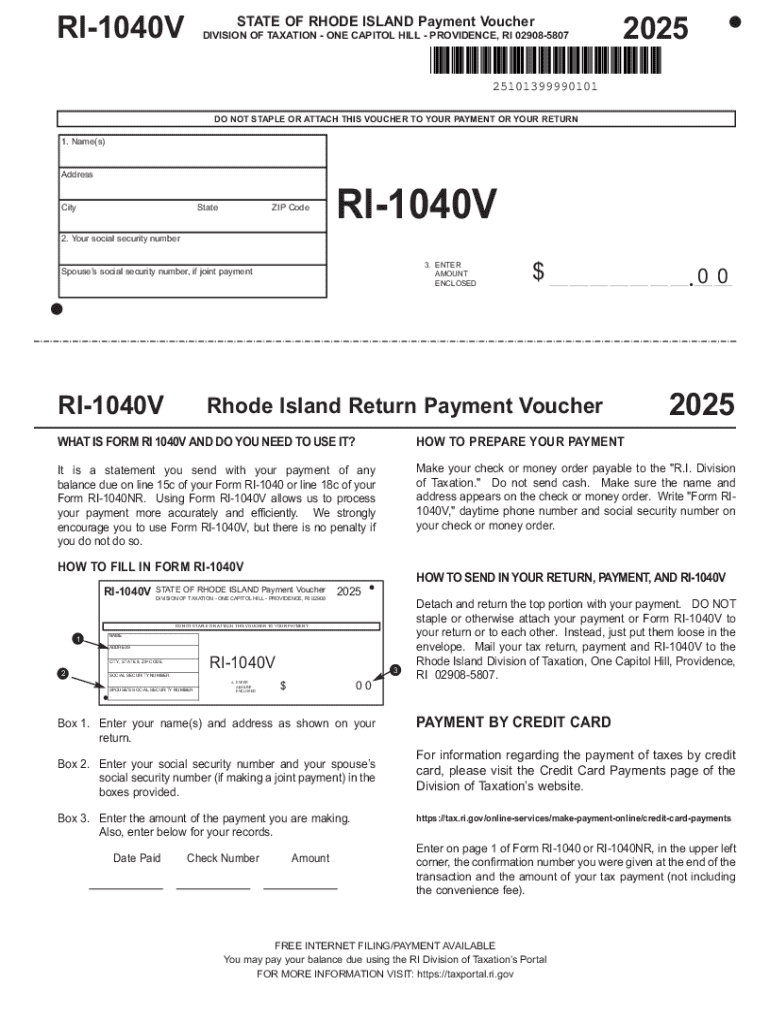
"DO NOT STAPLE OR ATTACH THIS VOUCHER TO YOUR PAYMENT OR YOUR RETURN" is a specific instruction commonly found on payment vouchers related to tax filings or other financial documents. This guideline indicates that the voucher should be submitted separately from other documents, like your tax return or payment. The separation of documents ensures efficient processing by preventing errors or delays that could arise if papers are inadvertently stapled or attached together.
How to Use the Voucher
Understanding the proper use of a "DO NOT STAPLE OR ATTACH THIS VOUCHER TO YOUR PAYMENT OR YOUR RETURN" form is crucial for compliance and ease of processing. Here are steps to follow:
-
Review Vouchers Separately: Ensure you manage the voucher as a standalone document. Before submission, review the voucher's details to verify accuracy.
-
Separate Submission: Do not physically attach the voucher to any other forms or documents through staples, paperclips, or adhesive. Place it in an envelope without combining it with other documents.
-
Specific Mailing Instructions: Some institutions may provide specific mailing instructions. For example, if you're instructed to place the voucher at the top of your mail stack inside the envelope, following such guidance can help in sorting and processing.
Steps to Complete the Voucher
Completing this type of voucher involves specific information and careful attention to instructions:
-
Personal Information: Accurately fill in your name, address, and taxpayer identification number on the voucher.
-
Payment Details: Enter the amount you are remitting, ensuring it matches the figures in your supporting records or statements.
-
Verification: Double-check all entered information for accuracy to avoid processing errors.
-
Consulting Requirements: Some state-specific or federal forms may have unique completion instructions. Refer to the document instructions or local guidelines for clarity.
Why You Should Follow Instruction
Following the "DO NOT STAPLE OR ATTACH THIS VOUCHER TO YOUR PAYMENT OR YOUR RETURN" instruction avoids delays in processing your submission:
-
Streamlined Processing: Separate vouchers are easier for financial and tax institutions to handle and process correctly and quickly.
-
Error Prevention: Avoiding attachment prevents potential data entry errors that may occur if associated forms are stapled or obscured.
Who Typically Uses This Form
Such instructions are essential for various users, including:
-
Individual Taxpayers: Often encountered by taxpayers submitting state or federal tax payments.
-
Businesses: Companies making tax payments or filing returns may see this instruction in their documentation.
-
Accounting Professionals: Accountants frequently handle these forms and benefit from understanding best practices for compliance.
Important Terms Related to the Voucher
Understanding relevant terminology can aid in effectively using such vouchers:
-
Voucher: A slip of paper documenting a transaction, often representing a payment or claim.
-
Return: A documented record of income, expenses, and other tax-related items filed with tax authorities.
-
Remittance: The act of, or amount paid in, sending money as a payment or gift.
IRS Guidelines
The Internal Revenue Service (IRS) may offer specific guidelines on handling forms with this instruction, especially if related to federal taxes:
-
Always refer to the latest IRS publications for compliance updates and changes in form-handling procedures.
-
Checking the IRS website or consulting with a tax professional can provide further clarity on these guidelines.
Filing Deadlines / Important Dates
Timeliness is of essence when dealing with vouchers:
-
Federal & State Deadlines: Be aware of relevant filing schedules - different for taxes, depending on jurisdiction.
-
Submission Periods: Ensure vouchers are submitted within defined periods to avoid penalties or late fees. This is crucial for both individuals and businesses.
Required Documents
When submitting a form marked with "DO NOT STAPLE OR ATTACH THIS VOUCHER TO YOUR PAYMENT OR YOUR RETURN," you'll typically need:
-
Personal Identification: Often involves taxpayer identification numbers and/or social security numbers.
-
Corresponding Payment: Ensure the financial aspect matches the amount declared on the voucher for transparency.
-
Additional Support: Any supplementary documents required should be organized separately but should not be physically attached to the voucher.
Adhering to these instructions safeguards the submission process's integrity and efficiency, ensuring your tax or financial affairs are processed without unnecessary delays.