
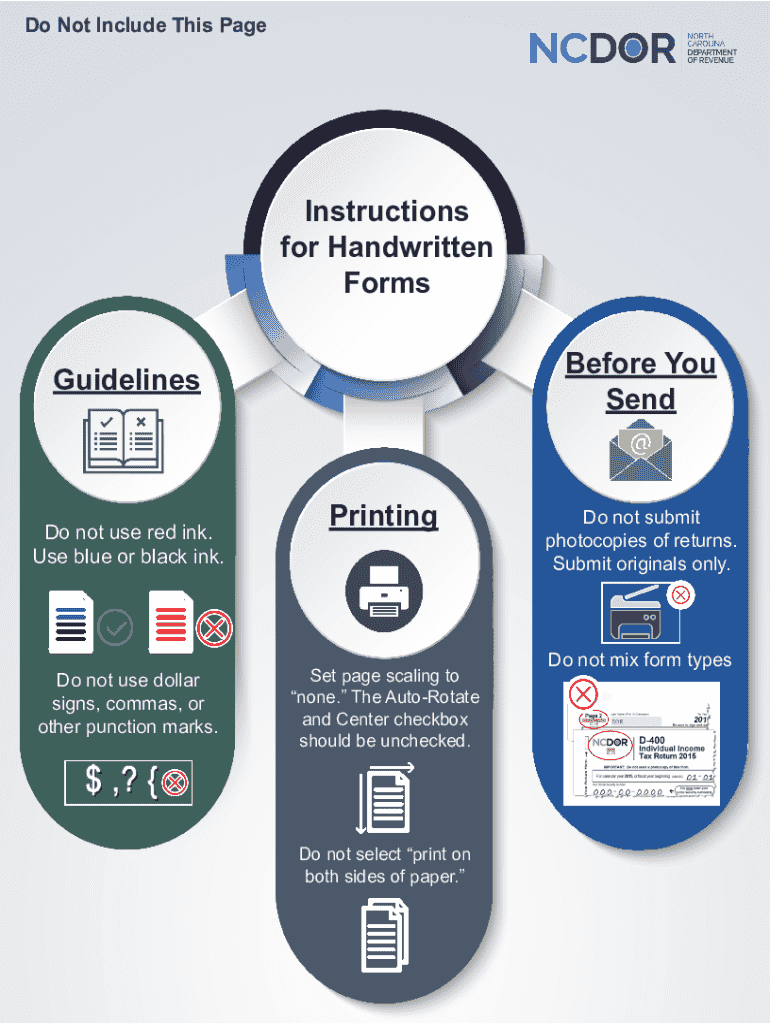







Steps to Complete the Handwritten Forms
Completing handwritten forms accurately is crucial to avoid processing delays. Here are detailed steps to ensure you fill out these forms correctly:
-
Gather Necessary Materials:
- Ensure you have blue or black ink pens, as they are typically required for official forms.
- Have a clean, flat surface to write on to maintain neat penmanship.
-
Understand the Form Requirements:
- Carefully read any instructions provided with the form. This will help you understand which sections are mandatory and any specific guidelines.
-
Fill in Personal Information:
- Begin with entering your personal details. Double-check for accuracy as errors here can lead to processing issues.
- Use block letters to enhance legibility, which is particularly important for names and addresses.
-
Provide Relevant Details:
- Move to the sections that require detailed information, such as financial data or employment history.
- Avoid abbreviations unless specified; write out full titles and explanations where necessary.
-
Review for Completion:
- Before submitting the form, review it thoroughly to ensure all sections have been completed.
- Confirm that no section is left blank unless specified as optional in the instructions.
-
Sign and Date the Form:
- Ensure you sign and date the form where required. This is often a crucial component for the form’s validity.
-
Submission Preparation:
- Organize any additional documents that need to accompany the form.
- If mailing, use a secure envelope. Verify the correct mailing address and consider using tracked mail to confirm delivery.
Common Instructions for Handwritten Forms
Understanding the common guidelines for handwritten forms can prevent errors:
- Ink Color: Use blue or black ink. This is often stipulated to ensure that the form is readable and that copies can be made if necessary.
- No Additional Symbols: Avoid using dollar signs, commas, or any punctuation marks that are not explicitly needed. This prevents misinterpretation of the information provided.
- Legibility: Write clearly and legibly, paying attention to avoid overwriting or corrections that can render the text unreadable.
Key Elements of the Instructions
When handling handwritten forms, several elements must be keenly observed:
- Mandatory Information: Sections marked as mandatory must be filled out to avoid the form being returned or rejected.
- Instruction Adherence: Follow specific instructions for sections that require detailed information to ensure compliance.
- Signature Fields: These must be completed personally, as signatures are unique and validate the authenticity of the form.
State-Specific Regulations
In the United States, certain handwritten forms may have state-specific requirements:
- Residency Details: Some forms might require proof of residency, varying from state to state.
- State Compliant Details: Ensure that any state-specific fields are filled according to local regulations to avoid disputes or requests for additional information.
Why Use Handwritten Forms
Handwritten forms still serve valuable purposes despite digital advancements:
- Official Requirements: Some legal or bureaucratic processes still demand original copies with handwritten signatures.
- Security Concerns: Physical forms are sometimes considered more secure where digital data breaches are a concern.
- Accessibility: Handwritten forms do not require internet access, making them viable for everyone, including those without digital access.
Who Typically Utilizes These Instructions
Various groups regularly interact with handwritten form instructions:
- Individuals without Digital Access: Those not equipped with digital tools rely on handwritten forms for tax filings, applications, and official documentation.
- Businesses with Low-tech Operations: Certain small businesses and traditional sectors may prefer handwritten forms due to familiarity and lower operational costs.
Legal Use and Compliance
Maintaining legal compliance with handwritten forms is essential:
- Validation: Ensure all information is correct and verifiable to avoid issues of invalidity.
- Filing Procedures: Follow the specific filing procedure for each form to maintain compliance, avoiding fines or penalties for incorrect submissions.
Digital vs. Paper Versions: A Comparison
While digital forms are increasing in popularity, handwritten forms remain relevant:
-
Paper Forms:
- Easily accessible without technological barriers.
- Preferable when immediate submission is required without electronic means.
-
Digital Forms:
- Offer convenience and are often quicker to fill out.
- Allow for easy data correction and electronic submission.
How to Obtain Handwritten Forms
Accessing handwritten forms typically involves:
- Official Sources: Visit government offices, libraries, or official websites for printable versions.
- Request by Mail: Some organizations offer the option to request forms by mail, providing a physical copy.
- Community Resources: Non-profit organizations or community centers often have physical forms available for public use.


