






Definition & Meaning
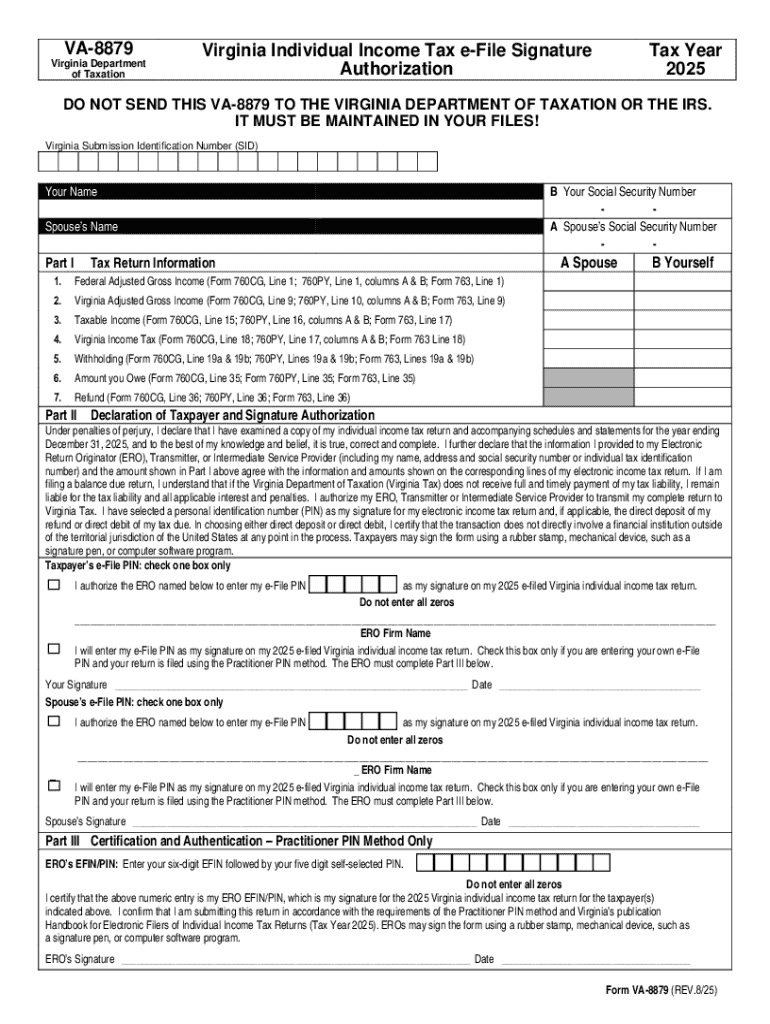
The E-File Signature Form VA-8879PDF serves as an authorization document primarily used for electronically filing Virginia state taxes. This form acts as a declaration that taxpayers consent to the use of their electronic signature for submitting their tax returns and confirms the accuracy of the tax information submitted. This process is crucial for ensuring compliance with tax regulations and for maintaining the integrity of the electronic filing system.
Specific Functionality
- Authorization: By submitting the VA-8879PDF, taxpayers authorize the electronic filing of their Virginia state tax return.
- Verification: The form verifies that the taxpayer has reviewed the return and approves the information provided.
- Legality: It serves as a legally binding agreement between the taxpayer and the tax authority, signifying consent to the electronic process.
Steps to Complete the E-File Signature Form VA-8879PDF
Filling out the E-File Signature Form VA-8879PDF requires careful attention to detail. Here are the comprehensive steps to follow:
- Access the Form: Obtain the VA-8879PDF from reliable sources like tax preparation software or directly from the Virginia Department of Taxation website.
- Review Information: Ensure all pre-filled information is correct. This includes personal data and the financial figures drawn from your tax return.
- Sign the Form: The taxpayer must electronically sign the form. Options include using a stylus, mouse, or touchpad to provide a digital signature.
- Submit the Form: Once signed, submit the form through your chosen tax software, or follow your tax preparer's instructions for electronic submission.
Common Mistakes
- Incomplete Fields: Ensure all mandatory fields are filled. Missing information can delay the tax filing process.
- Incorrect Data: Double-check figures against your tax records to avoid discrepancies.
Why Should You E-File Signature Form VA-8879PDF
Using the E-File Signature Form VA-8879PDF offers several advantages:
- Efficiency: Electronic filing accelerates the processing of tax returns compared to paper submissions.
- Convenience: Filing from any location eliminates the need for in-person visits or physical mailing.
- Timeliness: E-filing often results in faster refunds if applicable and ensures compliance with filing deadlines.
Who Typically Uses the E-File Signature Form VA-8879PDF
The E-File Signature Form VA-8879PDF is most frequently used by:
- Individual Taxpayers: Residents of Virginia submitting their state tax returns.
- Tax Professionals: Accountants and tax preparers who assist clients with e-filing state taxes.
- Businesses: Entities operating within Virginia required to submit state-specific tax filings.


Key Demographics
- Residents: Primarily used by Virginia residents or those with state tax obligations within Virginia.
- Income Levels: Applicable across various income levels, from students to high-income earners.
Key Elements of the E-File Signature Form VA-8879PDF
Several critical components make up the VA-8879PDF that users need to be familiar with:
- Taxpayer Information: Includes personal details such as name, address, and social security number.
- Tax Return Reference: Details of the tax return to which the form pertains.
- Signature Section: Area designated for the taxpayer’s electronic signature.
Form Specifics
- Tax Amounts: Displays key financial figures from the tax return for confirmation.
- Preparer's Declaration: If applicable, contains a section for the tax preparer’s declaration and details.
State-Specific Rules for the E-File Signature Form VA-8879PDF
Virginia has distinct rules and guidelines for the use of the VA-8879PDF in order to ensure compliance and streamline the electronic filing process:
- Submission Guidelines: The form should not be sent separately to the Virginia Department of Taxation. Instead, it's retained as part of your records.
- Retention Period: Taxpayers and preparers are advised to retain copies of the VA-8879PDF for at least three years in case of audits.
Regional Considerations
- Local Taxes: In addition to state taxes, residents should be aware of any local taxes that might require separate filings or declarations.
IRS Guidelines
While the VA-8879PDF is a state-specific form, it aligns with federal guidelines for electronic signatures as stipulated by the IRS, ensuring:
- Compliance: It follows federal standards for digital consent and record-keeping.
- Uniformity: Maintains consistency with federal e-filing procedures.
Coordination with Federal Filing
- It's often used in tandem with federal e-file signature forms, keeping the filing process streamlined.
Required Documents
In preparing to complete the VA-8879PDF, having the accurate documents on hand is critical:
- Current Tax Returns: Both state (Virginia) and federal returns should be available for cross-referencing.
- Identification Documents: Such as your social security number for verification purposes.
Supporting Documentation
- Income Statements: W-2s or 1099 forms as necessary based on your income sources.
- Deductions Proof: Documentation supporting any deductions claimed on your return.