






Definition & Meaning
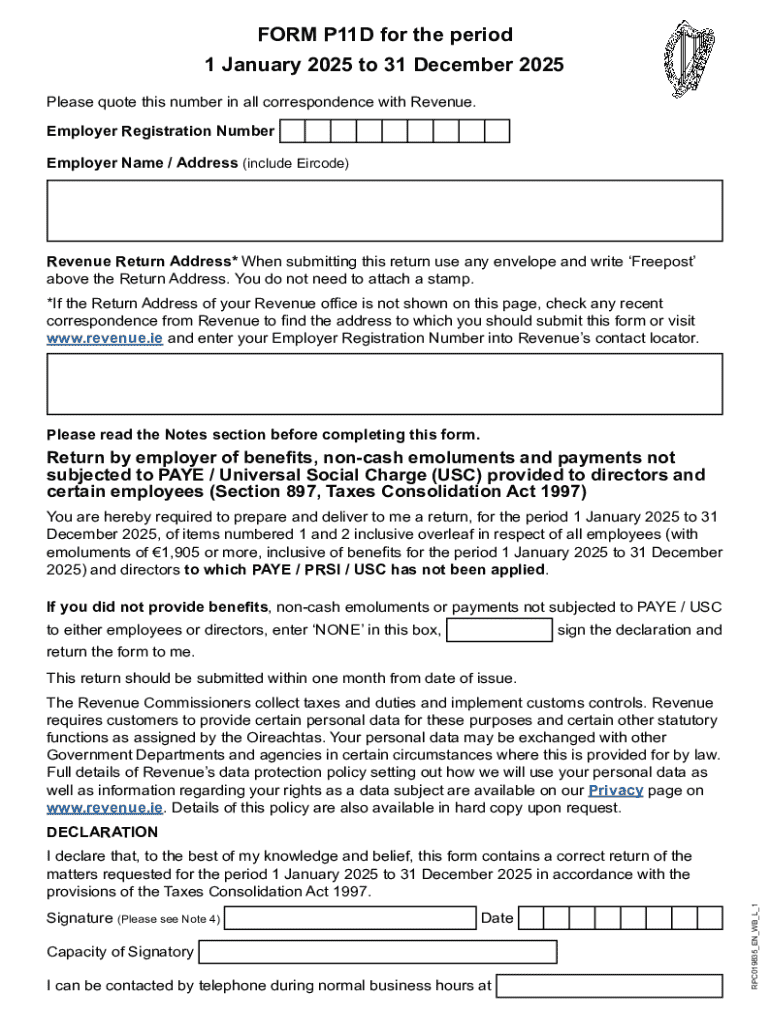
The P11D form, part of the Tolley Tax Glossary, is a critical document used to report expenses and benefits related to employment in the United Kingdom. This form is submitted to HM Revenue and Customs (HMRC) and ensures that such financial advantages are appropriately taxed in line with U.K. tax laws. Employers are responsible for completing the P11D form for each employee receiving taxable benefits, which can range from company cars to health insurance.
Examples of Benefits Reported
- Company Cars: Employers detail the make and model of vehicles provided to employees.
- Private Medical Insurance: Any healthcare benefits paid by the employer must be included.
- Interest-Free Loans: The form covers loans exceeding a certain amount provided to employees.
How to Use the P11D FormTolley Tax Glossary
To effectively use the P11D formTolley Tax Glossary, understanding each section of the form is important. Employers should compile accurate details of every benefit or expense reimbursed to the employee over the tax year. It is crucial to adhere to HMRC guidelines to ensure compliance and avoid penalties.
Key Steps for Employers
- Gather Data: Compile information about all benefits and expenses for each employee.
- Follow Guidelines: Ensure each benefit is categorized correctly as per HMRC rules.
- Complete the Form: Accurately fill in every section of the form based on the compiled data.
Steps to Complete the P11D FormTolley Tax Glossary
Completing the P11D form requires precise attention to detail. Both the company and the employees' details need to be accurately documented, followed by an exhaustive list of benefits provided.
- Employee Information: Enter personal details such as name and national insurance number.
- Benefit Details: Record specifics for each type of benefit, like the cash equivalent value.
- Submission: Submit the form to HMRC by the required deadline, typically by July 6 following the tax year.
Legal Use of the P11D FormTolley Tax Glossary
The P11D form serves a legal purpose, ensuring compliance with U.K. tax regulations. It ensures that all non-salary compensation is reported and taxed appropriately.
Compliance Requirements
- Accuracy: Ensure all entries are correct.
- Timeliness: Submit on or before the deadline to avoid penalties.
- Documentation: Retain copies of forms for a specified period for audit purposes.
Important Terms Related to P11D FormTolley Tax Glossary
Understanding key terms related to the P11D form is essential for accurate completion.
- Taxable Benefits: Non-cash benefits that must be reported for tax purposes.
- Cash Equivalent: The monetary value of benefits provided to employees.
Examples
- Taxable Benefits: Company-provided vehicles.
- Cash Equivalent: Monetary value calculation of medical insurance provided.
Filing Deadlines / Important Dates
The P11D form must be submitted by specific deadlines to HMRC. Missing these deadlines can lead to penalties.
- Submission Deadline: July 6 following the end of the tax year.
- Employer Class 1A National Insurance Contributions (NICs) Payment: July 19 for non-electronic payments, July 22 for electronic payments.
Penalties for Non-Compliance
Failure to submit the P11D form on time can lead to significant fines and penalties. These penalties increase over time if non-compliance continues.
Example Penalties
- Initial Penalty: A fixed penalty per overdue form.
- Ongoing Penalty: A daily penalty for continued non-compliance after the initial period.
Software Compatibility (TurboTax, QuickBooks, etc.)
Employers can utilize various software solutions for completing the P11D form. Software such as QuickBooks can track expenses, while other specialized tax software can assist in creating the form itself.
Benefits of Using Software
- Efficiency: Streamlines data compilation and form completion.
- Accuracy: Reduces human error in data entry.
- Integration: Seamlessly integrates with existing payroll systems.
Eligibility Criteria
The P11D form is applicable to employees receiving benefits not included in their PAYE (Pay As You Earn) calculations. Understanding eligibility can streamline the form's completion.


Eligibility Assessments
- Analyze employee payroll to identify benefits.
- Determine which benefits need to be reported on the P11D form.
Versions or Alternatives to the P11D FormTolley Tax Glossary
Different forms or versions may be required depending on the employment benefit type, such as the P11D(b) form for reporting Class 1A NICs due on expenses and benefits.
Alternative Forms
- Form P11D(b): Used by employers for Class 1A NICs purposes.
- P46(Car): Specifically for company car benefits and acquisitions.
Who Issues the Form
The P11D form is issued by employers to HMRC and employees. Employers are responsible for ensuring all relevant details and benefits are reported accurately.
Process of Issuance
- Compile yearly benefit reports.
- Submit the P11D form to both HMRC and the individual employee.
- Confirm receipt with employees to ensure accuracy and compliance.
Disclosure Requirements
Full disclosure on the P11D form is mandatory. Employers must document every applicable employee benefit to maintain transparency and adhere to U.K. tax law.
Disclosure Elements
- Employee Details: Includes personal identifiers like name and address.
- Benefit Details: Outlines value and nature of each benefit.
Business Types that Benefit Most from P11D FormTolley Tax Glossary
Certain businesses find the P11D form particularly beneficial, especially those offering substantial non-cash benefits.
Examples of Applicable Business Types
- Corporations: Providing extensive employee perks.
- Small Businesses: Offering unique benefits not part of salaries.