






Definition & Meaning
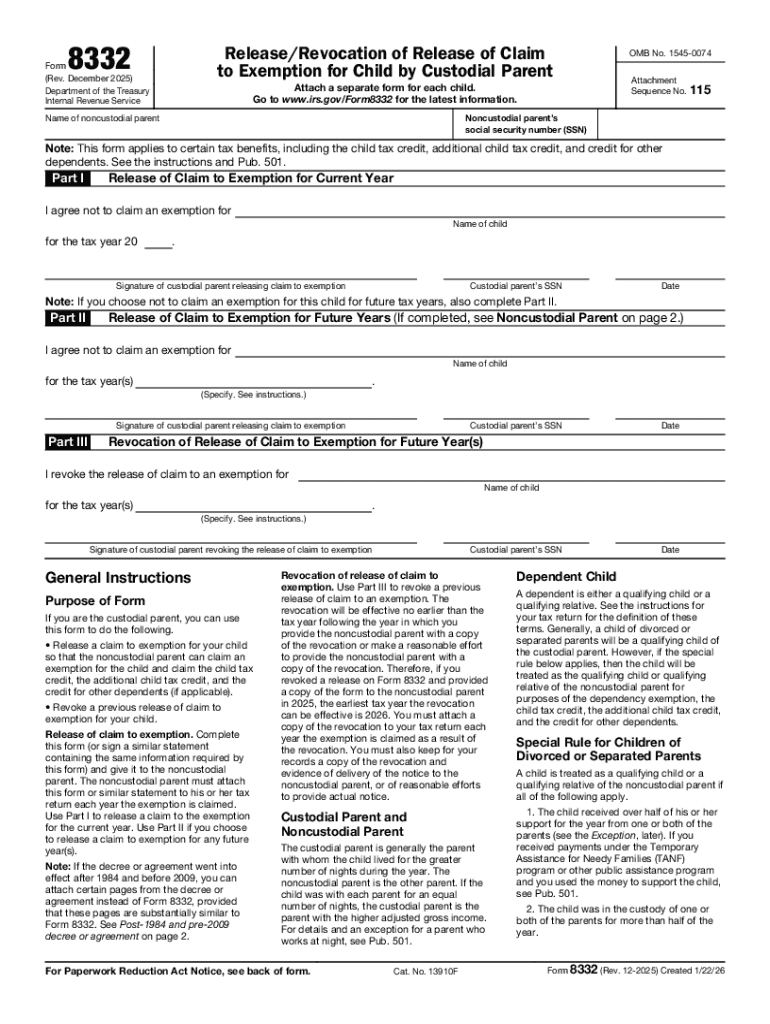
Form 8332, formally known as "Release/Revocation of Release of Claim to Exemption for Child by Custodial Parent," is a document provided by the Internal Revenue Service (IRS). Revised in December 2025, this form is crucial for taxpayers navigating custody arrangements regarding child exemptions. It allows the custodial parent to release their claim to an exemption for a child, permitting the noncustodial parent to claim it instead. Its envisaged use simplifies shared custody arrangements by enabling clear, documented agreements on who can claim the exemption in tax filings. This can profoundly affect the tax obligations of both parents, influencing their returns based on the exemption's specifications.
How to Use the Form 8332 (Rev December 2025)
When intending to utilize Form 8332, the custodial parent must fill out the form with accurate details about the child, themselves, and the noncustodial parent. The release can cover one or multiple tax years and must be signed by the custodial parent before the noncustodial parent can claim the child exemption on their taxes. It's essential to specify the tax years for which the release is applicable, ensuring clarity for both parties and the IRS. Once completed, the noncustodial parent files the form with their tax return. This procedural clarity fosters compliance and avoids potential disputes between parents over exemptions.
Steps to Complete the Form 8332 (Rev December 2025)
- Enter Basic Information: Include the custodial parent’s name, Social Security Number, and address. This identifies the releasing party.
- Child Information: Specify the child's name and Social Security Number, ensuring there's no ambiguity about whom the exemption involves.
- Noncustodial Parent's Details: Provide the name and Social Security Number of the noncustodial parent who will claim the exemption.
- Specify Tax Years: Indicate which tax years the release applies to, ensuring both parents understand when the claim changes occur.
- Custodial Parent's Signature: The custodial parent must sign and date the form to confirm consent to the release.
- Submission of the Form: The noncustodial parent must attach Form 8332 to their tax return to complete the claim process.
The step-by-step completion ensures all necessary information is included, aligning with IRS requirements.
Who Typically Uses the Form 8332 (Rev December 2025)
Form 8332 is predominantly used by divorced or separated parents who have agreed to share the financial benefits of tax exemptions for their child or children. The custodial parent, who usually claims the exemption, uses this form to permit the noncustodial parent to claim it instead. This is often part of negotiated custody agreements or court orders that detail financial responsibilities and benefits.


Legal Use of the Form 8332 (Rev December 2025)
The legal framework surrounding Form 8332 emphasizes its role in formalizing and legitimating the transfer of exemption rights between parents. It ensures compliance with IRS regulations concerning dependent exemptions and fosters transparency and accountability. By officially documenting the exemption's transfer, the form helps prevent disputes and guarantees that the claiming parent can substantiate their tax filings if questioned by the IRS.
Key Elements of the Form 8332 (Rev December 2025)
- Custodial Parent's Identification: Details to clearly identify the form's issuer.
- Child's Specific Information: Ensures unequivocal identification of the dependent involved.
- Noncustodial Parent's Identification: Enables precise allocation of the exemption.
- Designated Tax Years: Documents the specific time frame for the exemption's transfer.
- Signatory Requirements: The custodial parent's signature to confirm consent.
A thorough understanding of these elements assists in efficiently using, completing, and filing the form.
IRS Guidelines
The IRS provides comprehensive directions on the execution and submission of Form 8332. Their guidelines underscore the procedural steps, IRS expectations, and common errors to avoid. By following these guidelines, taxpayers can ensure that both the release and subsequent claim are legally valid. Guidance from the IRS also includes advice on retaining a copy for personal records, which can be critical if disputes arise or if clarification is required in future tax years.
Required Documents
To correctly fill and submit Form 8332, parents should prepare the following:
- Current and Valid Identification: To ensure accurate, error-free identity details.
- Child’s Birth Documents: Confirm the dependent's legitimacy and details.
- Court Orders or Custody Agreements: In cases where the exemption arrangement stems from legal directives.
- Previous Year Tax Returns: Helpful for reference, ensuring no detail is overlooked.
By organizing these documents prior to filling the form, delays and errors in the submission process can be minimized.
Form Submission Methods (Online / Mail / In-Person)
While Form 8332 is predominantly filed with a tax return, a physical copy is necessary. It can be submitted:
- By Mail: Attached to a paper tax return.
- Online: Scanned and uploaded when filing electronically through compatible tax software.
- In-Person: When consulting in-person tax services or advisories, ensuring face-to-face confirmation and guidance.
Selecting an appropriate submission method balances personal convenience with timeliness, ensuring the noncustodial parent can claim the desired exemption accurately.