






Understanding Ohio IT 1040
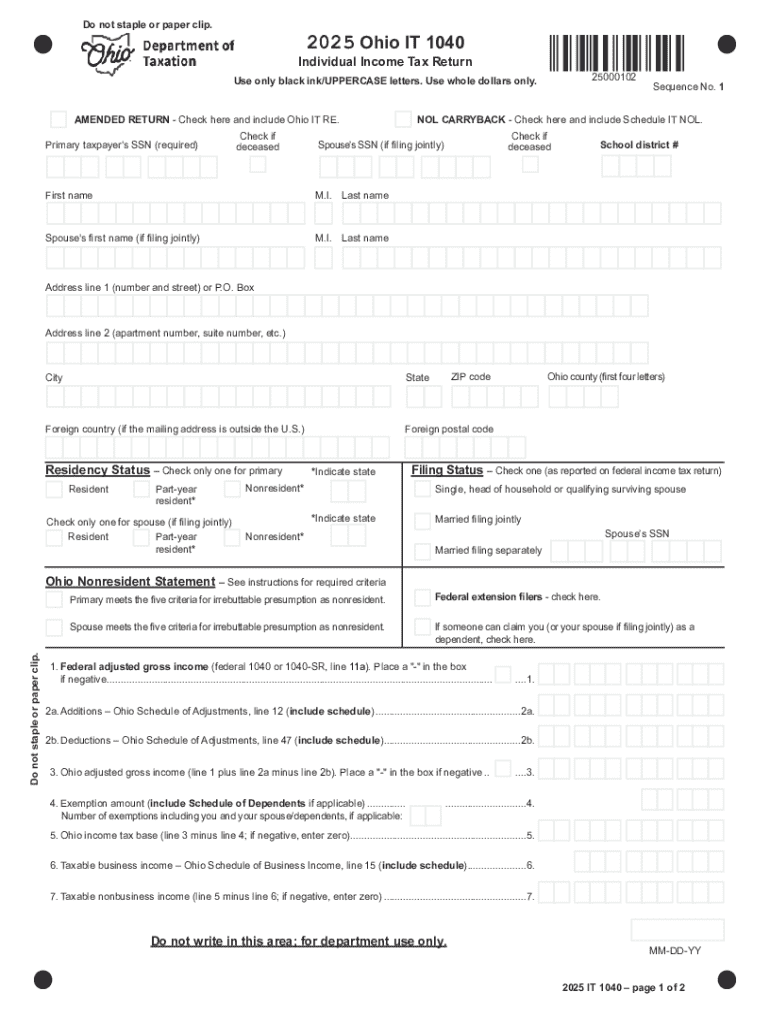
The Ohio IT 1040 form is a critical document for residents of Ohio who need to file their state individual income tax return. This form is used to report income, calculate taxes owed, and determine any refunds due for the tax year. The document requires detailed information about income, deductions, and tax credits specific to Ohio taxpayers. Ensuring accurate completion of this form is crucial to avoid penalties and interest charges.
Key Components of the Ohio IT 1040
- Income Information: Includes wages, salaries, and other income sources as per the taxpayer's federal return.
- Deductions and Credits: State-specific deductions and credits that can reduce taxable income and tax liability.
- Tax Calculation: Detailed sections for calculating owed taxes, including applicable rates and liabilities.
- Refund or Payment: Determination of whether the taxpayer is due a refund or owes additional taxes.
Steps to Complete Ohio IT 1040
- Gather Required Documents: Collect W-2 forms, 1099s, and any other income documentation.
- Fill Personal Information: Include taxpayer's name, social security number, and filing status.
- Report Income: Enter all qualifying income from federal return forms.
- Apply Deductions and Credits: Use Ohio-specific deductions and nonrefundable credits.
- Calculate Tax Liability: Follow form instructions to determine total tax due.
- Determine Refund or Payment: Complete sections calculating overpayment or balance due.
- Review and Sign: Double-check all details for accuracy and sign the document.
Common Mistakes to Avoid
- Incorrect SSN or Taxpayer ID: Ensure personal identifiers are entered correctly to prevent processing delays.
- Omitted Income: Make sure all income is reported, even from secondary sources.
- Failure to Apply Credits: Neglecting state-specific credits can result in higher tax liability.
Obtaining the Ohio IT 1040 Form
Taxpayers can access the Ohio IT 1040 form through several methods:
- Online: Downloadable from the Ohio Department of Taxation's official website.
- By Mail: Request a paper form by contacting the Ohio Department of Taxation.
- In Person: Pick up at local tax office locations.
Digital vs. Paper Filing
- Digital Filing: Offers quicker processing times and immediate confirmation of submission.
- Paper Filing: Provides a tangible document but may result in longer processing periods.
Legal Use and Compliance
Filing the Ohio IT 1040 with complete and accurate information is a legal requirement for residents with taxable income. Non-compliance, including late submissions or inaccuracies, can result in penalties and additional interest charges.
Penalties for Non-Compliance
- Late Filing Penalty: Assessed if the form is not submitted by the deadline.
- Underpayment Penalty: Occurs if taxes are not paid in full by the due date.
- Accuracy Penalties: Imposed for errors or fraudulent entries on the tax return.
Filing Deadlines and Important Dates
The Ohio IT 1040 form generally follows federal tax return deadlines. For most taxpayers, this means the form is due by April 15. Extensions may be requested, giving additional time to file, though any taxes owed must still be paid by the original deadline to avoid late payment penalties.
Taxpayer Scenarios
Ohio Form IT 1040 applies to various taxpayer scenarios, including:
- Self-Employed Individuals: Report business income and utilize applicable state tax deductions.
- Students and Retirees: Must report any taxable scholarships, pensions, or distributions.
- Business Owners: Ensure they account for any income from Ohio-based operations.


Considerations for Different Taxpayer Types
- LLCs and Corporations: Additional forms may be required, and some tax treatments differ based on entity structure.
- Multiple State Income: Special considerations exist for those earning income in multiple states.
Software Compatibility
Modern tax preparation software, such as TurboTax and QuickBooks, supports the Ohio IT 1040. These tools can simplify the filing process by importing federal return data and applying state-specific rules automatically for users.
Benefits of Using Tax Software
- Accuracy: Software helps eliminate errors by guiding users through the form step-by-step.
- Efficiency: Automates calculations and reduces manual entry requirements, saving time.
Special Considerations for Ohio Residents
Understanding the nuances of Ohio-specific tax regulations is essential to ensure compliant and efficient filing.
- Nonresident Filers: Nonresidents with income sourced in Ohio are also required to file but may need to complete additional schedules.
- State-Specific Credits: Examples include the Joint Filing Credit and the Resident Credit, which can significantly impact tax liability.
These sections offer a comprehensive overview of the Ohio IT 1040 form, ensuring taxpayers can effectively manage their state tax obligations while maximizing potential deductions and credits.