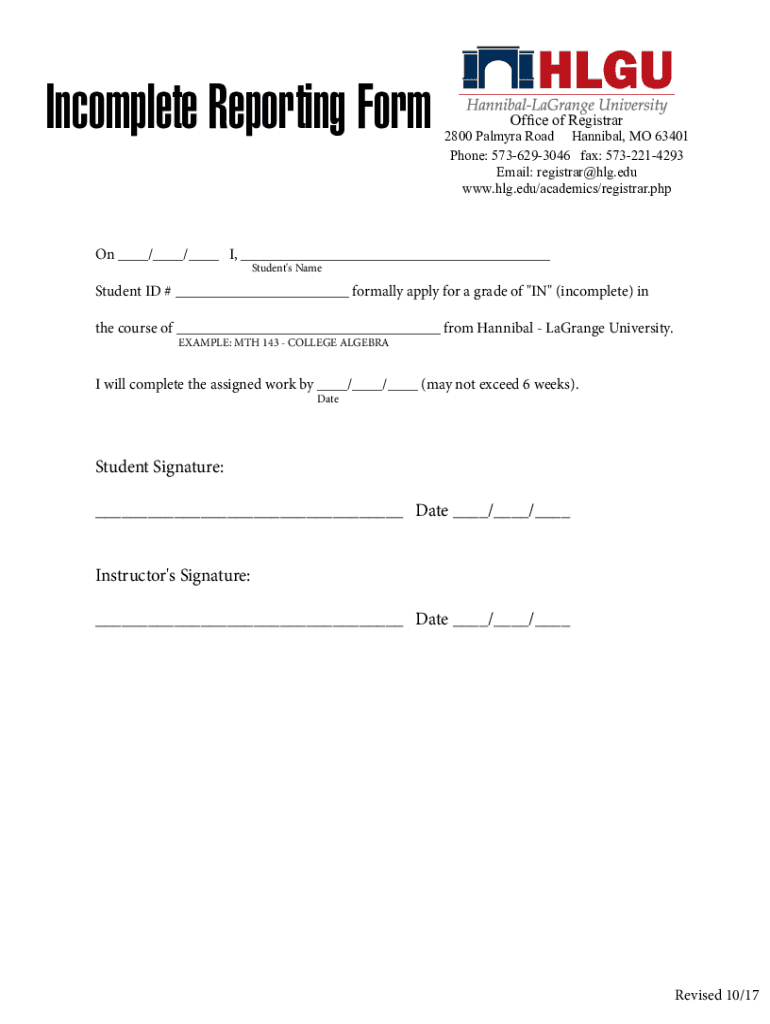







Definition and Meaning
The "DocHub 12082360--Incomplete-reportingFillable Online hlg Incomplete reporting form08 indd" is a specialized digital form used for reporting incomplete documentation or data submission to a specific organization. This form is designed for ease of use and integration within digital workflows, allowing users to submit owed information succinctly and efficiently to the Office of Registrar or similar entities. It's particularly useful in environments where precise and timely data reporting is critical, such as academic institutions or regulatory bodies.
Key Characteristics
- Purpose-driven: Ensures the capture of missing or incomplete information.
- Standardized structure: Adheres to formatting rules to maintain consistency in data entry.
- Digital compatibility: Structured for easy online fillability with tools like DocHub for enhanced workflow integration.
How to Use the DocHub Incomplete Reporting Form
Using the DocHub Incomplete Reporting Form effectively hinges on understanding its comprehensive features and integrating it into your existing document management systems.
Step-by-Step Usage
- Access the Form: Obtain the form through DocHub's online platform or the specific institution's portal.
- Digital Compatibility: Ensure you have compatible software, such as DocHub itself, to facilitate editing and submission.
- Input Missing Details: Enter the incomplete information into designated fields, following instructions provided for each section.
- Review: Conduct a thorough review for accuracy.
- Submit: Use the specified method, typically via online submission or email.
Steps to Complete the DocHub Incomplete Reporting Form
Completing the form requires a methodical approach to ensure accuracy and compliance with submission requirements.
- Gather Required Information: Collect any supporting documents or data needed for the form's completion.
- Fill in Personal Data: Provide personal or organizational data in the header sections.
- Detail Incomplete Sections: Specify sections that were incomplete or need rectification.
- Use Fillable Fields: Utilize the form's interactive fields for ease of data entry.
- Final Check: Double-check all entries for correctness.
- Save and Export: Once satisfied, save the completed form for your records and prepare it for submission.
- Submit: Follow institutional guidelines for submission — typically online via DocHub or by email.
Important Terms Related to the DocHub Incomplete Reporting Form
Understanding key terms associated with the form can facilitate more effective use.
- Fillable Fields: Sections designed to accept dynamic input, aiding in digital completion.
- Authentication Protocols: Security measures ensuring only authorized users can access or alter the form.
- Electronic Signature: Legally binding digital signature that can be appended to the form for authentication.
- Form Manager: Tool within DocHub to oversee form completion and submission processes.
Legal Use of the DocHub Incomplete Reporting Form
The form's legal implications are crucial for compliance, especially in contexts like academic reporting.
Legal Considerations
- Confidentiality: Ensures sensitive information is handled per privacy regulations.
- Data Integrity: Maintains data accuracy and reliability throughout the process.
- Legal Binding: Electronic submissions, when paired with digital signatures, are legally recognized under regulations such as the ESIGN Act.
Key Elements of the DocHub Incomplete Reporting Form
This form consists of several sections geared towards capturing detailed and specific information.
Highlighted Sections
- Identification Fields: Capture basic identifying information for reference.
- Data Correction Field: Specific area to detail omitted or incorrect data.
- Signature Block: Provides space for an electronic or manual signature to authenticate the submission.
Software Compatibility for the DocHub Form
Understanding the software compatibility requirements is crucial for smooth form interaction.
Compatible Software
- DocHub: Primary platform for accessing and processing the form.
- Google Workspace Integration: Allows seamless import and export of documents between DocHub and Google applications like Drive and Gmail.
- Third-Party Tools: Compatibility with accounting and documentation software like QuickBooks, aiding in contextual documentation processes.
Examples of Using the DocHub Incomplete Reporting Form
Real-world scenarios help illustrate practical applications of the form.
Academic Institution
At universities, this form can be utilized to rectify student record discrepancies, ensuring all student data is up-to-date and accurate for course enrollments.
Corporate Use
Within a corporate setting, departments might use the form to correct incomplete financial reports submitted for internal audits, ensuring regulatory compliance and accurate record-keeping.