






Definition and Purpose of the Application for Refund
The "Application for Refund" is a critical document used by individuals and businesses to request the return of an overpayment made to a government agency or organization. This document serves a crucial role in financial management, allowing taxpayers or members to reclaim funds that were inadvertently overpaid due to various reasons such as adjustments in tax liabilities or contribution errors. It is essential to understand this form's purpose, as it is often associated with specific rules and requirements that govern eligibility and the refund process.
How to Use the Application for Refund
To use the Application for Refund effectively, it is crucial to follow the specific guidelines outlined by the issuing authority. Generally, the process begins with obtaining the correct version of the form, ensuring it matches the specific overpayment situation. After procuring the form, users should meticulously complete each section with accurate information, such as personal or business details, the period covered by the overpayment, and the amount claimed. This thoroughness is vital to prevent delays or denials of the refund request.
Real-World Scenario
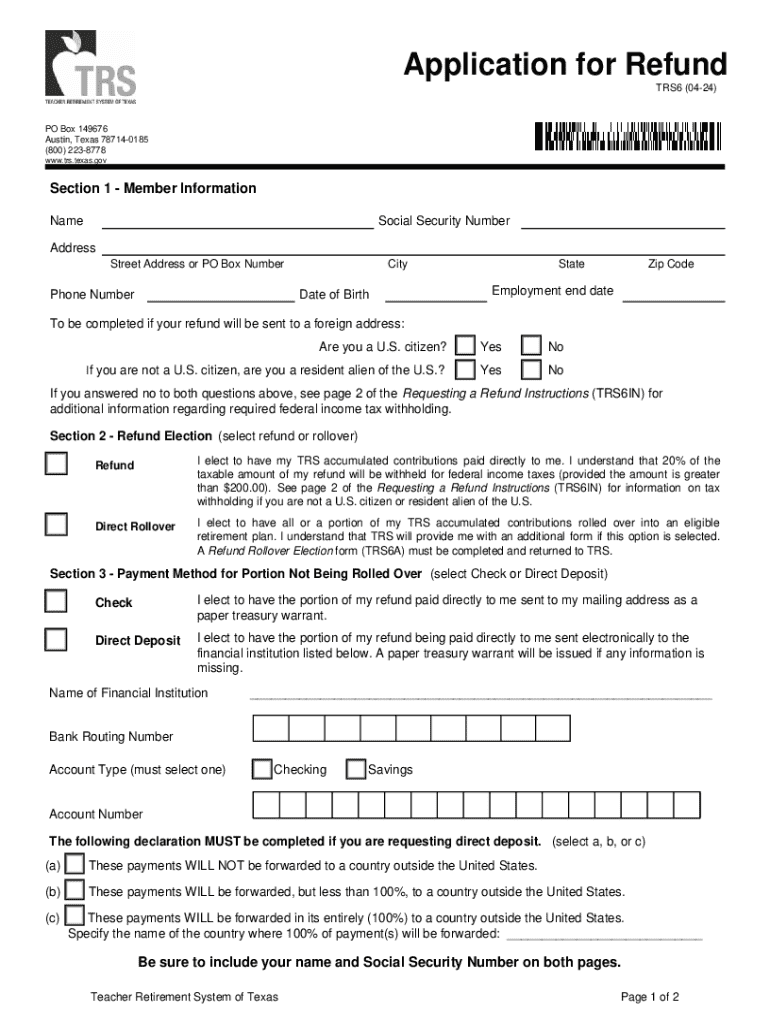
Consider a retired individual who contributed excess funds to the Teacher Retirement System of Texas. By using the Application for Refund, they can request the return of these funds. The form will guide them through detailing their membership information and the specific period of overpayment, ensuring all details are clearly documented for accurate processing.
How to Obtain the Application for Refund
The availability of the Application for Refund varies depending on the issuing body. Typically, these forms can be accessed directly through the official website of the agency responsible for collecting the overpayment. Government websites often provide downloadable versions of refund applications, ensuring they are easily accessible. For those who prefer physical copies, these forms are also available at local agency offices.
Steps to Complete the Application for Refund
- Gather Necessary Information: Compile all relevant documents, such as payment histories, identification details, and reason for overpayment.
- Obtain the Appropriate Form: Access the form through the official source, ensuring it corresponds to the refund type.
- Fill Out Personal Information: Enter accurate personal data, such as name, address, and taxpayer identification number.
- Detail the Overpayment: Clearly specify the overpaid amount, payment date, and period it covers.
- Attach Supporting Documents: Include any additional documentation that substantiates the claim.
- Review and Submit: Carefully review all entries before submitting through the chosen method—online, mail, or in-person.
Important Terms Related to the Application for Refund
Understanding the terminology associated with the Application for Refund is critical. Terms such as "eligibility," "overpayment," "refund request," and "supporting documents" frequently appear. Each term has specific implications for how the form should be completed and the kind of documentation required to support the request.
Example Terms
- Overpayment: The excess amount paid over what was required, which is being requested for return.
- Eligibility: The conditions that qualify a taxpayer or member to apply for a refund.
Key Elements of the Application for Refund
The application consists of several vital components that must be accurately completed:
- Identification Information: Basic details about the individual or entity requesting the refund.
- Overpayment Details: Specifics about the excess payment, including dates and amounts.
- Attachments: Necessary supporting documents that corroborate the refund claim.
- Signature and Date: Certifying the accuracy of the information provided, confirming the requester's intent.
Form Submission Methods
Once the form is accurately completed, it can be submitted through various methods, depending on the issuing authority's options. Common submission methods include online portals for electronic filing, traditional mailing services, or in-person delivery at designated offices. An online submission typically offers faster processing times, while mailing or in-person delivery may cater to those who prefer or require physical documentation.
Eligibility Criteria for Refund Applications
Eligibility to use the Application for Refund is determined by specific criteria set by the issuing body. Generally, eligibility hinges on the occurrence of an actual overpayment within a defined time frame. Additional factors, such as the nature of the overpayment and the timing of the request, can also impact a user's qualification for a refund.


External Considerations
- Time Limits: Refund requests may only be accepted within certain timeframes post-payment.
- Supporting Documentation: Adequate records must be presented to prove entitlement to a refund.
Application Process and Approval Time
The duration between submitting the Application for Refund and receiving the refund can vary significantly. The processing time is influenced by factors such as the complexity of the refund request, the completeness of the submitted documentation, and the workload of the processing agency. Generally, clearer and more straightforward applications tend to be processed more swiftly.
Versions or Alternatives to the Application for Refund
Different organizations or states may have alternative forms or specific versions of the Application for Refund tailored to unique situations. These alternatives are designed to cater to the particular requirements of different types of overpayments or specific refund processes, emphasizing the importance of selecting the correct form to prevent processing issues.