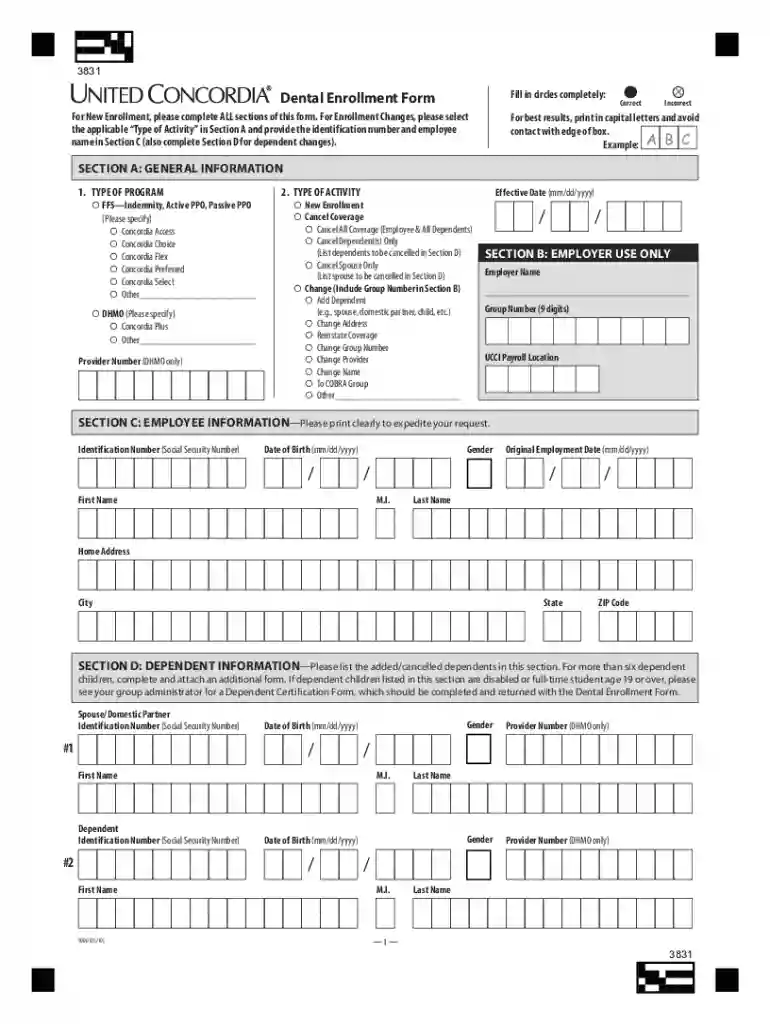
PDF 3831 - UNITED CONCORDIA Dental Enrollment Form - Lebanon-2026

Get Form
PDF 3831 - UNITED CONCORDIA Dental Enrollment Form - Lebanon Preview on Page 1

Here's how it works

01. Edit your form online
Type text, add images, blackout confidential details, add comments, highlights and more.

02. Sign it in a few clicks
Draw your signature, type it, upload its image, or use your mobile device as a signature pad.

03. Share your form with others
Send it via email, link, or fax. You can also download it, export it or print it out.

Definition and Purpose of the Form

The PDF 3831 - UNITED CONCORDIA Dental Enrollment Form - Lebanon is designed to facilitate new enrollment and changes in dental coverage for employees and their dependents. This form captures essential information, such as employee details, dependent coverage, and any additional dental plans, ensuring that the enrollment process is thorough and all necessary data is collected. Accuracy is pivotal, as this document also contains legal disclaimers related to fraud prevention and anti-discrimination policies.

How to Use the Enrollment Form

Using the form involves a few critical steps that ensure efficient completion and submission:

  1. Download the Form: Obtain the PDF 3831 form either directly from the United Concordia website or through DocHub for ease of access and digital editing.
  2. Complete Each Section: Fill out distinct sections in the form, which typically include:
    • General information such as name, address, and contact details.
    • Employee information to specify eligibility under the dental plan.
    • Details about dependents who will also require coverage.
  3. Review and Double-Check: Ensure all information is accurate and complete. Verify that mandatory fields are filled, particularly those required for processing the enrollment without delay.
  4. Submission: Submit the completed form to United Concordia through their preferred submission method. If using DocHub, you can sign electronically before submission.

How to Obtain the Form

The PDF form is readily accessible through several convenient channels:

  • Directly from United Concordia: Available for download on United Concordia's official website.
  • Through DocHub: Enables users to download and edit the form directly from the platform, ensuring a streamlined digital workflow.
  • HR Departments: Many organizations distribute this form to eligible employees as part of their onboarding or benefits renewal processes.

Steps to Complete the Form

Filling out the PDF 3831 successfully requires attention to detail and adherence to the provided instructions:

  1. Gather Required Information: Ensure you have all necessary personal and dependent details at hand. This includes social security numbers and existing policy numbers for any current coverage.
  2. Digital or Manual Entry: Decide whether to complete the form online using tools like DocHub or manually print and fill it out. Both methods are acceptable, but digital entry supports easier updates and error correction.
  3. Follow Form Instructions: Carefully read instructions accompanying each section to prevent incorrect entries that could delay processing.
  4. Sign and Date: The form might require a signature to validate data authenticity. Use DocHub’s digital signature feature or manually sign the printed form.

Key Elements of the Dental Enrollment Form

The form typically covers essential components that ensure comprehensive enrollment:

  • General Information Section: Captures personal and contact details for proper identification.
  • Employee Eligibility: Confirms employment status and qualification for dental coverage.
  • Dependent Coverage: Lists dependents under the employee's coverage plan requiring the same details as the primary entrant.
  • Other Coverage Information: Identifies any existing dental policies to avoid duplication and ensure compliance.

Important Terms Associated with the Form

Understanding key terms is crucial for proper completion:

  • Primary Coverage: Refers to the main dental plan an employee is enrolling in.
  • Qualified Dependents: Family members eligible for coverage under the employee's plan, generally spouses and children.
  • Secondary Coverage: Any additional dental insurance owned by the employee or dependents that might overlap.

Legal Use of the Form

Compliance with legal standards ensures valid enrollment:

  • The document mandates accurate representation of data to avoid legal repercussions like fraud allegations.
  • Anti-discrimination clauses ensure fair treatment and accessibility for all eligible employees.
  • Legal disclaimers outline penalties for misrepresentation or omission of required information.

Who Typically Uses the Form

The primary users of the PDF 3831 form include:

  • Employees: Those seeking to enroll in or update current dental coverage details.
  • HR Representatives: Responsible for managing employee benefits and ensuring proper completion and submission of forms.
  • Dependents: Although not directly completing the form, they are involved due to their coverage inclusion.
decoration image ratings of Dochub
be ready to get more

Complete this form in 5 minutes or less

Get form

Got questions?

We have answers to the most popular questions from our customers. If you can't find an answer to your question, please contact us.
Contact us
2025 Plan Benefits Summary 2026 Plan Year - Covered Dental Services1United Concordia Dental Pays2 High Option Plan Dental Implant Services Annual Maximum (per covered person) $2,500 $2,500 Lifetime Orthodontic Maximum (per covered person) $3,000 $3,000 Dental Accident Lifetime Maximum (per covered person) $2,000 $2,00033 more rows
About the TDP The TDP, administered by United Concordia, provides worldwide dental care to eligible beneficiaries. The TDP is divided into two geographical service areas: CONUS and OCONUS. CONUS. The 50 U.S. states, D.C., Puerto Rico, Guam, and U.S. Islands.
Help Center Just sign in to MyDentalBenefits, where you can view your ID card or print out a replacement. You can also pull up your digital ID card on your phone.
Aetna took top place this year with a high score of 816 beating out last years top performer, Humana Dental which ranked 2nd in 2023 (809). United Concordia Dental takes 3rd place with a satisfaction ranking at 796 and Dental Quest comes in 4th with a rank of 794.

Security and compliance

At DocHub, your data security is our priority. We follow HIPAA, SOC2, GDPR, and other standards, so you can work on your documents with confidence.
Learn more
ccpa2
pci-dss
gdpr-compliance
hipaa
soc-compliance
be ready to get more

Complete this form in 5 minutes or less

Get form