






Definition & Meaning
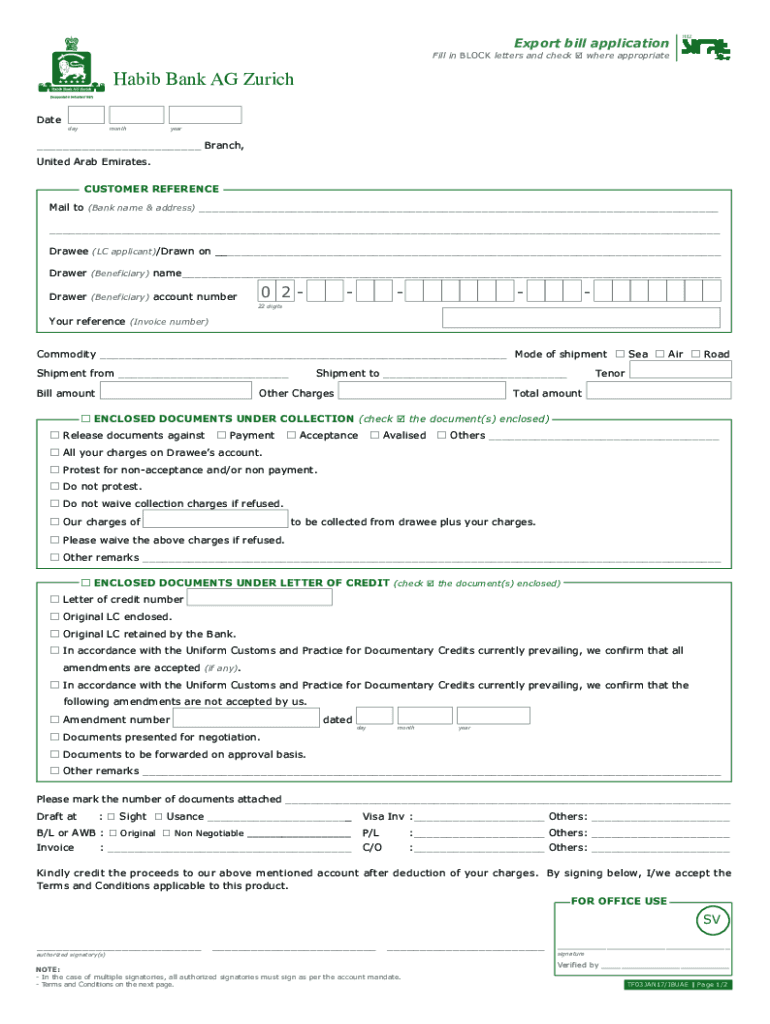
The "Request Letter for Export Bill Processing - Yes Bank" is a formal document used primarily by businesses engaged in international trade. This letter serves as a formal request to Yes Bank for the processing of export transactions, facilitating the movement of goods and funds across borders. It involves various elements such as customer details, shipment information, and specific instructions for processing export bills under a letter of credit. The main goal of this form is to ensure that all vital information is captured to expedite the secure handling and processing of export-related financial documentation.
How to Use the Request Letter for Export Bill Processing - Yes Bank
To effectively use the "Request Letter for Export Bill Processing," ensure you have all necessary business and transaction information ready. Here’s a step-by-step guide:
-
Gather Information: Collect details like customer information, invoice numbers, consignment details, and any relevant letters of credit.
-
Complete the Form: Enter all required information accurately in their respective sections, ensuring that the data matches the supporting documents.
-
Review and Attach Supporting Documents: Include related documents such as invoices, shipping bills, and any required compliance certificates.
-
Submit with Instructions: Clearly mention any specific instructions related to the handling or processing of the documents.
-
Follow up: After submission, maintain communication with Yes Bank to confirm receipt and address any queries that may arise during processing.
Steps to Complete the Request Letter for Export Bill Processing - Yes Bank
Here’s a detailed breakdown of how to fill out this form:
-
Customer Information: Start by providing your company's name, address, and contact details. This section ensures the bank knows who is requesting the service.
-
Details of Export Transaction: Include specifics about the export transaction like invoice number, date, and shipment details such as the consignee’s information.
-
Letter of Credit Information: If applicable, enter details regarding the letter of credit such as the issuing bank, reference numbers, and conditions.
-
Document Checklist: Use this section to ensure all necessary documents are enclosed. Common documents include invoices, shipping documents, and certificates of origin.
-
Special Instructions: If there are specific requests or instructions related to the export bill processing, note them clearly in this section.
-
Signature and Date: Finally, ensure that the form is signed and dated by an authorized representative of your company before submission.
Why Should You Use the Request Letter for Export Bill Processing - Yes Bank
Utilizing the "Request Letter for Export Bill Processing" offers multiple advantages:
-
Facilitates Smooth Transactions: The letter ensures that Yes Bank has all the necessary details to process export transactions efficiently.
-
Ensures Compliance: By providing all required information and documents, your export business maintains compliance with banking standards and international trade regulations.
-
Risk Mitigation: Properly filled and supported forms reduce the risk of errors or misunderstandings that could lead to financial loss or delays in payment.
-
Streamlined Process: This formal method of communication with the bank helps streamline the entire export transaction process, ensuring timely processing and payment.
Key Elements of the Request Letter for Export Bill Processing - Yes Bank
Several elements make up this important document:
-
Customer Information: Identifies the party requesting the bank's services.
-
Transaction Details: Provides necessary transactional information to process the export bill.
-
Supporting Documents: Lists all attached documents needed for processing.
-
Instructions: Clearly defined steps or notes dictating the handling of the export bill.
-
Authorization Section: Confirms the document's legitimacy through signatures of authorized company representatives.
Ensuring all these elements are properly addressed not only aids the bank in processing the export bills efficiently but also bolsters trust and transparency in international business transactions.
Required Documents
When completing the request letter, ensure the following documents are ready:
-
Commercial Invoice: The initial and crucial document detailing the goods being exported.
-
Shipping Bill: Contains shipment details and is needed for customs clearance.
-
Letter of Credit: If applicable, include it to verify conditions.
-
Certificates of Origin: These may be required to establish the goods' origin, aiding tariff decisions.
-
Insurance Documents: To ensure that goods are covered during transit.
Securing these documents is vital to avoid processing delays and ensure compliance with all relevant financial and trade regulations.
Form Submission Methods (Online / Mail / In-Person)
Submitting the "Request Letter for Export Bill Processing" can be done through various channels:
-
Online Portal: Many banks, including Yes Bank, may offer secure online submission portals where businesses can upload forms and documents digitally.
-
Physical Mail: Send the completed form along with all supporting documents through courier or traditional postal services.
-
In-Person: Visiting a Yes Bank branch allows you to submit the documents directly and clarify any immediate queries with bank staff.
Each method has its benefits, so choose the one that best aligns with your business needs and capabilities.
Digital vs. Paper Version
Businesses today have the choice between digital and paper submissions:
-
Digital Submission: Faster and more efficient, allowing instant uploads and reducing the need for physical storage space.
-
Paper Submission: Offers a tangible record and is often preferred when wet signatures are necessary.
Choosing between these depends on your company's technology readiness, regulatory considerations, and personal preference of operational procedures regarding documentation.