







Definition & Meaning
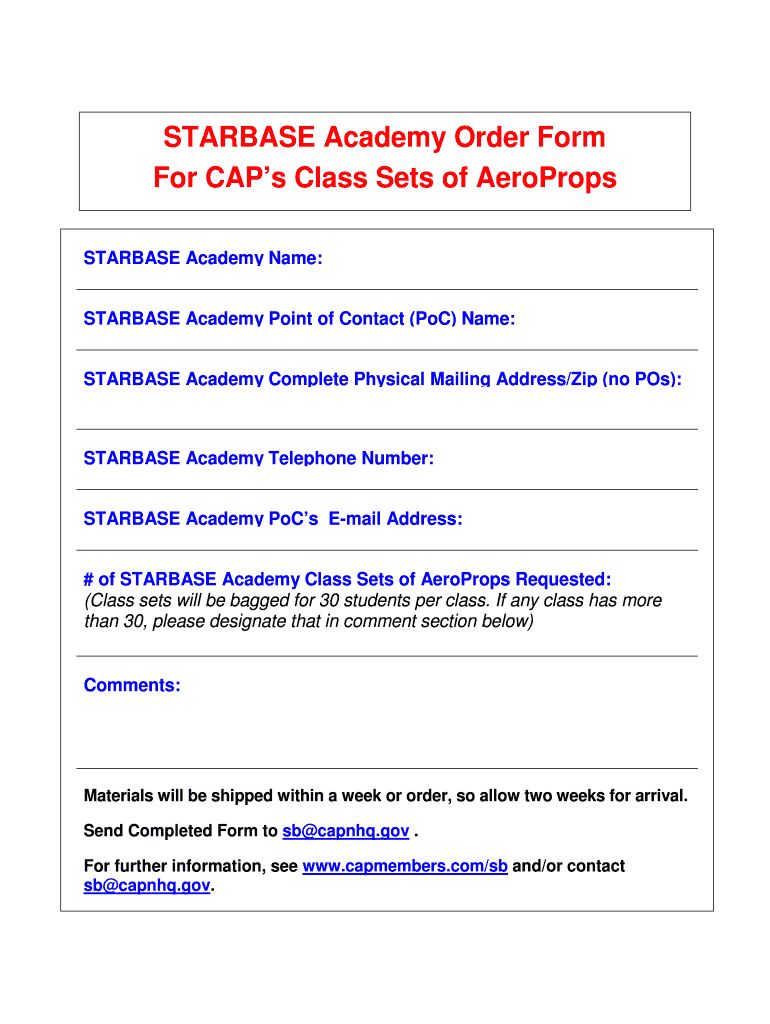
The "Order Form Oct 11" is a specialized document used by STARBASE Academy to request class sets of AeroProps from the Civil Air Patrol (CAP). This form serves as an official channel for placing orders, ensuring that all necessary details, such as the academy's name and contact information, are captured accurately. It is an essential tool for educational institutions needing supplies in a timely manner and provides a structured format to facilitate communication between the academy and CAP.
Key Elements of the Order Form Oct 11
Understanding the critical components of the "Order Form Oct 11" is vital for ensuring successful order placement. Some of the key elements include:
- Academy's Name and Contact Information: Essential for identifying the institution placing the order and facilitating communication.
- Number of Class Sets Required: Specifies the quantity of AeroProps needed, ensuring accurate processing of requests.
- Submission Instructions: Details on how and where to submit the form, which may include online, mail, or in-person options.
These elements help streamline the ordering process and minimize errors in order fulfillment.
How to Obtain the Order Form Oct 11
There are several ways to acquire the "Order Form Oct 11," ensuring accessibility for all potential users. Typically, the form can be obtained directly from STARBASE Academy's administrative office or their official website, if available. Additionally, representatives from CAP might provide the form during scheduled visits or educational events. As institutions have different procedures, it is advisable to contact STARBASE Academy directly for the most current methods of obtaining this form.
Steps to Complete the Order Form Oct 11
Filling out the "Order Form Oct 11" involves a systematic approach to ensure accuracy and compliance. Follow these steps:
- Provide Academy Information: Enter the academy's name and contact information at the top of the form.
- Specify Quantity: Indicate the number of AeroProps class sets needed.
- Review Submission Guidelines: Check all submission instructions to ensure proper completion of the form.
- Sign and Date: Sign the form where required, and include the date of submission.
- Submit: Choose the preferred submission method, whether online, via mail, or in person, following all provided guidelines.
Each step ensures comprehensive information is provided and accelerates the processing of the request.
Why Should You Use the Order Form Oct 11
Using the "Order Form Oct 11" is crucial for a streamlined and efficient order process. The form is designed to prevent miscommunication and errors that can occur when placing large, organized orders. It offers clarity through its structured fields, reducing the likelihood of issues in order fulfillment. This method also ensures compliance with STARBASE Academy’s procedural requirements, demonstrating organizational professionalism and attention to detail.
Examples of Using the Order Form Oct 11
In practice, STARBASE Academy might use the "Order Form Oct 11" during various institutional activities:
- STEM Workshops: To provide all necessary materials for hands-on learning experiences.
- Regular Classes: To maintain a steady supply of AeroProps for semester-long educational programs.
- Special Events: When organizing events that require increased quantities of resources.
Each scenario illustrates the form’s role in maintaining a seamless educational operation.
Legal Use of the Order Form Oct 11
The "Order Form Oct 11" must be used in accordance with STARBASE Academy guidelines and the Civil Air Patrol policies. This ensures that all orders are legally binding and align with both entities' operational standards. Compliance minimizes potential disputes and guarantees that all orders are processed within the legal framework established by both the academy and CAP.
Form Submission Methods
The "Order Form Oct 11" offers multiple submission methods to accommodate diverse user needs and circumstances. These include:
- Online Submission: Allows for electronic sending through email or digital platforms, fostering quick and efficient processing.
- Mail Submission: Provides an option for submission through postal services, suitable for those who prefer traditional methods.
- In-Person Submission: On-site delivery might be available during academy hours or designated times for drop-off.
These options ensure flexibility and accessibility, enhancing the user experience.
Required Documents
To streamline the order process, users must prepare specific documents when completing the "Order Form Oct 11." Although the primary focus is on the form itself, accompanying documents may include:
- Official Identification: Verifies the identity of the person submitting the form.
- Proof of Academy Representation: Confirms the individual’s authority to place orders on behalf of the academy.
Preparing these documents in advance ensures a smooth submission process.
State-Specific Rules for the Order Form Oct 11
While the "Order Form Oct 11" is utilized primarily by STARBASE Academy, various states may have specific requirements or modifications. Users should be aware of any state-specific regulations that could affect the order process, including:
- State Mandates: Requirements that may influence how orders are processed.
- Delivery Restrictions: Terms that dictate where and how products can be shipped.
Ultimately, understanding these regulations supports compliance and enhances order accuracy.




