
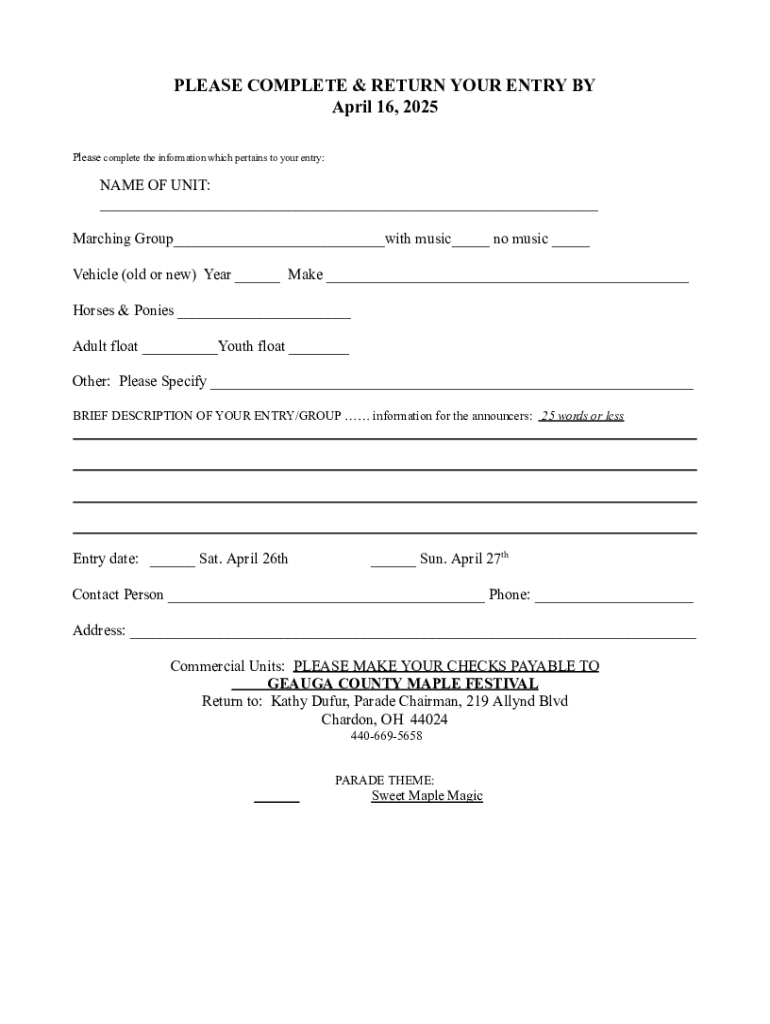







Definition and Purpose of a Customizable Parade Entry Form Template
A customizable parade entry form template is a structured document designed to facilitate participation in parades by collecting necessary information from participants. These templates streamline the entry process by providing organizers with all the required details in a standardized format. Key elements typically include participant contact information, details about the parade entry (such as the type of unit and size), and safety compliance confirmations. Customization allows event organizers to tailor the template to fit specific parade themes or compliance requirements, ensuring that all pertinent data is captured efficiently.
How to Use the Customizable Parade Entry Form Template
-
Download and Customize: Obtain the template from a trusted source like DocHub, which offers customizable features and integration options. Customize fields to align with the parade's unique requirements, such as adding specific compliance checks or tailoring branding elements.
-
Distribution to Participants: Share the form with potential parade participants through digital file formats or printed copies. For broader reach and convenience, digital distribution via email or direct download links can enhance accessibility.
-
Collection and Review: Allow entrants to fill out the form using an editable platform like DocHub, ensuring accuracy with validation checks. Once forms are submitted, review them to ensure complete data collection and compliance with participation guidelines.
How to Obtain the Customizable Parade Entry Form Template
-
Online Platforms: Access the template via a digital document service such as DocHub, which offers flexible formats compatible with PDF, DOC, or other file types.
-
Event Organizer Websites: Many event organizing bodies provide forms directly on their official websites. These are often available for download and come with specific instructions for completion.
-
Community and Cultural Centers: For localized events such as the Geauga County Maple Festival, community centers or event offices may provide printed or digital forms to potential participants.
Steps to Complete the Customizable Parade Entry Form Template
-
Participant Information: Begin by entering contact details, including name, phone number, and email address.
-
Entry Details: Specify the category of the parade unit, such as floats, marching bands, or vehicles. Provide dimensions if required.
-
Safety and Compliance: Complete sections related to insurance coverage, compliance with safety regulations, and any associated liability waivers.
-
Submission: After reviewing the form for completeness and accuracy, submit it according to the event's specified method, which may include email, online submission portals, or in-person drop-offs.
Who Typically Uses the Customizable Parade Entry Form Template
-
Parade Organizers: Event coordinators use these templates to standardize participant entry applications and ensure efficient processing of information.
-
Community Groups and Schools: Organizations such as local community groups, educational institutions, and cultural clubs often participate in parades and rely on these forms to formalize their entry.
-
Individual Entrants: Individuals who want to exhibit floats or perform in parades use the template to register officially with the organizing body.


Key Elements of the Customizable Parade Entry Form Template
-
Contact Information: Essential for communication and notifications related to parade logistics or emergencies.
-
Entry Type and Description: Detailed sections specifying the nature of the entry, including dimensions and unique features that might affect parade logistics, such as sound levels or special effects.
-
Regulatory Compliance: Includes fields for insurance verification, safety protocols adherence, and other legal requirements necessary for participation in public events.
Required Documents for Form Submission
-
Proof of Insurance: This document verifies adequate coverage, protecting against potential liabilities during the parade.
-
Safety Certifications: If required, provide certifications or confirmations that the entry complies with relevant safety standards.
-
Identification: Submit copies of valid identification for primary contacts or entry leaders to verify identity and authorization.
Form Submission Methods: Online, Mail, or In-Person
-
Online Submission: Many events now offer fully digital submissions through platforms like DocHub, ensuring quick and trackable entry processing.
-
Mail-In Options: Participants can opt to send completed forms via postal mail, typically requiring longer lead times for processing.
-
In-Person Delivery: Some organizers accept forms dropped off at designated locations, providing a personal touch and opportunity for direct interaction with event staff.
Digital vs. Paper Version of the Form
-
Digital Forms: Offer enhanced convenience with features like auto-fill, electronic signing, and easy updating. They also provide faster submission processing and tracking.
-
Paper Forms: While decreasing in prevalence, these remain an option for regions with limited digital access or for participants preferring physical documentation. However, they may pose challenges in terms of data entry and error correction compared to their digital counterparts.




