







Definition & Meaning
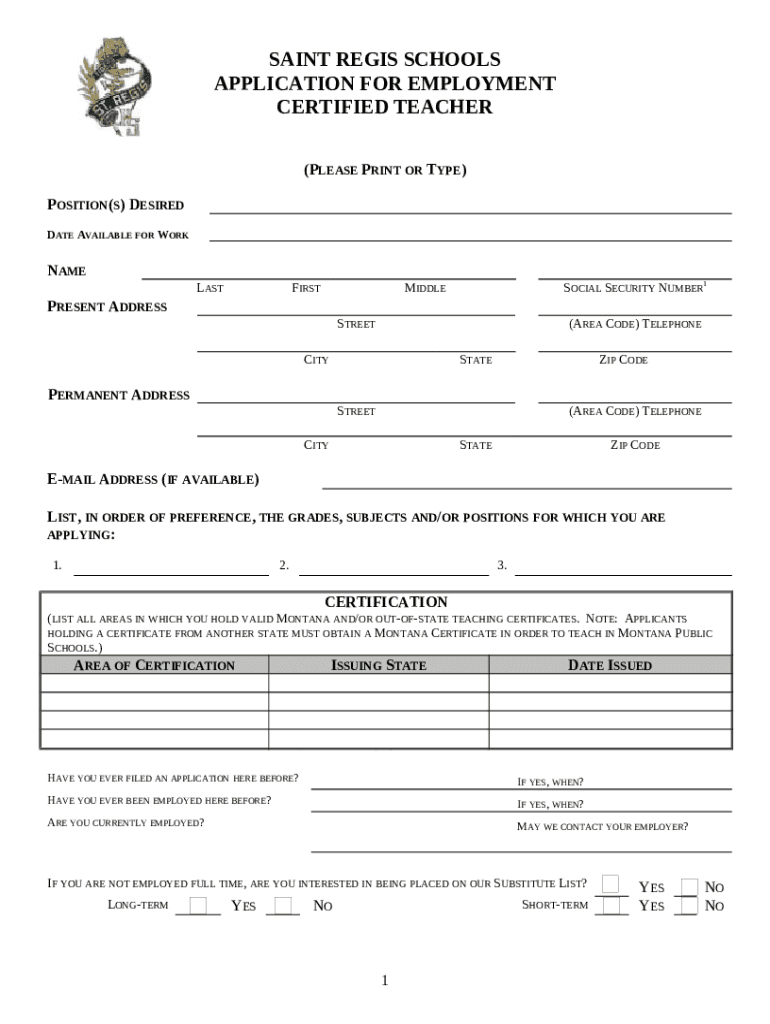
The 2 Form PA PDE 353A is a standardized document used by certified teachers in Pennsylvania to submit employment applications. This form is designed to capture essential information regarding an applicant’s personal details, professional experiences, educational background, and certification credentials. By filling out this form, applicants provide detailed data required by Saint Regis Schools to evaluate their qualifications and suitability for teaching positions.
How to Use the 2 Form PA PDE 353A Fill Online, Printable, Fillable
To use the 2 Form PA PDE 353A effectively, applicants need to access an online platform that supports filling, printing, and electronically submitting this fillable form. Platforms like DocHub allow users to import the form for seamless interaction. Users can:
- Add personal and professional data directly into fillable fields.
- Ensure all required sections are completed by following the structured prompts within the document.
- Save progress and return to unfinished sections if necessary, facilitated by online forms that support saving and editing.
How to Obtain the 2 Form PA PDE 353A Fill Online, Printable, Fillable
Obtaining the 2 Form PA PDE 353A involves visiting educational institutions’ websites or official portals like Pennsylvania's Department of Education site, where these forms are typically available for download. Alternatively, platforms like DocHub provide access to a library of forms that can be filled out immediately:
- Navigate to the suitable category, such as educational or teaching forms.
- Locate the form and download it in the desired format (PDF or DOC).
- Use the platform’s tools to sign and edit the form or print it for manual completion.
Steps to Complete the 2 Form PA PDE 353A Fill Online, Printable, Fillable
- Access the Form: Visit a trusted platform like DocHub to locate and open the form in fillable format.
- Provide Personal Information: Enter personal details such as full name, address, contact number, and email.
- Detail Educational Background: List education credentials, including degrees attained, universities attended, and dates of graduation.
- Certification Information: Fill in details about your teaching certification, such as areas of certification and certification dates.
- Work Experience: Record previous teaching and related professional experiences, including positions held and duration.
- References: Provide references, including contact information and their professional relationship to the applicant.
- Review and Submit: Double-check all entered information for completeness and accuracy before submitting via the chosen method.
Key Elements of the 2 Form PA PDE 353A Fill Online, Printable, Fillable
- Personal Information Section: Fields for entering essential personal details needed for identification and communication.
- Certification Details: Comprehensive indicators of the types of certifications held along with their validation dates.
- Educational Background: Areas designated for recording academic achievements that qualify applicants as certified teachers.
- Employment History: A structured timeline of previous teaching experiences, showcasing an applicant’s professional journey.
- Clearance and Background Checks: Documentation pertinent to a background check to ensure suitability for roles involving student interaction.
Who Typically Uses the 2 Form PA PDE 353A Fill Online, Printable, Fillable
Primarily used by aspiring or current educators applying for teaching positions in Pennsylvania, the form serves:
- Certified teachers looking to join schools like Saint Regis Schools.
- Educational administrators collecting standardized data for recruitment processes.
- Applicants needing to verify and submit complete employment data quickly and efficiently for evaluation.


Legal Use of the 2 Form PA PDE 353A Fill Online, Printable, Fillable
In Pennsylvania, the 2 Form PA PDE 353A acts as a legal instrument to:
- Validate an applicant’s eligibility for teaching positions by verifying their credentials and background.
- Standardize information collection, ensuring all educational institutions use uniform data points to evaluate applicants.
- Provide a concrete trail of application information that is compliant with state educational and employment regulations.
Form Submission Methods (Online / Mail / In-Person)
- Online Submission: Use platforms like DocHub to complete and submit the form electronically directly to the hiring institution.
- Mail Submission: Print the completed form and mail it to the designated address for the hiring school or authority.
- In-Person Submission: Some institutions may require or allow hand-delivered submissions to ensure the receipt of all requisite materials and signatures.
State-Specific Rules for the 2 Form PA PDE 353A Fill Online, Printable, Fillable
Applicants should be aware that Pennsylvania may have specific regulations regarding the completion and submission of employment forms:
- Certification Verification: Pennsylvania may require verification numbers or certificates to be included directly on the form.
- Background Checks: State laws necessitate certain clearances, which should be included with form submission.
- Local Training Requirements: Some regions may have local educational prerequisites documented on the form as part of the submission process.
Important Terms Related to 2 Form PA PDE 353A Fill Online, Printable, Fillable
- Fillable Fields: Dynamic sections of the form that accept data entry, allowing customization beyond basic text information.
- Compliance: Adherence to state educational standards through the accurate completion and submission of required forms.
- Electronic Signatures: A secure and legally acceptable method for signing digital documents to complete form submissions.




