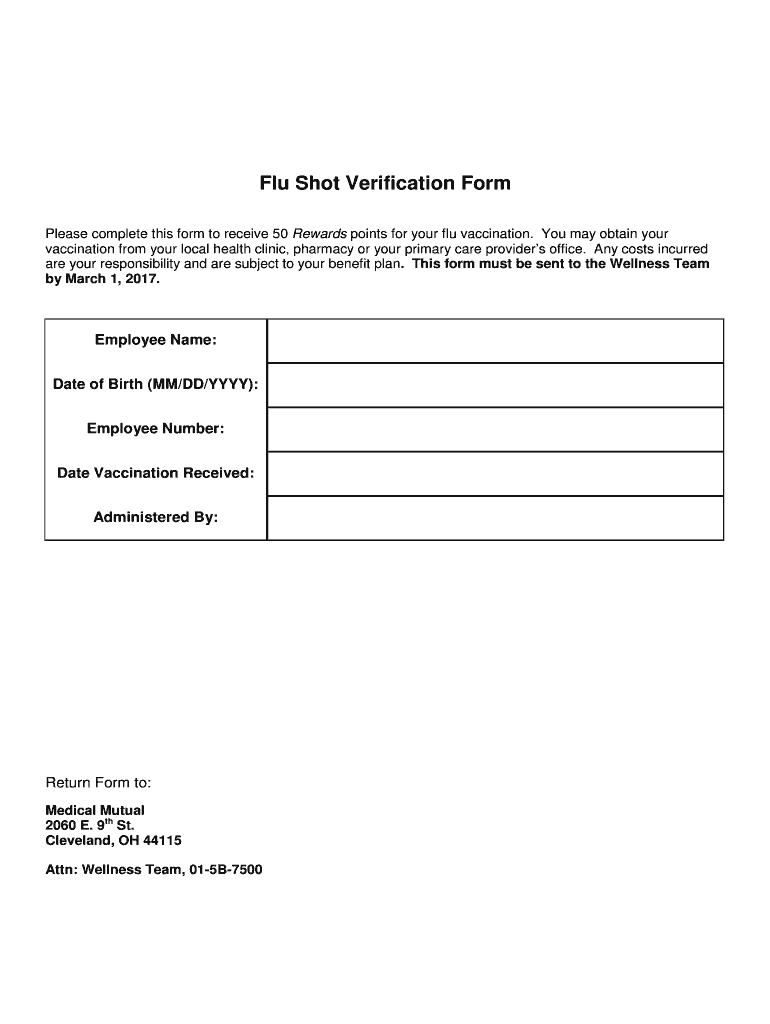







Definition and Purpose of the Flu Shot Verification Form
The Flu Shot Verification Form is designed to document and verify an individual's receipt of a flu vaccination. This form serves as an official record, often used by employers, schools, and health organizations to ensure that individuals within their systems have been vaccinated against the flu. The primary purpose is to protect community health by reducing the spread of influenza, particularly in environments where close contact with others is unavoidable.
Flu Shot Verification Forms hold particular relevance in workplaces that incentivize flu vaccinations, often offering rewards or points, such as the 50 Rewards points employees may receive. These incentives aim to increase vaccination rates, thereby decreasing the likelihood of flu outbreaks within the organization.
How to Obtain the Flu Shot Verification Form
The form can typically be obtained from a variety of sources, depending on the context in which it is required. For workplace programs, the form is often distributed by the human resources or wellness department. Alternatively, individuals may find downloadable versions of the form from healthcare provider websites, employee portal systems, or digital document platforms like DocHub.
To receive the form digitally, employees can log into their company's employee services portal, where such forms are often hosted for ease of access. For those using platforms such as DocHub, uploading or creating a customized verification form becomes a seamless process, as it allows for direct access and editing from cloud storage.
Steps to Complete the Flu Shot Verification Form
- Personal Information Section: Fill out personal details such as name, employee ID, and department. Ensure accuracy to prevent any administrative issues.
- Vaccination Details: Record the date and location where the flu shot was received. Some forms might require the name of the administering healthcare professional or facility.
- Employee Acknowledgement: Sign and date the form to confirm the accuracy of the information provided.
- Submission: Submit the completed form to the designated department, such as HR or a wellness team. This may be done via email, employee portal, or a document management system.
Double-check all entries for accuracy, as mistakes can lead to processing delays or invalidation of the reward points.
Why Use a Flu Shot Verification Form?
Using a Flu Shot Verification Form provides several benefits, particularly in professional or educational environments. It formalizes the process of recording and verifying flu vaccinations, which is crucial for maintaining updated health records and promoting public health initiatives.
- Promotes Health Safety: By verifying vaccinations, employers and schools can create safer environments, minimizing flu outbreaks.
- Facilitates Incentive Programs: Forms play a critical role in managing reward systems for vaccinated individuals, offering a structured way to claim related benefits.
- Ensures Compliance: Many organizations may require proof of vaccination for compliance with health policies or legal mandates. The form serves as official documentation in these situations.
Key Elements of the Flu Shot Verification Form
Several critical elements comprise the structure of a Flu Shot Verification Form:
- Personal Information: Includes name, ID number, and contact information to identify the individual accurately.
- Vaccination Details: Contains specifics such as the vaccination date, brand, batch number, and administrating institution to verify the authenticity.
- Acknowledgement Section: A signed statement by the recipient confirming the vaccine was received as claimed.
- Submission Instructions: Clear guidelines outlining how and where the form should be submitted for official processing.
Each section must be filled correctly to ensure the form's validity and proper processing within an organization.
Sample Scenarios for Using the Flu Shot Verification Form
Workplace Incentive Program
Consider a company that offers 50 Rewards points to employees who receive their flu shots. Employees must submit the completed Flu Shot Verification Form to the wellness team by a specified date each year to claim these points. This initiative has been shown to increase vaccination uptake among employees, resulting in fewer sick days and enhanced workplace productivity.
University Compliance
Universities may require students living on-campus to submit a Flu Shot Verification Form to reduce the spread of influenza in dormitory settings. This preventative measure supports university health services in maintaining a healthy student population through systematic vaccination tracking.
Form Submission Methods
The Flu Shot Verification Form can be submitted via various methods, accommodating recipients' needs and preferences:
- Online Submission: Many organizations and educational institutions support forms submitted through online portals, enabling efficient digital record-keeping.
- Email Attachment: Forms can be completed and signed electronically, then sent via email to the designated recipient within the organization.
- In-Person Submission: Some forms may still require in-person submission to HR or a wellness office, particularly if physical verification of documentation is needed.
Adopting multiple submission methods allows organizations to cater to diverse logistical needs, ensuring everyone can participate in vaccination tracking without hassle.
Who Typically Uses the Flu Shot Verification Form?
Flu Shot Verification Forms are utilized by various entities, each with specific purposes:
- Employers: Use the form to document employee vaccinations as part of workplace wellness programs.
- Schools and Universities: Require it for healthcare compliance, especially for students in communal living setups.
- Healthcare Providers: Utilize forms within patient records to ensure continuity of care and documentation accuracy.
By targeting the form's use toward specific audience needs, these entities maintain safer, healthier environments, leveraging documentation for preventive public health strategies.