






Definition and Meaning of the Prescription Referral Form - Soothing Elements
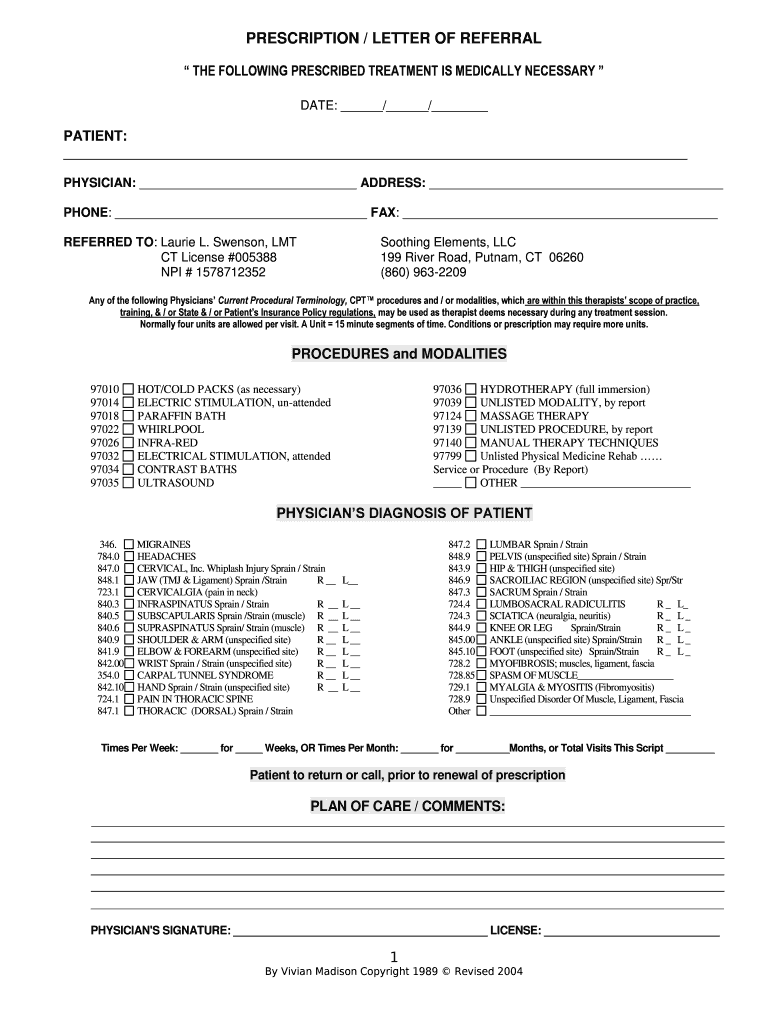
The "Prescription Referral Form - Soothing Elements" serves as a formal document used to recommend a patient for specific medical treatments. This form typically includes vital information about the patient's medical history, symptoms, and a physician's diagnosis, which direct the prescribed therapeutic interventions. The primary purpose of the form is to ensure that patients receive appropriate treatments such as therapies outlined by professionals like Laurie L. Swenson, LMT. These treatments may include various therapeutic modalities aimed at addressing conditions like migraines or sprains. Ensuring a streamlined flow of medical directives, the form helps facilitate communication between healthcare providers and therapists.
How to Use the Prescription Referral Form - Soothing Elements
-
Collect Necessary Patient Information: Ensure that you have all relevant patient details available, including full name, contact information, and medical history. This information is crucial for accurate form completion.
-
Document Diagnosis: Accurately record the physician’s diagnosis on the form. Outline the specific conditions that necessitate therapeutic treatments, such as migraines or muscle strains.
-
Specify Treatment Details: Clearly define the treatments and modalities recommended, including frequency and duration. Use the form’s structure to ensure all necessary details are conveyed.
-
Obtain Physician's Signature: The form should be signed by the prescribing physician to validate the treatment recommendations. This signature confirms the physician’s endorsement.
-
Distribute the Form: Provide the completed form to the relevant parties, ensuring it reaches the therapist responsible for administering the treatment.
Steps to Complete the Prescription Referral Form - Soothing Elements
-
Step 1: Gather the patient's details, ensuring all fields are filled accurately. This includes personal information and previous medical records.
-
Step 2: Write down a detailed diagnosis, specifying the conditions being addressed, such as headaches or physical injuries.
-
Step 3: Outline the therapeutic treatments, including specific procedures, expected results, frequency, and any additional instructions relevant to the patient’s care.
-
Step 4: Allocate space for the physician’s comments or additional notes that might affect treatment delivery or patient monitoring.
-
Step 5: Ensure the physician authenticates the form with a signature, which is a requirement for legal and procedural validity.
-
Step 6: Submit the form to the relevant therapist or institution responsible for carrying out the prescribed treatments.
Key Elements of the Prescription Referral Form - Soothing Elements
-
Patient Identification: Critical for maintaining the patient’s individualized care plan and ensuring accurate treatment administration.
-
Medical History and Current Diagnosis: Highlights the conditions under treatment, thereby enabling targeted therapeutic interventions.
-
Treatment Plan Specifications: Encompasses prescribed therapies, including types of modalities and their respective application schedules.
-
Physician’s Certification: Includes comments and the necessary authorization signature, serving as a formal endorsement of the treatment plan.
-
Contact and Follow-Up Details: Ensures that any queries or adjustments from therapists can be communicated efficiently with the prescribing physician.
Who Typically Uses the Prescription Referral Form - Soothing Elements
This form is predominantly used by:
-
Primary Care Physicians: To refer patients to specialists or therapists for additional treatment.
-
Therapists and Treatment Specialists: To receive detailed directives on implementing prescribed medical procedures.
-
Patients: To present and achieve approval for recommended treatments, ensuring they receive necessary medical care.
-
Healthcare Administrative Staff: For documentation and coordination in medical facilities, ensuring seamless integration of patient care protocols.


Legal Use of the Prescription Referral Form - Soothing Elements
The form must adhere to medical and legal standards for it to be valid:
-
Confidentiality Compliance: Patient information must be handled according to HIPAA regulations, maintaining privacy rights.
-
Medical Authorization: The form functions as a legal document that mandates specific treatments, requiring proper authorization from a certified physician.
-
Record Keeping: As part of a patient's medical record, it must be stored and accessed according to legal requirements governing patient documentation.
Examples of Using the Prescription Referral Form - Soothing Elements
-
Scenario 1: A patient experiencing chronic migraines is referred to an LMT for therapeutic massages and relaxation techniques. The form specifies massage types, session frequency, and expected outcomes.
-
Scenario 2: A patient with ankle sprains receives a treatment plan for physical therapy. The form details the exercises to perform, their intensity, and duration.
-
Scenario 3: A physician refers a patient for acupuncture treatments as part of a holistic pain management plan. The form identifies target areas and anticipated therapeutic benefits.
State-Specific Rules for the Prescription Referral Form - Soothing Elements
While the form follows general medical standards, some states might have unique requirements regarding:
-
Scope of Practitioner Authorization: Certain states may limit which medical practitioners can authorize specific treatments.
-
Insurance and Reimbursement Policies: Variations in state regulations might affect how insurance claims are processed based on form details.
-
Documentation and Archiving: State guidelines might dictate distinct record-keeping procedures to ensure compliance with local health regulations.