




01. Edit your form online
Type text, add images, blackout confidential details, add comments, highlights and more.

Type text, add images, blackout confidential details, add comments, highlights and more.

Draw your signature, type it, upload its image, or use your mobile device as a signature pad.

Send it via email, link, or fax. You can also download it, export it or print it out.
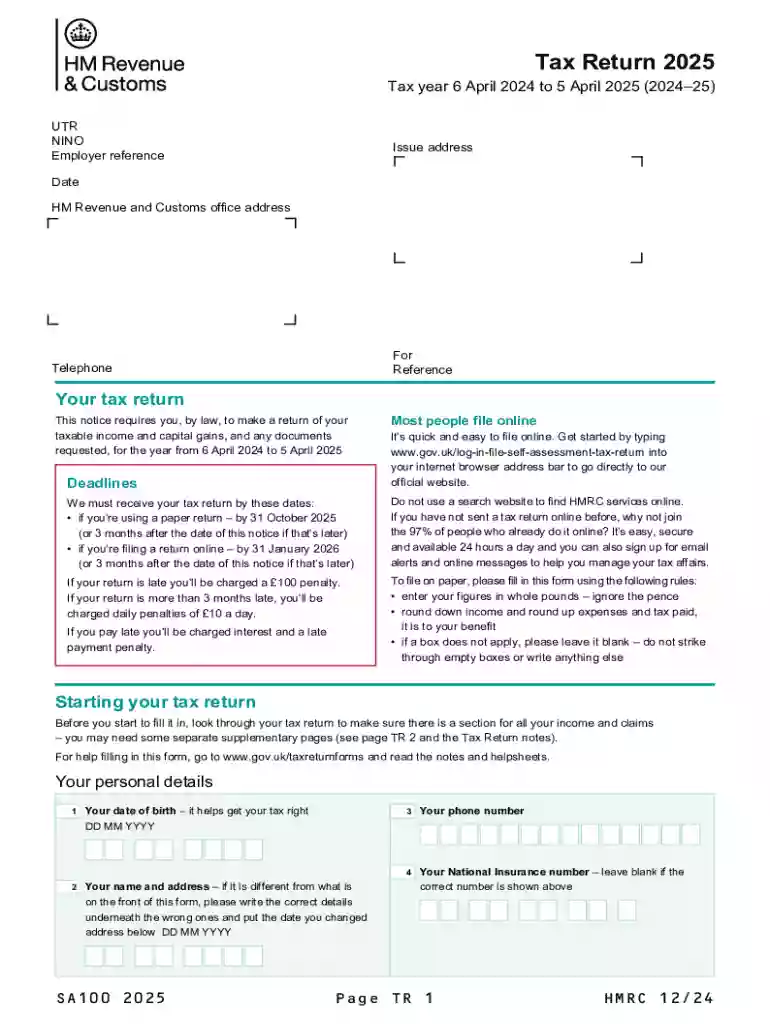
The Sa is a critical document used for filing Self Assessment tax returns in the UK for the tax year 2024-25. It is specifically tailored for individuals who need to report their income, expenses, and other pertinent financial details to HM Revenue & Customs (HMRC). This form is applicable to people like self-employed individuals, freelancers, and those with additional income streams outside regular employment. Understanding the requirements and purposes of the Sa is essential for taxpayers to ensure compliance and accurate reporting.
Filing the Sa form involves several important steps:
Gather Required Information: Before you start, collect your Unique Taxpayer Reference (UTR), National Insurance number (NINO), income statements, and any expense receipts.
Fill in Personal Details: Begin with entering your personal information, including your name, address, and contact details.
Report Income Details: Provide details of your income sources, including employment earnings, rental income, dividends, and any foreign earnings, if applicable.
Declare Expenses: List any allowable business expenses that you can deduct from your total income, ensuring you adhere to HMRC guidelines.
Calculate Tax Due: The form helps you to compute your taxable income and the tax owed. Double-check calculations to avoid errors.
Review and Submit: Once completed, review all entries for accuracy before submission.
Familiarizing yourself with key terms related to the Sa can aid in accurate form completion:
To ensure a smooth filing process, collect and verify all necessary documents:
Staying aware of important deadlines ensures compliance and avoids penalties:
Failing to comply with filing requirements can result in the following penalties:
Both online and paper submission methods are available, each with pros and cons:
The Sa is primarily used by:


Choosing between digital and paper forms depends on accessibility and personal preference:
Understanding the distinctions aids taxpayers in selecting the method that best suits their circumstances. Emphasis on staying compliant with guidelines and deadlines ensures adherence to tax obligations.
We've got more versions of the Sa100 2025 form. Select the right Sa100 2025 version from the list and start editing it straight away!
| Versions | Form popularity | Fillable & printable |
|---|---|---|
| 2026 | 4.9 Satisfied (30 Votes) | |
| 2025 | 4.3 Satisfied (34 Votes) | |
| 2024 | 4.3 Satisfied (35 Votes) | |
| 2023 | 4.3 Satisfied (43 Votes) | |
| 2021 | 4.8 Satisfied (125 Votes) | |
| 2020 | 4.1 Satisfied (65 Votes) | |
| 2019 | 4.2 Satisfied (102 Votes) | |
| 2018 | 4.4 Satisfied (163 Votes) | |
| 2016 | 4 Satisfied (28 Votes) | |
| 2014 | 4.4 Satisfied (278 Votes) | |
| 2011 | 4 Satisfied (55 Votes) | |
| 2010 | 4 Satisfied (48 Votes) |
At DocHub, your data security is our priority. We follow HIPAA, SOC2, GDPR, and other standards, so you can work on your documents with confidence.




The primary objective of this study was to assess the safety and tolerability of oral SA100 given twice daily for 8 weeks as assessed by clinical and laboratory
Cell phone distraction increases risk because you take your eyes off the road (visual distraction), your hands off the wheel (manual distraction)


