Definition and Meaning
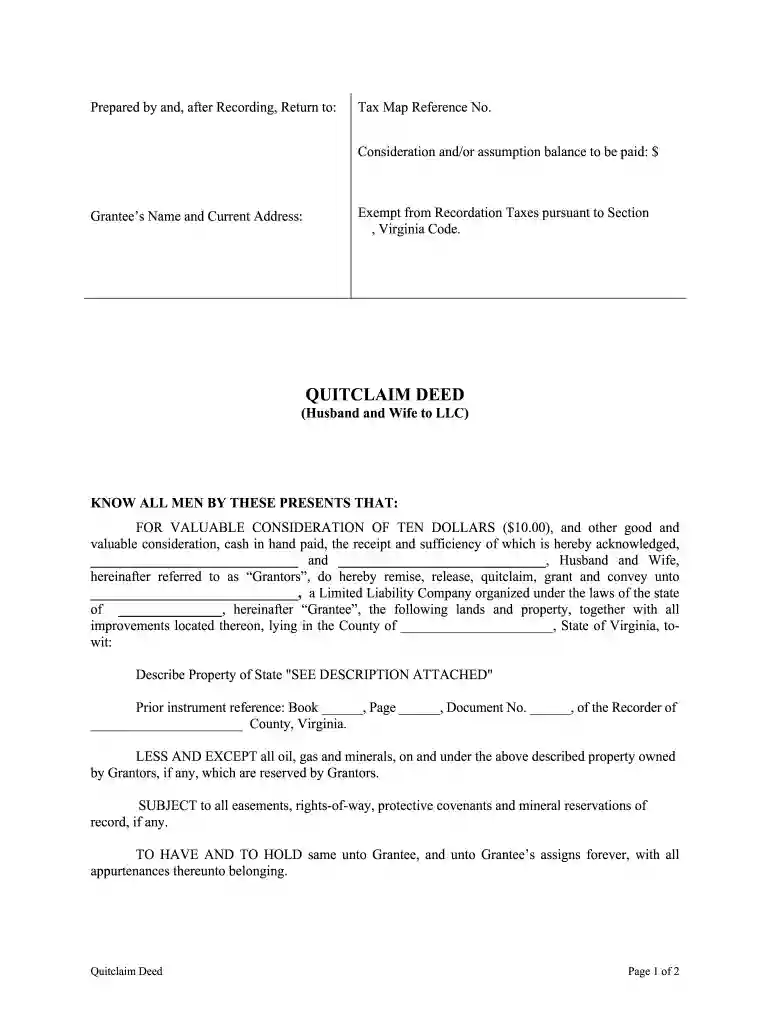
The term "va husband wife" refers to a specific form used in Virginia, primarily involved in property transactions. In this context, it signifies a Virginia Quitclaim Deed form employed by a husband and wife for transferring property to another entity, such as a limited liability company (LLC). This legal document facilitates the transfer of ownership rights without assurances about the property title's validity, offering a straightforward mechanism to change property ownership among parties.
Key Aspects of the Document
- Transfer Mechanism: Utilized when ownership transfer needs to occur between spouses and an LLC.
- No Warranty: Unlike warranty deeds, it does not guarantee that the title is free from claims.
- Legal Documentation: Essential for formalizing property transfers under Virginia law.
Steps to Complete the Virginia Quitclaim Deed
Completing a Virginia Quitclaim Deed involves several crucial steps to ensure the document's legality and proper execution. Each step requires careful attention to detail to avoid potential legal complications.
- Obtain the Correct Form: Ensure you have the Virginia-specific quitclaim deed form, available via legal service providers or Virginia's public records.
- Provide Detailed Property Description: Clearly describe the property being transferred, using official land descriptions from previous deeds or public records.
- Identify Parties Involved: Both the grantors (husband and wife) and grantees (such as an LLC) must be clearly identified.
- Declare Consideration: While a quitclaim deed often involves nominal consideration, this section must specify the amount exchanged.
- Signatures with Notarization: Both parties must sign the document in the presence of a notary public to authenticate the transfer.
How to Use the Virginia Quitclaim Deed Form
Users need to follow the correct procedures to utilize the quitclaim deed effectively, ensuring all requirements are met and filed appropriately.
- Filing with the County Clerk: Post-signature, the deed must be filed with the Clerk's office in the county where the property is located. This step is vital for public records and legal recognition.
- Payment of Fees: Filing typically involves a fee; check specific county requirements for accurate information.
- Record-Keeping: Maintain copies of the deed for both the grantor and grantee to provide evidence of transfer.
Legal Use of the Virginia Quitclaim Deed
The legal use of a Virginia Quitclaim Deed encompasses specific scenarios wherein this form is applicable and beneficial.
- Transfer Without Promises: Ideal for cases where a clear title guarantee is unnecessary—often used among family members or to formalize previously informal arrangements.
- Giving Away Property: Suitable when property rights are gifted or transferred without monetary compensation or warranty.
- Amending Title Names: Employed to correct or update the names on title deeds, such as when a spouse changes their name.
Important Terms Related to the Virginia Quitclaim Deed
Understanding key terminologies is critical for proper interpretation and execution of a Virginia Quitclaim Deed.
- Grantor: The party (in this case, typically the husband and wife) who transfers the property interest.
- Grantee: The recipient entity receiving the property interest, such as an LLC.
- Consideration: The nominal value, often symbolic, exchanged during the transaction.
Key Elements of the Virginia Quitclaim Deed
Several essential elements must be included in the Virginia Quitclaim Deed to ensure its legal validity.
- Names and Addresses: Details of all parties involved must be current and accurate.
- Legal Property Description: Utilize official descriptions from previous property deeds.
- Date and Execution Specifics: Include the date of execution and any special terms or conditions agreed upon by both parties.
Examples of Using the Virginia Quitclaim Deed
Real-world examples illustrate the practical applications of a Virginia Quitclaim Deed.
- Spousal Transfers: A husband and wife transferring property to their jointly-owned LLC for asset protection.
- Family Property Reassignment: Parents transferring property to a family trust managed by their children.
State-Specific Rules for the Virginia Quitclaim Deed
Virginia has particular rules and exemptions impacting how quitclaim deeds are used and recognized legally.
- Recordation Tax Exemptions: Certain property transfers within families may qualify for exemptions under state law—be aware of these to potentially reduce associated taxes.
- Local Ordinances: Each Virginia county may have specific requirements regarding the form's filing, making local legal advice beneficial.
Form Submission Methods: Online, Mail, In-Person
Various submission methods exist for filing the Virginia Quitclaim Deed, each suited to different user needs and preferences.
- In-Person: Direct submission at the county clerk's office ensures immediate processing.
- Mail: Available for individuals preferring remote filing, though processing time may vary.
- Online Services: Increasingly available for more tech-savvy users, facilitated by digital platforms enabling electronic submission.