
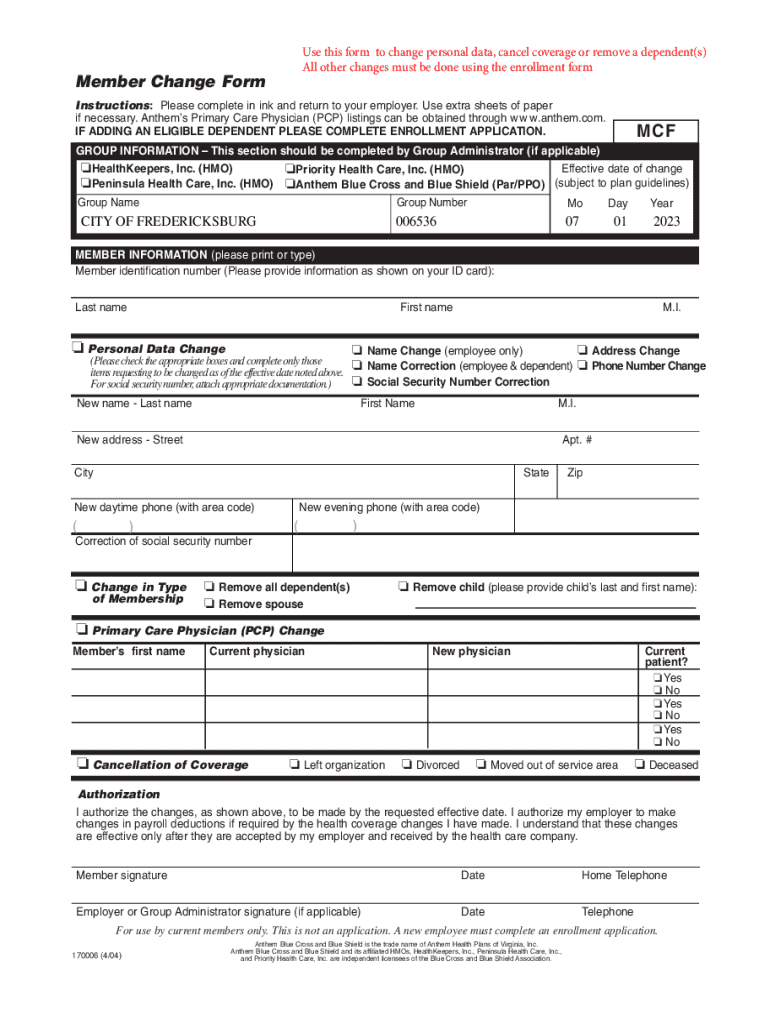







Definition & Meaning of the Member Change Form
The Member Change Form is a vital document used primarily in health insurance contexts to facilitate updates to personal data, cancellation of coverage, or removal of dependents. This form is commonly utilized by insurance holders to maintain accurate records with companies such as Anthem Blue Cross and Blue Shield. By using this document, individuals ensure that their insurance details are kept current, which is crucial for processing claims and other insurance-related services.
The form serves multiple purposes, allowing members to update their name, address, or contact number, and to make adjustments to their policy by removing dependents or canceling coverage altogether. This centralized approach simplifies administrative processes, reducing the likelihood of errors associated with managing multiple documents for different requests.
How to Use the Member Change Form
To effectively utilize the Member Change Form, follow these structured steps to ensure all sections are correctly completed:
-
Fill in Personal Information:
- Start by providing your current personal details, including your full name, policy number, and contact information. These fields are crucial to identify your existing account within the insurance provider's system.
-
Select the Appropriate Changes:
- Clearly indicate the specific changes you wish to make. Options typically include amendments to personal details, canceling your coverage, or removing dependents from your plan.
-
Provide Specific Details:
- When requesting changes, offer precise information. If changing an address, include the complete new address. For removing dependents, list their names and any relevant identifiers, such as their Social Security numbers.
-
Ensure Completeness:
- Verify that all required fields are filled out completely. Incomplete forms could lead to processing delays.
-
Sign and Date the Form:
- After filling out the necessary sections, ensure you sign and date the form. This step confirms the accuracy of your information and authorizes the requested changes.
Steps to Complete the Member Change Form
Completing the Member Change Form involves a series of defined actions to ensure accuracy and completeness:
-
Obtain the Form:
- Access the form through your insurance provider’s online portal, a physical office, or request it via mail.
-
Review the Instructions:
- Carefully read all instructions provided with the form. These guidelines are important for understanding specific requirements and avoiding mistakes.
-
Fill Out the Form Using Ink:
- If completing a paper version, use a pen to fill in the form. This ensures legibility and permanence.
-
Double-check Entries:
- Review all entered information for accuracy, especially names, numbers, and dates. Errors could result in processing issues.
-
Attach Supporting Documents:
- Some changes may require additional documentation. For instance, a name change might necessitate a copy of a legal document, such as a marriage certificate.
-
Submit the Form:
- Return the completed form as instructed, either by mailing it back to your insurance company or through their designated online submission process.
-
Confirmation of Receipt:
- After submission, confirm that the insurance provider has received your form. Retain copies of your submission and any correspondence for your records.
Key Elements of the Member Change Form
The Member Change Form is composed of distinct sections to cater to various requests:
-
Personal Information Section:
- Essential for identification and includes policyholder details.
-
Change Request Options:
- Clearly outlined fields where you specify personal information updates or insurance modifications.
-
Authorization and Signature:
- Confirms the accuracy of the information provided and authorizes the requested changes.
-
Employer Information:
- If applicable, this section is crucial for members with employer-sponsored health plans.
Each section is designed to gather specific information efficiently, streamlining the process for both the insurance provider and the policyholder.
Legal Use of the Member Change Form
Various legal considerations accompany the use of the Member Change Form, particularly for health insurance purposes:
-
Data Protection:
- The form requires personal data that must be handled according to privacy laws and regulations such as HIPAA in the United States.
-
Contractual Obligations:
- Completing this form acts as a formal request and carries weight in adjusting your insurance contract terms.
Understanding these legal aspects ensures the form is appropriately used and that the member's rights and responsibilities are recognized and upheld.
Who Typically Uses the Member Change Form
This form is a crucial tool for a diverse set of users, including:
-
Insurance Policyholders:
- Individuals maintaining personal health insurance plans utilize the form to update personal details or adjust coverage.
-
Employer Administrators:
- Employers managing group insurance plans often assist employees in completing and submitting the form.
-
Healthcare Providers:
- They may recommend the use of this form to clients when health insurance details need to be updated to prevent service disruptions.
The versatility of the form makes it a fundamental component across various scenarios in health insurance management.


Digital vs. Paper Version of the Member Change Form
Deciding between digital and paper formats for the Member Change Form involves considering several factors:
-
Digital Version:
- Pros: Easy access, quick submission, and often integrated with cloud services for storage and tracking.
- Cons: Requires internet access and may not be suitable for less tech-savvy users.
-
Paper Version:
- Pros: Does not depend on technology, easy for users who prefer physical documents.
- Cons: Might be slower to process due to mail delivery and manual handling.
Selecting the appropriate format depends on personal preference, available resources, and specific situation requirements.
Penalties for Non-Compliance
Failing to update personal information or inform your insurance provider of significant changes can lead to several consequences:
-
Coverage Denial:
- Inaccurate information may result in the denial of claims or loss of coverage.
-
Financial Penalties:
- In some cases, incorrect data may lead to financial penalties or additional fees.
-
Legal Repercussions:
- Particularly if misinformation leads to unauthorized benefit access or fraud allegations.
Ensuring timely and accurate completion of the Member Change Form helps prevent these negative outcomes.




