Reactivate cds account 2026

Get Form
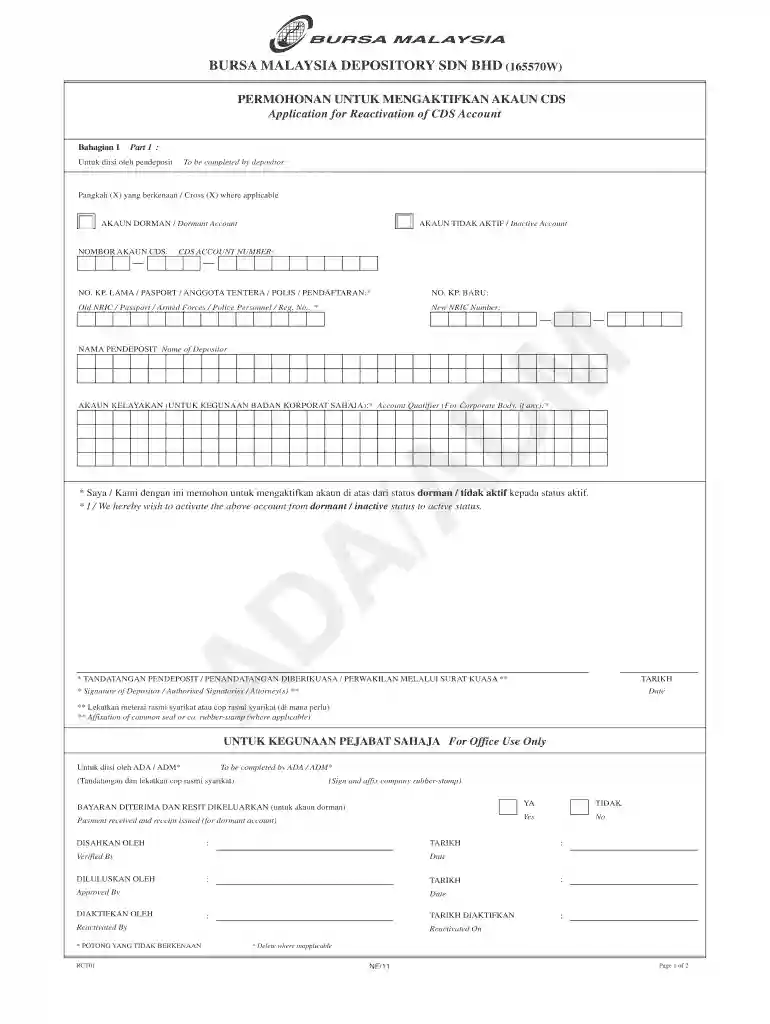
cds reactivation form Preview on Page 1

Here's how it works

01. Edit your cds reactivation form online
Type text, add images, blackout confidential details, add comments, highlights and more.

02. Sign it in a few clicks
Draw your signature, type it, upload its image, or use your mobile device as a signature pad.

03. Share your form with others
Send akaun cds via email, link, or fax. You can also download it, export it or print it out.

How to use or fill out reactivate cds account with our platform

Form edit decoration
9.5
Ease of Setup
DocHub User Ratings on G2
9.0
Ease of Use
DocHub User Ratings on G2
  1. Click ‘Get Form’ to open the Reactivate CDS Account form in the editor.
  2. In Part 1, complete your personal details. Fill in your old and new NRIC or Passport numbers, ensuring accuracy.
  3. Indicate whether your account is dormant or inactive by crossing (X) the appropriate box.
  4. Provide your name as the depositor and, if applicable, include the account qualifier for corporate bodies.
  5. Sign and date the form where indicated. If you are representing a corporate body, ensure to affix the company seal or stamp.
  6. Review all entries for clarity and correctness before submitting. Remember that any corrections must be legible and signed by both parties.

Start reactivating your CDS account today using our platform for free!

be ready to get more

Complete this form in 5 minutes or less

Get form

Got questions?

We have answers to the most popular questions from our customers. If you can't find an answer to your question, please contact us.
Contact us
An account holder must submit a written application to the bank to reactivate a dormant account. They can check whether their banks mobile banking application offers the option of re-activating a dormant or inactive bank account.
1 CDS account number 1.6. 2 ID/Passport number 1.7 The client must attach a copy of their ID (both front and back) or a copy of their passport. 1.8 The client must create a username and password for online access.
A dormant account is not just one that hasnt been used for a while, its one that has been left without any customer-initiated activity for an extended period. This period can vary docHubly depending on the provider, from 12 months for current accounts to up to 15 years for savings accounts.
Lets walk through it step by step. Step 1: Check the Status of Your Account. Before doing anything, log into your trading or demat account if you still remember the credentials. Step 2: docHub Out to Your Broker. Step 3: Update Your KYC. Step 4: Submit the Reactivation Request. Step 5: Log In and Test Your Account.
To activate an account that has not been operated for more than two years and has become dormant, you need to visit your branch in person. Take photocopies and originals of address and identity proof with you.

Security and compliance

At DocHub, your data security is our priority. We follow HIPAA, SOC2, GDPR, and other standards, so you can work on your documents with confidence.

Learn more
ccpa2
pci-dss
gdpr-compliance
hipaa
soc-compliance
be ready to get more

Complete this form in 5 minutes or less

Get form

People also ask

DEA Fund: Unclaimed balances in savings/current accounts which have not been operated for 10 years are transferred to the Depositor Education and Awareness (DEA) Fund by the Reserve Bank of India (RBI).
The Takeaway. Banks and credit unions take note of accounts that show no transactions for a long period of time. The dormant account process starts with one year of no activity. After three to five years, depending on your state, ends with your money being turned over to the state.
Any update made to the Account Particulars of a depositor will only affect the CDS account at that particular ADA where the change was made. Individual and corporate depositor may choose to update their particulars by appearing in person at the ADAs office where the account is maintained or by writing to the ADA.

how to activate cds account